

Newbie first meeting questions | Community
Skip to main content
Newcomer
November 13, 2021
Solved

Newbie first meeting questions

  • November 13, 2021
  • 1 reply
  • 0 views

I will be attending a Zoom meeting for the first time. I have downloaded the Desktop Client, registered, browsed through a few tutorials and videos, attended a "Back to Basics" live training, and tried a test meeting. I know how to join a meeting,  but still have a few questions about attending one.


The meeting is an informal family meeting, with several speakers, including myself. I will turn off mic and video at the start of the meeting, and turn them on before my turn comes. After speaking, I will turn them off again. Questions:


- Is it possible to chat with just the host, and not with everyone? In case I have a technical issue.


- I would like to view only what the host presents, and the other speakers, but not all the attendees. Can this be done by selecting the "Speaker View" option in "Gallery View"? Or is there another way?


- I would like to continue to attend the meeting after my speech. How do I let the host know that I have finished my speech?


Thanks in advance.
    Best answer by Ohkawa

    Hi, mjt4283


    I'll tell you what I know.

    You can chat with just the host or specific participant by specifying the destination of the chat.

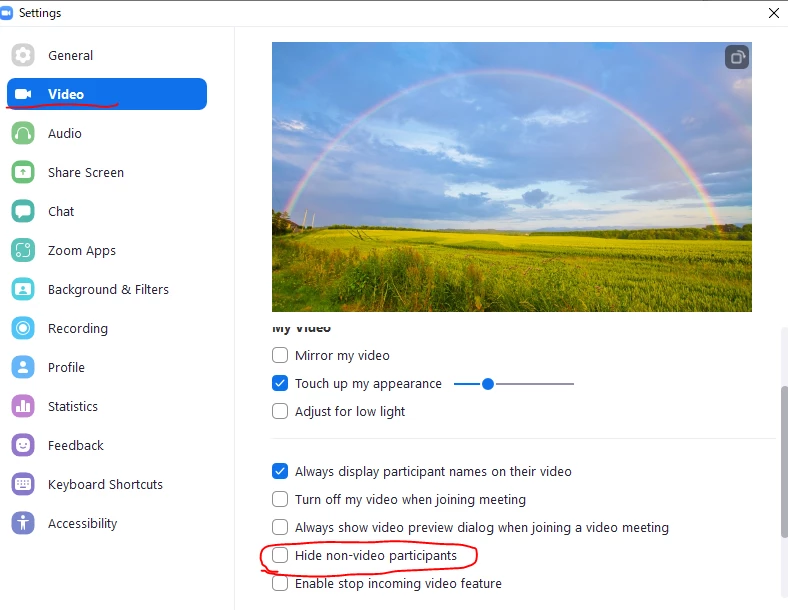
    In the desktop client's video settings, you can check the "Hide non-video participants" checkbox to show only those who have video turned on in the gallery view.


    1 reply

    Ohkawa
    Community Champion | Customer
    OhkawaAnswer
    Community Champion | Customer
    November 14, 2021

    Hi, mjt4283


    I'll tell you what I know.

    You can chat with just the host or specific participant by specifying the destination of the chat.

    In the desktop client's video settings, you can check the "Hide non-video participants" checkbox to show only those who have video turned on in the gallery view.


    mjt4283Author
    Newcomer
    November 14, 2021

    Thank you for the response. It is helpful.