
New "Unmute" and "Mute" announcement | Community
Skip to main content
Newcomer
August 18, 2021
Solved

New "Unmute" and "Mute" announcement

  • August 18, 2021
  • 9 replies
  • 7 views

Does anyone have any idea as to why starting this week Zoom is telling you (in a very loud voice) that you are "muted" "unmuted"? I can't find a way to stop it from telling me. 

    Best answer by mranderson

    I'm using a Jabra headset and noticed that behaviour only when connecting to Zoom using that device.

    Here is how I solved that mute/unmute announcement:

    1. Go to Settings > Audio

    2. Uncheck the option "Sync buttons on headset"
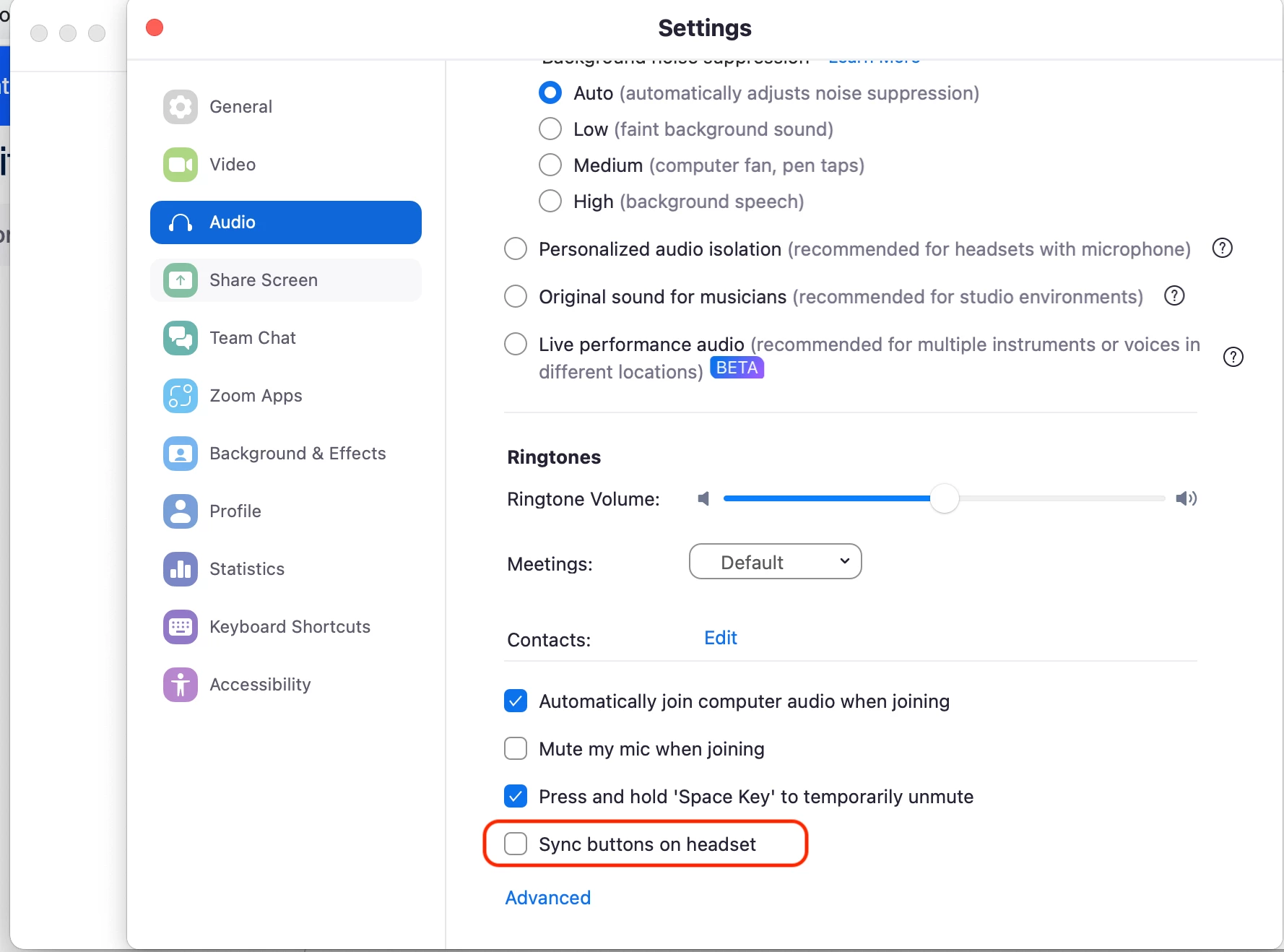
    I did that on macOS but it must be the same for other OS

    Hope that helps you too.

    9 replies

    Community Manager
    August 25, 2021

    Hi @eradhakrishnan, interesting, I am unaware of that feature. Do you have screen-reading software that may be outputting that to you? I haven't tested this, that's why I'm interested! 🤔 🤔

    rwarren
    Newcomer
    Newcomer
    November 19, 2021

    Can that message (the audio of it) be customized?  We have a noticeable percentage of folks connecting by telephone only, and when they hear "You are muted, you can unmute by pressing *6..." or similar, a few think this is an invitation to unmute.  it's getting worse recently, we had to mute one person 12 times during one church service.

    Bort
    Employee
    Employee
    November 19, 2021

    Unfortunately, the audio messages participants hear when they've connected their audio by dial-in is not customizable, as it is generic audio for all customers that call in. 

    Newcomer
    May 14, 2022

    I also have a problem and feel disturbed by the zoom pop-up box which saying You are muted


    the window keeps coming each time I close it. This is honestly disturbing while we're in a zoom meeting because it keeps popping out and we have to close the window multiple times while telling me that I was muted when I am mute myself. I realize this happens after I do some updates on the zoom apps. Please help me figure this out, thank you.

    Newcomer
    June 1, 2022

    I think it is your microphone (headphone), change it to use your system or any other microphone source you have on zoom app.

    Newcomer
    July 18, 2022

    any way to turn off those announcements ? "you are muted" , "you are unmuted" . these are disturbing.

    Newcomer
    March 27, 2023

    Check your Logitech, Plantronics, or other headset provider. Especially if they have a software package that runs on your PC.


    In my case, the notifications suddenly started, occurred whenever I hit the Zoom mute button, but were actually coming from my Logitech Zone headset software.

    Newcomer
    April 11, 2023

    Thanks! This actually solved my problem!

    Newcomer
    June 22, 2023

    Same. Started after zoom restarted. Not my headset as it doesn't happen in other virtual meeting software. Also checked all of my mac accessibility settings

    Partner
    September 6, 2023

    I'm using a Jabra headset and noticed that behaviour only when connecting to Zoom using that device.

    Here is how I solved that mute/unmute announcement:

    1. Go to Settings > Audio

    2. Uncheck the option "Sync buttons on headset"

    I did that on macOS but it must be the same for other OS

    Hope that helps you too.

    Newcomer
    September 6, 2023

    ty!

    Newcomer
    September 6, 2023

    Ty!