

My Meetings/Recurring Meetings Are Gone! The answer... | Community
Skip to main content
Ray_Harwood
Community Super Champion | Customer
July 12, 2023
Question

My Meetings/Recurring Meetings Are Gone! The answer...

  • July 12, 2023
  • 30 replies
  • 0 views

IMPORTANT UPDATE:


Zoom has listened! 


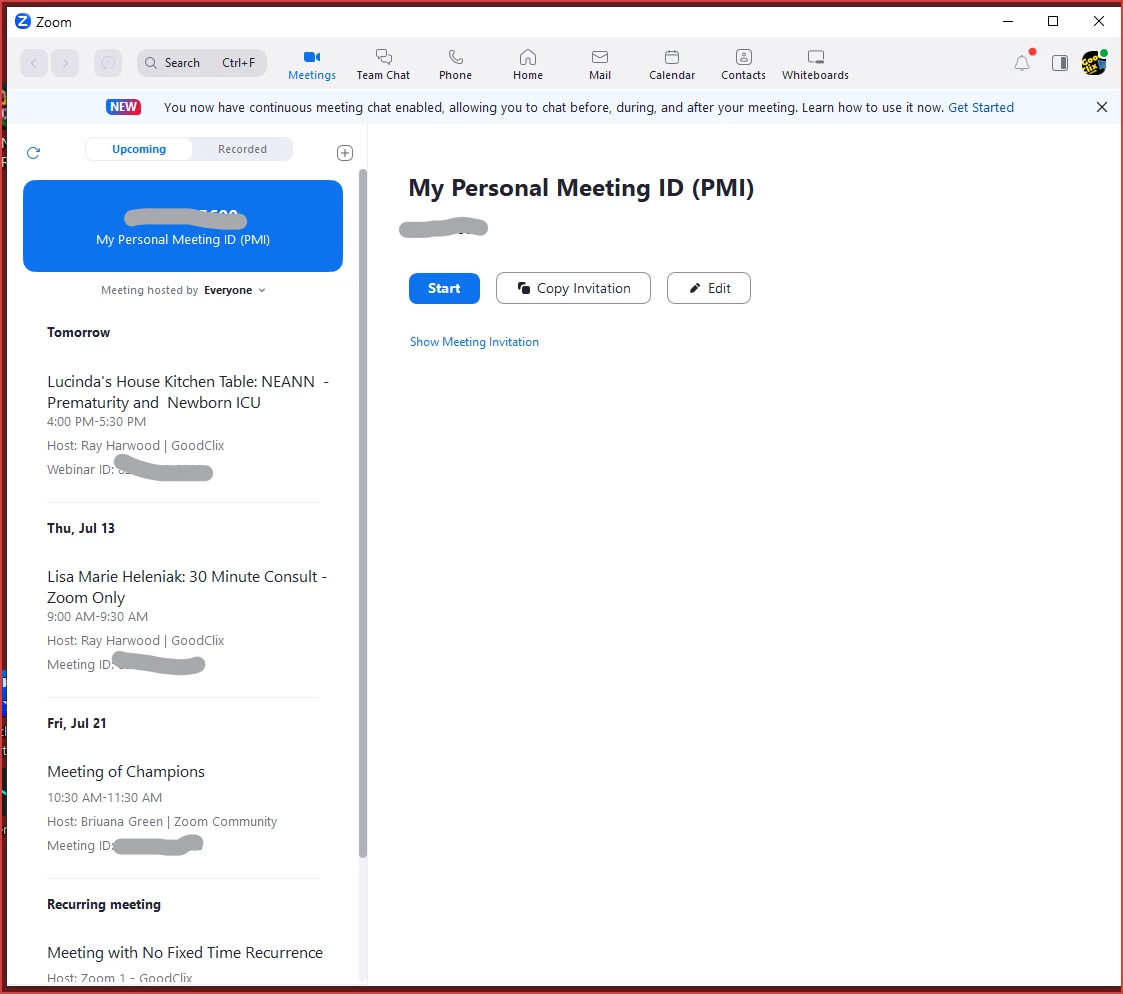
The removal of the Home tab and replacing the contents of the Meeting tab with the one-day calendar of events has been REVERTED.  Log out and back in on your desktop app to see the Home and Meetings tabs at the top, and select the Meetings tab to see the layout previously available prior to the roll-out of 5.15.3.


Please see this Zoom Support article for details:

https://support.zoom.us/hc/en-us/articles/17564111105677


My previous post from 7/12/2023 at 10:20am/MST is included below...


------------------------

Greetings, all!


Yes, the update to 5.15.3 has made a change to the Meetings tab. Please - no whining or complaining here - I'm just the messenger providing you with information!


Previously it looked like this. where you could see a list along the left side of all upcoming sessions (meetings and webinars):
 

Now it looks like this, with meetings ONE DAY AT A TIME on the right side:
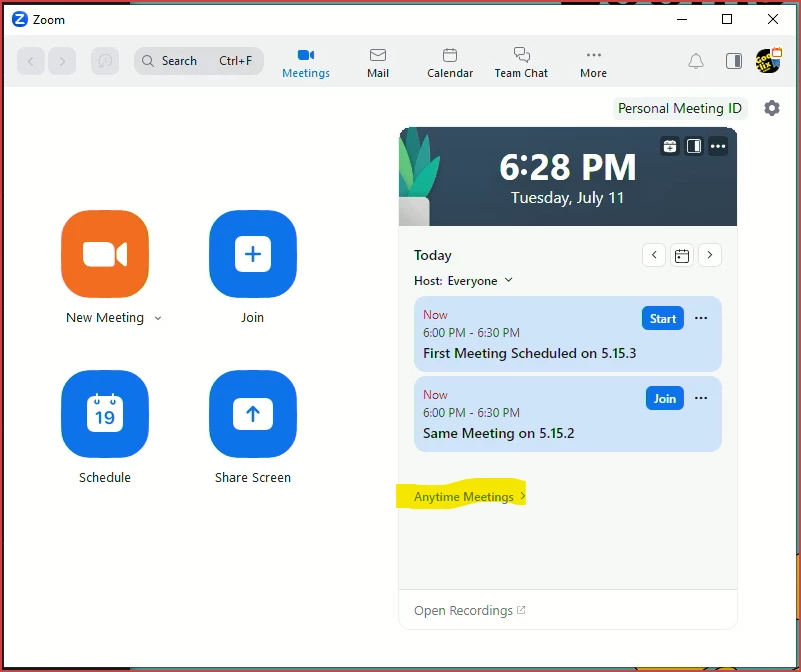
Click the arrows to move forward/backward in the calendar, or click the calendar icon for "today's meetings".


If you have any recurring meetings with no-fixed-time, they will be listed under the "Anytime Meetings" drop-down.  If you don't have any, the drop-down won't show.


This new view on the Meetings tab is what was previously on the Home tab... and the Home tab is now gone.

30 replies

Newcomer
July 12, 2023

thanks, what a non customer focussed way to annoy people with such a stupid and non documented change - took me ages until I thought of looking here (and found this by chance!

Newcomer
July 13, 2023

same here. Drove me nuts- finding my meeting schedules. This update is crap. Would much rather prefer the older version.

Newcomer
July 12, 2023

I don't have Anytime Meetings showing in my calendar, though I have several recurring meetings set up in Zoom. Looks like the only way I can access my recurring meetings on the computer is to log in through the web browser. What a pain!


Newcomer
July 12, 2023

I'm in the same boat. I have a few recurring meetings that show up in the web browser, but Anytime Meetings does not appear. Complete pain in the butt.

Newcomer
July 12, 2023

Thanks Ray - the solution you provided is clear but unfortunately the solution is not present for me. There is no "anytime meetings" appearing on my mac desktop app unless I login to my account on the web browser.


Is there a solution coming?

Newcomer
July 13, 2023

Ditto.

Newcomer
July 12, 2023

How do you schedule a recurring meeting?  Are the old ones deleted?  I can't find them and don't have that "Anytime Meeting" showing up

Ray_Harwood
Community Super Champion | Customer
July 12, 2023

Welcome to the Zoom Community, @mdueck.


Note that the display only shows meetings for a single day -- not "all meetings" like the previous version.  If there are no recurring meetings on the viewed/selected day,  that "Anytime Meetings" drop-down won't appear on your display; only on the days that have recurring meetings.


If that still doesn't match up with that you're seeing, let me know.

Newcomer
July 12, 2023

In my case, and I suspect this applies to others in the thread, is that the anytime meetings aren't set for a specific day, as my client meetings aren't always set for the same time/day. It can vary by week and our schedules. I think the frustration is that they show up in the Web browser under upcoming, but are no longer visible in the desktop client. I'm not shooting the messenger, the inconsistency is frustrating.

Newcomer
July 12, 2023

My recurring meetings aren't set for a specific day and time.  They are anytime meetings.

Newcomer
July 12, 2023

I second AReikLife's comment. Recurring means "meet anytime" in Zoom parlance. Also, thanks for keeping up with this thread, Ray. 


Newcomer
July 12, 2023

It looks like you have to login from a desktop window and not from the app.  Once you do that you can click on meetings on the left side of the screen and see you meetings and start them, copy the invitation, etc...  Frustrating!  It appears the the app is useless more efficient meeting management.

Newcomer
July 12, 2023

For all on the thread, I contacted support, who suggested I remove and reinstall the app. I downloaded the most recent version from their website and reinstalled it. Took care of the issue. I can now see the recurring meetings as shown in the screenshot below.

Newcomer
July 12, 2023

Yes, that is what I finally did to solve the problems. But support team had no idea how this was working, I had to figure it out.

Newcomer
July 12, 2023

As others have noted, this is a very unwelcome change. With no prior warning, to boot. Which means that we had absolutely no time to prepare and take appropriate actions.


Very poor communication and user experience.


L

Newcomer
July 12, 2023

I agree - who on earth thought that maybe we would want our recurring meetings hidden or de-emphasized in the app, and why didn't they at least give us an option for how to display them?