

My Meetings/Recurring Meetings Are Gone! The answer... | Community
Skip to main content
Ray_Harwood
Community Super Champion | Customer
July 12, 2023
Question

My Meetings/Recurring Meetings Are Gone! The answer...

  • July 12, 2023
  • 30 replies
  • 0 views

IMPORTANT UPDATE:


Zoom has listened! 


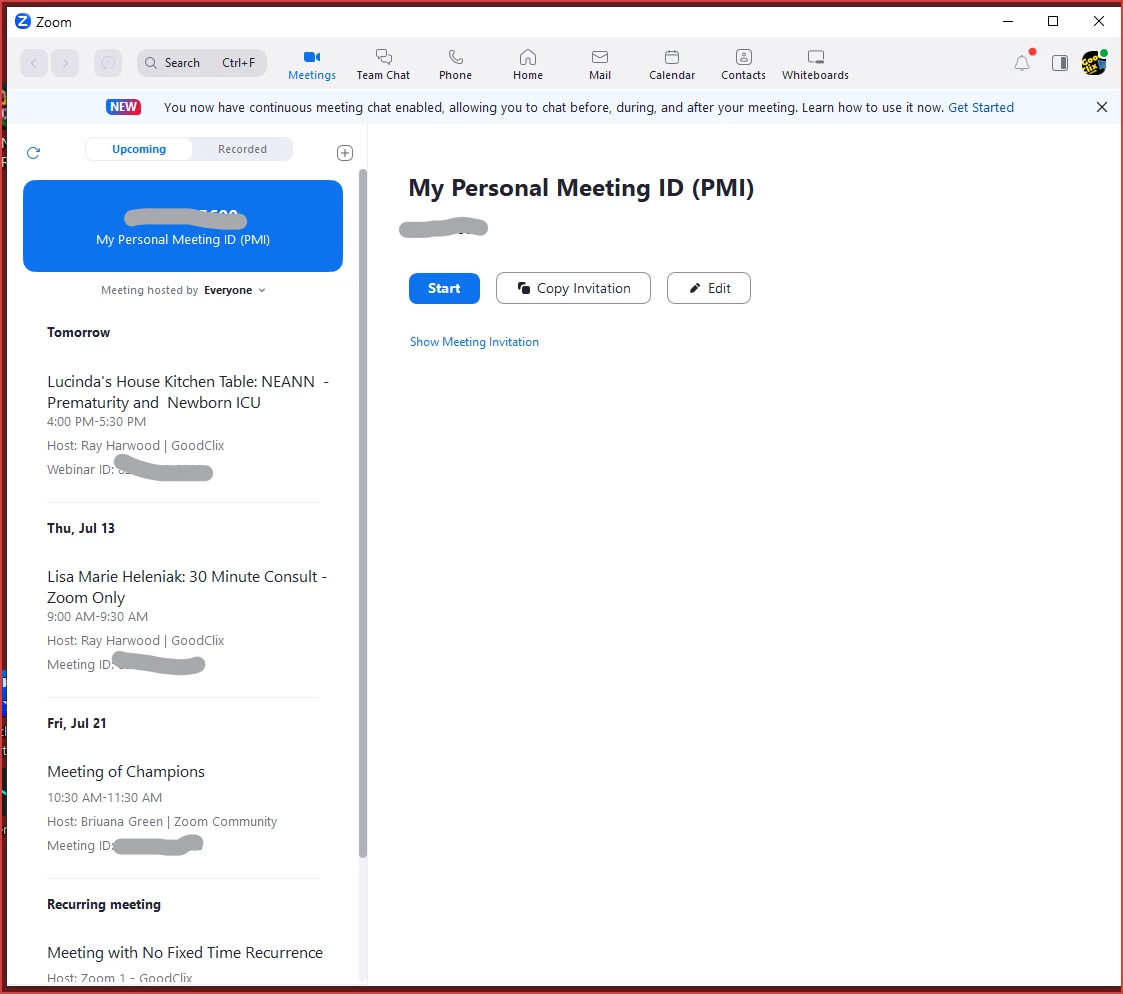
The removal of the Home tab and replacing the contents of the Meeting tab with the one-day calendar of events has been REVERTED.  Log out and back in on your desktop app to see the Home and Meetings tabs at the top, and select the Meetings tab to see the layout previously available prior to the roll-out of 5.15.3.


Please see this Zoom Support article for details:

https://support.zoom.us/hc/en-us/articles/17564111105677


My previous post from 7/12/2023 at 10:20am/MST is included below...


------------------------

Greetings, all!


Yes, the update to 5.15.3 has made a change to the Meetings tab. Please - no whining or complaining here - I'm just the messenger providing you with information!


Previously it looked like this. where you could see a list along the left side of all upcoming sessions (meetings and webinars):
 

Now it looks like this, with meetings ONE DAY AT A TIME on the right side:
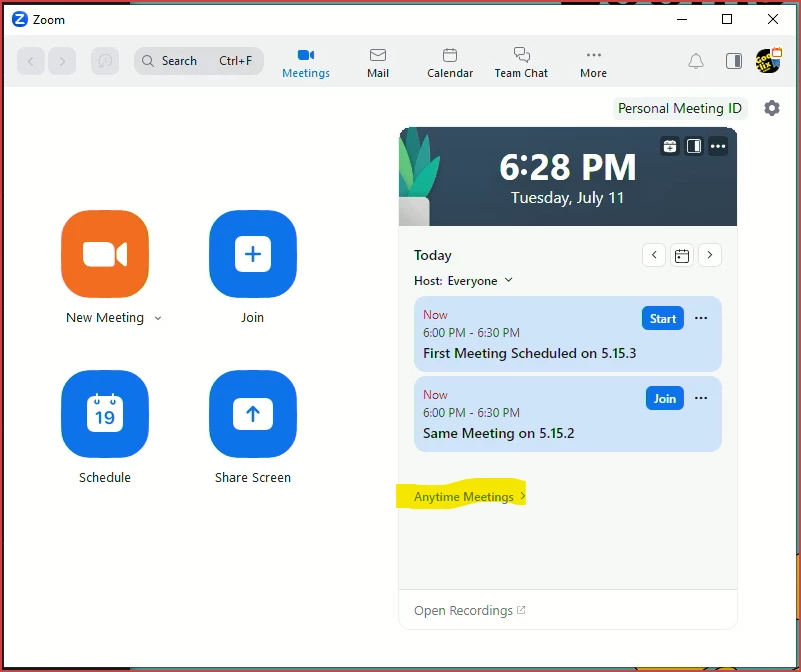
Click the arrows to move forward/backward in the calendar, or click the calendar icon for "today's meetings".


If you have any recurring meetings with no-fixed-time, they will be listed under the "Anytime Meetings" drop-down.  If you don't have any, the drop-down won't show.


This new view on the Meetings tab is what was previously on the Home tab... and the Home tab is now gone.

30 replies

Newcomer
July 13, 2023

Thanks for all the advice.  I've reinstalled the Desktop, but I have a Mac with a silicone chip so it is a different version than the default listed one.  Still no recuring meetings listed, and no dropdown for Anytime Meetings that I can find.  Any other suggestions or shall I just use the web browser?  Thanks again.

Newcomer
July 13, 2023

I'm not a mac user so can't advise further, sorry. No idea if raising a ticket with Zoom will generate a useful reply...

ZoomVA
Community Manager
Community Manager
July 13, 2023

@Ray_Harwood Thank you so much for sharing this helpful info! I'm so sorry for the frustration this has caused. We're in the process of reverting this change. In the meantime, as Ray mentioned, you may need to update your Zoom desktop client to version 5.15.3 and locate your recurring meetings from the Meetings tab in the Anytime Meetings drop-down arrow. We have a new support article about this issue and will keep it updated with new information as it becomes available.

Newcomer
July 13, 2023

I *am* on the lastest version. 


There is no "anytime meetings" drop down. That is the point.


Y'all have made nothing but bad user interface decisions for about two years.


Who is running this company?

Newcomer
July 13, 2023

curious if your need to state "no whining or complaining here" is an indicator to the company that you are regularly making horrible decisions for your customers. I haven't been this baffled by a company since Microsoft introduced Windows 8. Y'all are batty.

Newcomer
July 13, 2023

I downloaded newest version and NO Meetings showed up. I teach a weekly class at an exact time every Wednesday. That is not an ANYTIME meeting. 


I also signed up again for monthly pro account. Still no recurring meetings.


Thanks but this still is an unwelcome upgrade. Shanta Gabriel


Newcomer
July 13, 2023

Sorry Ray, it worked yesterday, but today I can no longer see either the Anytime meetings tab or any of my scheduled meetings.  Zoom is very broken and close to unusable.

Newcomer
July 13, 2023

If you haven't already, revisit clicking "Meetings" on the menu at the top of the page, and see if your meetings will appear.  I did a couple of hours ago, and there they were!  I so hope this works for you!


Newcomer
July 13, 2023

Thanks, that worked, but the interface still looks different than it did yesterday.

Newcomer
July 13, 2023

I figured it out, but it wasn't obvious at all.  What a crazy "update."  On my MacBook, if I open the app and go to any date 2/3 of the way down under the date and time in VERY SMALL AND FAINT print is "anytime meetings."  if you click on that my meetings show up.  All my meetings are anytime since occasionally I need to change the time of one.

Newcomer
July 14, 2023

Thanks again Ray, just one supplementary issue perhaps you can help with: my list of recurring meetings includes several that are not connected to specific dates ie participants know to use 'the usual' meeting login, no matter which day we meet. But when I now try to set up a new recurring meeting, I am faced with specific date choices: daily, weekly, monthly, yearly - none of which achieve what I'm after. Am I missing something very obvious?

Newcomer
July 28, 2023

They have depreciated the "no fixed time" option from the desktop client. Now the only option is to schedule a "fixed time" meeting, and then log in via web browser to edit the meeting to "no fixed time." This is an absurd feature to remove from the desktop client and a completely unnecessary extra bunch of steps added.

Newcomer
July 14, 2023

i can no longer find the "anytime meeting" anywhere on my desktop app. I had it yesterday but now it's gone. this is some serious BS! Zoom charges way too much to be this poorly designed. 

Wai-WENDY
Newcomer
Newcomer
July 15, 2023

Thank you for the information, Ray. 

Newcomer
July 18, 2023

Kia ora Ray


Can you confirm that the one-off meetings as well as the reoccurring meetings/appointments will populate on the left side 'Upcoming' panel so that all meetings are in chronological order?!?!


Because as it is now the Upcoming panel list is split, and doesn't give me a clear indication of all my online work; as the reoccurring meetings are down the bottom and easily missed.


Cheers Raewyn