

Microphone not working after recent Zoom update | Community
Skip to main content
Newcomer
June 7, 2023
Solved

Microphone not working after recent Zoom update

  • June 7, 2023
  • 8 replies
  • 1 view

Updated Zoom today and now the built in microphone will not work. If I mute, then unmute, the microphone will pick up my voice for a half of a second (microphone icon shows green) and then it cuts out. Muting and unmuting a second time has no effect. I have updated microphone driver (already had the most updated version), disabled, enabled, uninstalled & reinstalled. Microphone works on the test side of the laptop. Will not work on the test side of Zoom. I have uninstalled and reinstalled Zoom. Microphone is allowed for all programs. It was working normally before the Zoom update. Nothing else has changed on my laptop otherwise. I have all the auto enhancements turned off. I have toggled through the settings to test each one. Microsoft Windows 11 on HP Envy. What am I missing?
Best answer by alifor111

Thanks for the possible work around! I've had to do my last three work zoom meetings on an ipad in a very unprofessional and time-eating manner because I too have a newer HP Envy and have done every single thing possible like kiwi. I even ran system scan for corruptions. 6 hours of online reading and troubleshooting and the problem persists. $149/yr and zero support from ZOOM. It's outrageous.


Hi

 
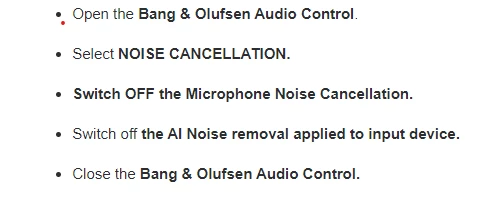
I have finally managed to resolve the issue. I have a fairly new HP Envy with Bang & Olufsen app. One of the zoom updates either changes
settings or conflicts with it. Zoom sent me this and it worked so fingers crossed for others!
Good luck

8 replies

Newcomer
June 14, 2023

I'm having the same problem.  My microphone was working correctly prior to installing the latest Zoom update (version 5.14.11).  I'm running Microsoft Windows 11 on HP ENVY laptop and ran the same tests.  I also went to Windows Settings, then System, then Sound, then under the Input section I selected the Microphone Array option, hit the START TEST  button to test the Microphone and it works perfectly.   I believe there must be a problem with the latest Zoom update.  I would like to know if others are having this problem and if there is a work-a- round fix that I can use until Zoom fixes the problem?

Newcomer
June 15, 2023

Same here - the web version works but the desktop doesn't - so there is the work around.

meet on the web 😞 this sucks!

kiwi9158Author
Newcomer
August 6, 2023

Hi

 
I have finally managed to resolve the issue. I have a fairly new HP Envy with Bang & Olufsen app. One of the zoom updates either changes
settings or conflicts with it. Zoom sent me this and it worked so fingers crossed for others!
Good luck

Thank you! This was the correct fix for me! 

Newcomer
June 20, 2023

Exactly the same problem on same laptop. Tech guys at work can’t solve it and have now sent a ticket to zoom, waiting for response. So frustrating, lost a days work yesterday due to this!

Newcomer
August 3, 2023

please let us know what you find out. Much, much appreciated. I only have Pro level so I can't get any support from Zoom and I've done every type of troubleshooting possible.

Newcomer
June 20, 2023

If your microphone is not working after a recent Zoom update, there are a few troubleshooting steps you can try:

Check microphone settings in Zoom: Open Zoom and go to the settings menu. Under the "Audio" or "Audio Settings" section, ensure that the correct microphone is selected as the audio input device. Test the microphone using the provided options in the settings to see if it's picking up sound.

Test the microphone in other applications: Verify if the microphone is working properly in other applications or software. This helps determine if the issue is specific to Zoom or if it's a broader problem with your microphone or system settings.

Check system settings: Ensure that your microphone is enabled and set as the default recording device in your computer's system settings. On Windows, go to the Sound settings in the Control Panel or Settings app. On macOS, go to the Sound settings in System Preferences.

Newcomer
June 20, 2023

I did all of this and I went as far as resetting my computer to try and fix it...its Zoom. I think it's something between zoom and HP envy computers

Community Super Champion | Partner
June 20, 2023

hi jennboughton,

you might consider using cleanzoom to completely uninstall zoom client and reinstall current zoom client.

Uninstalling and reinstalling the Zoom application – Zoom Support


if this does not fix the issue, you could try installing a previous release that was working.


thanks,  eliot

Newcomer
June 20, 2023

I have a similar problem but it only manifests when I move from one breakout room to another.  I have tried everything except for uninstalling and reinstalling.  Does anyone know if I lose my upcoming scheduled zoom meetings that I am hosting if I uninstall?


Newcomer
August 3, 2023

meetings not lost with uninstall, but not sure what happens with a full clean. 

stacy-bloom
Newcomer
Newcomer
June 20, 2023

Hi,

I had the same issue after a recent Zoom update. To solve the problem, I followed these steps:
1) Checked if the microphone was working on other applications or websites.
2) Verified that the microphone driver was up to date.
3) Disabled and re-enabled the microphone.
4) Uninstalled and reinstalled the microphone driver.
5) Uninstalled and reinstalled Zoom.
6) Ensured that the microphone was allowed for all programs.
7) Made sure that auto enhancements were turned off.
😎 Tested different settings in Zoom.
After following these steps, my microphone started working properly again. I hope it's also work for you!

Newcomer
August 23, 2023

same problem here, just spent 6 hours without any luck, I am pissed off, also have new HP Envy 17.  Obviously I have tried EVERYTHING as shown in HP and Zoom, at first I though it was Norton Utilities Ultimate, but after talking to their specialist he said its Zoom, but Zoom Help is not available by phone and internet help, chatbots, etc, have NO solutions!

Newcomer
June 25, 2024

I have the same problem on a 2020 Macbook air, with a Shure SM7, and Motu M2.  All worked fine until I upgraded to Zoom Workspace 6.0.1. Despite a zoom un & reinstall and a Motu Driver update, I can still not get the Shure and Motu to work in sound through the zoom app. The Macbook internal speakers work but not the Shure. So the only options seems to reinstall the previous version of the Zoom app back.  Lost productivity and wasted recording time....tech updates have gotten very sloppy out there in general across all companies.

Newcomer
July 4, 2025

I have a Dell computer and it's doing the same thing.  It's very frustrating.  I guess I need to contact Zoom to get a specific fix the a Dell.  At lease I know it's Zoom this time.