

Zoomtopia is here. Unlock the transformative power of generative AI, helping you connect, collaborate, and Work Happy with AI Companion.
Register nowEmpowering you to increase productivity, improve team effectiveness, and enhance skills.
Learn moreKeep your Zoom app up to date to access the latest features.
Download Center Download the Zoom appDownload hi-res images and animations to elevate your next Zoom meeting.
Browse Backgrounds Zoom Virtual BackgroundsEmpowering you to increase productivity, improve team effectiveness, and enhance skills.
Zoom AI CompanionUser groups are unique spaces where community members can collaborate, network, and exchange knowledge on similar interests and expertise.
Help & Resources is your place to discover helpful Zoom support resources, browse Zoom Community how-to documentation, and stay updated on community announcements.
The Events page is your destination for upcoming webinars, platform training sessions, targeted user events, and more. Stay updated on opportunities to enhance your skills and connect with fellow Zoom users.
2025-09-08 01:54 PM
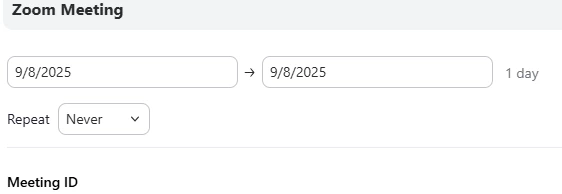
Previously when scheduling a meeting, there were fields to enter the time of the meeting, ie, 7pm to 9pm. Within the past month when scheduling a meeting, there are no fields to enter the specific meeting time. The invite template just shows the date fields. Is there something I'm missing or has the invite window changed?
Thanks
Solved! Go to Solution.
2025-09-10 03:41 PM
I am not sure how to answer your questions. I am a senior cit, not technologically in tune with all the current technology jargon :-). It's moving too fast to keep up.
I have Zoom Workplace Version: 6.5.12 (14128) downloaded on my pc. I click on the Workplace icon on my task bar when I sign in. My calendar is not integrated with Google or Outlook.
2025-09-08 09:38 PM
Hello hicjef,
Although your image does not display the All Day check box, it shows that you have the day unit for your meeting (9/8/2025 -> 9/8/2025 1 Day). Click into the date field after the invoking the Schedule page and it should appear along with the start and end times. Now you should be able to see and choose the start and end times.
I hope this helps.
ZoomieHelper
2025-09-09 12:27 PM
When opening the scheduling/invitation page from the calendar, the date field is already populated with the Day unit. The only thing that can be changed is if I want it to be a recurring meeting, ie every week, every month, etc. I tried clicking on the date field as you recommended, but that did not open an option to insert the meeting time.
2025-09-09 01:50 AM
I noticed the same thing recently and thought I was doing something wrong at first. It looks like the invite window might have been updated, but it’s definitely confusing without the start and end time fields showing. Hopefully they bring that option back or at least clarify how we’re supposed to set exact meeting times now.
2025-09-09 12:43 PM
I might have found the solution, however I am not sure why the process works one way, and not the other. IF I open the invitation from the ZOOM Workplace Calendar, the 'time' option is not available. However if I go to the Zoom Home Page, and click on 'Schedule' , the invitation opens as before allowing the meeting Time to be inserted🤔.
2025-09-10 01:15 PM
The time options should appear the same way for the Workplace calendar as well. This is how it appears on my Zoom Workplace desktop client 6.5.12 on Mac OS 15.1. This discrepancy requires us to validate the following.
Here is a snapshot of my scheduling invite page from the Workplace calendar which is identical to the Home tab Schedule invite. When I click on the start time field, the All Day check box option appears.
2025-09-10 03:41 PM
I am not sure how to answer your questions. I am a senior cit, not technologically in tune with all the current technology jargon :-). It's moving too fast to keep up.
I have Zoom Workplace Version: 6.5.12 (14128) downloaded on my pc. I click on the Workplace icon on my task bar when I sign in. My calendar is not integrated with Google or Outlook.
2025-09-27 12:13 PM
I can totally relate — tech changes so quickly it’s hard for anyone to keep up! You’re doing great just by getting Zoom Workplace set up and using it. A lot of people don’t even get that far. If the calendar isn’t integrated, no worries — as long as you can join your meetings, you’re on the right track. Step by step is the way to go. 🙂
2025-09-16 05:59 PM
Hello hicjef,
Although there is an inconsistency when displaying the start/end times in the calendar tab verses the home tab, it seems like you have a workaround for scheduling a meeting in the home tab. A new release of the Zoom client is available (6.6.0). You can upgrade to this release to see if the inconsistency is fixed.
ZoomieHelper
2025-09-17 01:24 PM
I updated to v6.0. When attempting to schedule a meeting from the Zoom Calendar, the time fields are not available.
It is still only allowing an 'all-day' scheduling.
I can schedule from the Home Page. Its no problem. When I schedule from the home page with the time of the meeting, the meeting with time then appears on the calendar.
Thanks.
2025-09-17 01:28 PM
Once the 'all-day' meeting is on the Calendar, I can go in and Edit it, and then the time fields are available to edit.