

Mac support for calendar integration | Community
Skip to main content
Newcomer
December 22, 2022
Solved

Mac support for calendar integration

  • December 22, 2022
  • 13 replies
  • 1 view

Does anyone know if its possible to use iCalendar/Mac Calendar with Zoom to schedule/show meetings?  We have the desktop app but our email is not hosted by Outlook or Google.  It appears that Zoom only supports Exchange and Google for these integrations.  

Anyone at Zoom reading this - will there ever be  Apple support for mail/calendar? 
    Best answer by YaBoiB

    Hi @Derek5


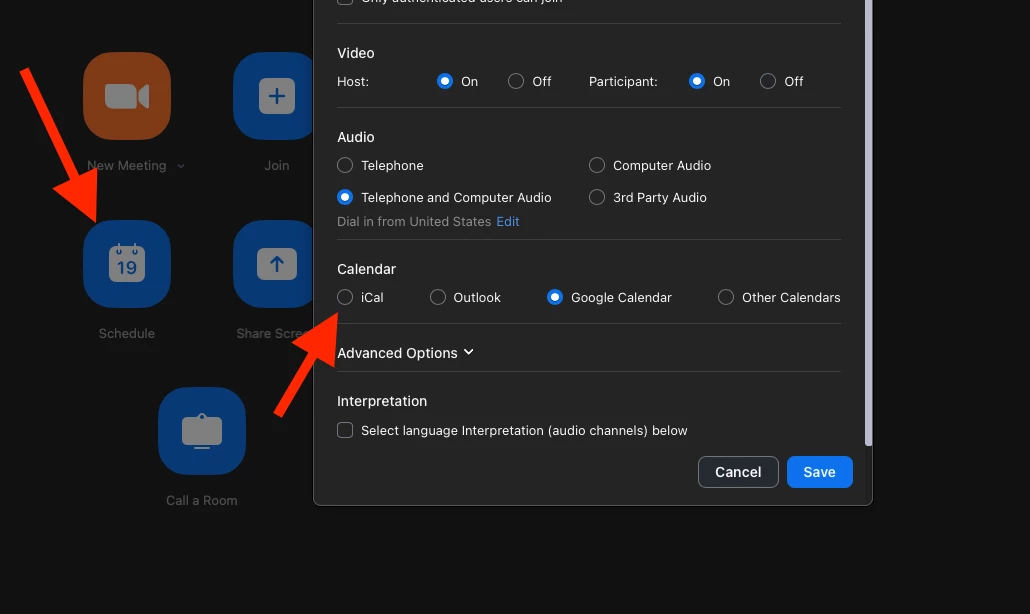
     The solution that I am speaking of is not in the web version of the Zoom client. It is on the app version on a PC or Mac. If you go to the home tab and then click on the blue schedule button you will see an option to schedule your meeting using iCal. 


     I hope that this is helpful. Let me know if there is anything further that I can do to assist you. 


    Brandon

    13 replies

    YaBoiB
    Community Champion | Employee
    Community Champion | Employee
    December 22, 2022

    Hello @sonoerin


     If you go through the Zoom Desktop App > on the home screen > click on the blue schedule button > scroll down to Calendar. There is an iCal option there that you can use. I just tested it and it worked for me in making a Zoom meeting event on my calendar. 


    That setting is static also, so you should not have to change it again, but you will have to schedule your meetings that way as far as I can tell. I have not tested the reverse of creating an event in iCal and attempting to add a Zoom Meeting that way. 


    I hope this helps. 


    Brandon

    Newcomer
    January 5, 2023

    Hi @YaBoiB ,


    Could you try your solution again?  I don't see an iCal option.  I was able to sync with iCal until the most recent update, and now only find Google, MS 365 and Exchange options under the new Workspace Management tab under Admin.   Wondering if something changed very recently and/or if there is another solution.  


    Thanks for your thoughts and help.  


    Derek

    Newcomer
    November 5, 2024

    Hi @Derek5


     The solution that I am speaking of is not in the web version of the Zoom client. It is on the app version on a PC or Mac. If you go to the home tab and then click on the blue schedule button you will see an option to schedule your meeting using iCal. 


     I hope that this is helpful. Let me know if there is anything further that I can do to assist you. 


    Brandon


    I wanted also integration with Ical. It works to add zoom appointments I create, but it doesn't pul appointments created by others into the zoom app from Ical.


    YaBoiB
    Community Champion | Employee
    Community Champion | Employee
    April 5, 2023

    @Kellipsf @GBE


     Another rep at Zoom taught me this so it is great when people help people out. That is what I love about the Zoom Community. Thanks for the kind words, have a wonderful day. 


    Regards,

    Brandon

    Newcomer
    August 8, 2023

    Can iCal integration with Zoom be expanded to function similarly to Google and Office 365 calendar integrations? If not, is there any insight into potential plans for incorporating iCal synchronization in the future? Given that the iOS Zoom app offers this feature, it would be valuable to understand the rationale for its absence in the MacOS version.


    Furthermore, I'm enthusiastic about the possibility of contributing to Zoom's development, particularly regarding the MacOS and iOS applications. Are there any potential job openings within Zoom that align with my expertise and could involve exploring and enhancing calendar integrations for these platforms?


    Additionally, I would greatly appreciate any links or resources you could provide for exploring job opportunities at Zoom, specifically those related to the development of the MacOS and iOS applications. Moreover, I'm curious if there are any online platforms or forums where I could engage in discussions about these integration aspects and the underlying technologies used in the Zoom applications?


    YaBoiB
    Community Champion | Employee
    Community Champion | Employee
    September 29, 2023

    @NathanMartinez


     I have been at Zoom for four years and we have never been able to expand the functionality of iCal to the level of Google and Office 365. I believe it has something to do with the APIs that Apple needs to run their calendar, but I can check into that for you. 


    As for jobs at Zoom, please go to our webpage at https://careers.zoom.us/home to search for possible positions that meet your strengths and expertise. 


    We have the community forum and we also have the developer forum that is open to the public for consumption. The developer forum site is https://devforum.zoom.us/ 


    Thanks, 

    Brandon

    Newcomer
    September 28, 2023

    I am using mac calendar and would like to add zoom links to my meetings in the mac calendar bc I have the full overview of my week there. It does not really help if I have to go to zoom each time I want to schedule a video-call and then would have to check back in calendar, when I am available. 

    @608130: Would be great if you could find an agreement with Apple here

    YaBoiB
    Community Champion | Employee
    Community Champion | Employee
    January 30, 2024

    @nic_olaz


     I apologize for the delay in getting back to you. I did not see the notification that you replied until just now. If you go to the home screen on your Zoom app and choose to schedule using the schedule button you can choose your iCal calendar and it will add the Zoom link (join link) into your calendar event. I just tested it on my mac using Sonoma version 14.3. I would show you a screenshot of my whole calendar, but I have sensitive information on it, but hopefully you see what I am talking about if you set up a meeting in Zoom to your iCal calendar. 


    Newcomer
    January 30, 2024

    Hi Brandon, thanks for the response. I was searching for a way to do it inside of Mac calendar as I am not using Zoom to schedule meetings directly. But I what I now did instead is: 
    I set a rule that anytime i type zoom my zoom-link appears so now i just type it into the notes of a new meeting and invited people can access my zoom call. Its not perfect but it works

    Newcomer
    January 31, 2024

    This did not work for me.  I'm a business with zoom appointments. I would like to link these appointments with my apple calendar and unlink the notices in my google calendar.


    Newcomer
    January 31, 2024

    There is no way to contact a live human being via zoom support to help with this. Quite frustrating. I often don't choose to use products with poor support staff; using zoom is a temporary fix until my clinical online video chat portal is fixed.

    YaBoiB
    Community Champion | Employee
    Community Champion | Employee
    February 1, 2024

    Hello @sarah12345


     I will work with you on this. I just sent you a DM to your profile. Please feel free to reach out to the email address that I provided to you, and we can work out a time to tackle the issues that you are facing. 


    Thanks, 

    Newcomer
    February 6, 2024

    SOLVED!!!! It took me a total of 5 hours with no answers on the internet but I figured this out for anyone looking in the future. To sync iCalendar to Zoom Desktop Client app for macOS you have to make sure your meetings are in the right Calendar in your iCalendar app!
    So in your iCalendar app, on the upper left side of the page, select the little calendar icon to pull up your different calendars. For me I had iCloud calendars and Google calendars. I'd ether make a new calendar under Google or use an already existing one if you do have one already. 
    Personally I had to delete all of my Zoom events in my iCloud calendars and reapply them to my google calendars all in iCalendar. 
    Then when you go to sync in zoom, select google. when it's installed you should see your different iCalendar calendars associated with google on the left. 

    Hope this helps!! I looked forever and couldn't find a single answer. 

    Newcomer
    February 6, 2024

    Glad that worked for you! I don't use google products, hence the issue (I can't link from google calendar since I'm not using google).

    Newcomer
    February 6, 2024

    I don’t use google calendar at all. I just use gmail and iCalendar. 
    If you don’t have gmail, you might be sol. 
    If you use gmail, open iCalendar. On the Mac menu bar go:

    Calendar>Settings>Accounts 

    Hit the + button on the bottom left. Choose “Google”

    Follow the prompts to log into your gmail. 

    Back in iCalendar, when you tap the little calendar button on the top to open up your different calendars on the left (if it’s not already open) and there should be a new Google “account” (or rather a calendar category) there. 

    To add a new calendar: go to Mac menu bar: file>new calendar>google


    If you don’t have gmail at all this won’t work. Best of luck!

    Newcomer
    April 1, 2025

    It seems that in the latest version of Zoom Workplace (6.4.3) the integration with the Apple Calendar (Mac OS 15.4) has been removed or transferred to another place than usual. Any hints? 

    Newcomer
    April 1, 2025

    @pankon you may have figured this out already, but a few versions back the Zoom team made a lot of changes to the UI and backend so now the event notice in iCal on Mac takes a long time to show up.  But it should come through if your email used in Zoom is also one of the accounts in iCal.  Again, it takes a while.


    I "Schedule" meetings from the Zoom desktop Home tab and I get the option of sending the invitation.  I don't know how the Zoom website works.


    Zoom deskyop Version = 6.4.3

    Macbook Pro version = 15.3.2

    Newcomer
    April 25, 2025

    After you schedule the meeting, and put in the recipients to the invitation, you can scroll to the bottom of the "New Event" window, and you should see a checkbox to use an external calendar.  Check that.  Then you should see a popup for iCal.  You may have to check the box for "More options".  At least, this works for me.

    Newcomer
    April 25, 2025

    The problem isn't ical - it's that the Zoom Workplace App itself on my Mac no longer shows the upcoming meetings...and it says that's because my external calendar (exchange/google/office365) isn't connected. But the zoom app should get its calendar from the zoom web, which DOES show the upcoming meetings.  IT did for years but stopped a few months ago