
Local recordings inaccessible and not converting | Community
Skip to main content
Newcomer
July 1, 2023
Question

Local recordings inaccessible and not converting

  • July 1, 2023
  • 2 replies
  • 4 views

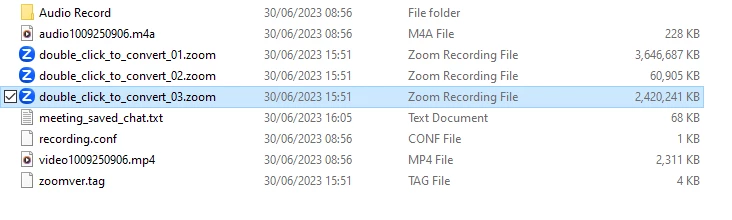
I ran a full day event yesterday and recorded to my external hard drive. The files SEEM to be there, but say "double click to convert to zoom". Double clicking is doing nothing.

Any advice?
 

2 replies

Community Champion | Customer
July 1, 2023

Hello,


  1. Sign in to the Zoom desktop client.
  2. Click the Meetings tab.
  3. Click the Recorded tab.
  4. Select the meeting topic with the local recording.
  5. Click Convert.

 
If that fails please follow the steps below;
 

  1. Create a new folder to your Documents or Download Folder and named it "Zoom" or anything you want.
  2. Once you are done creating a new folder on your Documents or Download folder, copy the  files "double_click_to_convert_01 & double_click_to_convert_02" and so on to the newly created folder.
  3. Double-click the larger file.


https://support.zoom.us/hc/en-us/articles/201362753-Troubleshooting-local-recording-issues 


Regards

If my reply helped, don't forget to click the accept as solution button!


Newcomer
July 14, 2023

thank you! I have tried for over a week to solve this problem and you just saved my day! Thank you!

Community Champion | Customer
July 14, 2023

Happy to help.

If my reply helped, don't forget to click the accept as solution button!
