
Local Recordings | Community
Skip to main content
Newcomer
November 1, 2022
Question

Local Recordings
  • November 1, 2022
  • 3 replies
  • 7 views

 Whenever I start recording, there is no recording happening but just this dialog box appears, how do I resolve this?

 

    3 replies

    Newcomer
    November 1, 2022

    Same issue

    Newcomer
    June 14, 2024

    Thankyou for all the help everyone.

    For information as I found by trial and error.

    Windows 11 Tower PC.

    Zoom is now putting the local recordings at this location - no input from me.

    C:\Users\<computeruser>\OneDrive\Documents\Zoom\<newfolderwithdate>

    I do not use onedrive except to upload to cloud in free account - the onedrive folder was created by Windows I guess.

    I have not bothered to alter it as I now know where they go as Zoom now displays a menu.

    So I copy the C: drive folder to my storage drive and delete the files on the C drive to keep space for Windows.

    stephanehanrez
    Employee
    Employee
    November 2, 2022

    Are you sure Zoom has the rights to write at the store location you have defined on this screen ? Could you check and maybe point to another location where you are sure Zoom can write ?

    Ray_Harwood
    Community Super Champion | Customer
    Community Super Champion | Customer
    November 3, 2022

    Hi, all... ( @RamRathan@MDavis21, and @stephanehanrez)


    Another possibility is that the path isn't set to an actual location. Sometimes this can happen if configurations of network drives and paths are changed.  Click the button to reset the path where Zoom stores files, and see if that works.

    Newcomer
    February 7, 2023

    I have the same issue.   I used to be able to do local recordings and now something has changed itself.  My first meeting in 2023 I could not do local so had to resort to Cloud for that meeting.

    I am the account holder/administrator for my Zoom account.

    I have tried telling Zoom in settings to record to a separate hard disk to Windows no change.

    I have tried switching off Cloud so only local is enabled, no change.


    The issue with Cloud is that I am only given 5GB recording space so I would prefer to continue with local but cannot get it to work like it used to work.

    Newcomer
    February 7, 2023

    Thankyou to Ray for the Dropbox link idea.   I fixed my main no "local recording" issue by uninstalling Zoom from Windows.

    Now I have another issue.   Main Drive is windows c:\.  I told Zoom in its pesky settings window that came up when the local would not work.  (see RamRathan post above).  I told zoom to save the recordings at e:\zoom folder.  (my internal storage drive in Windows PC).  Now I cannot find out how to do this following instruction because it does not work in my Zoom login by browser.    There is no Settings option when I click my profile picture so I cannot follow the below instructions.
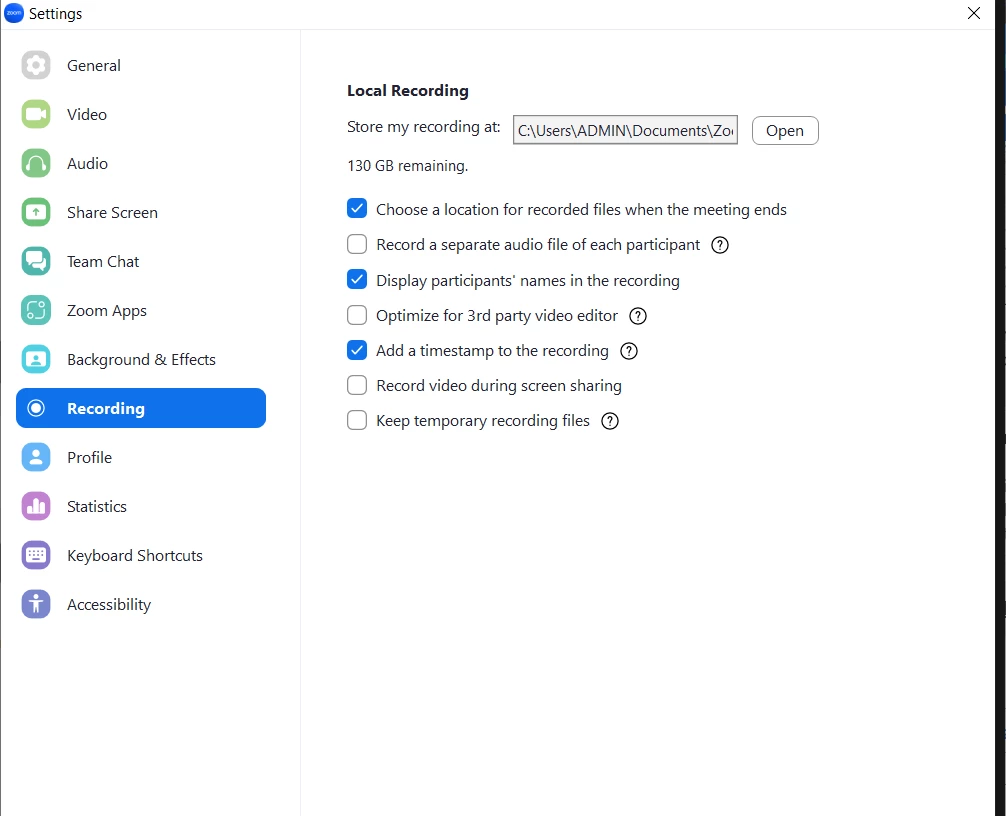
    I want to change the default file location for local recordings.  (I cannot find the options).

    How to view or change the default file location for local recordings

    You can find your default recording location for local recordings in your Zoom client settings

    1. Sign in to the Zoom desktop client.
    2. Click your profile picture then click Settings.
    3. Click 


       Recording.
    4. Click one of these options beside Local Recording:
      • Click Open to open the folder where your local recordings are stored.
      • Click Change to change the default recording location for your local recordings
    Ray_Harwood
    Community Super Champion | Customer
    Community Super Champion | Customer
    February 7, 2023

    Sorry, Teddy... you can't do local recordings from the browser:

    Has to be the desktop client.


    When you said you uninstalled the Zoom client, I was hoping you were also going to say "and reinstalled".


    What type of machine and OS are you using?


    If you click on the "Open" button on the Recording tab in Settings, does it take you to the location?