

Livestreaming to Facebook GROUPS now requires Custom RTMP | Community
Skip to main content
Ray_Harwood
Community Super Champion | Customer
April 22, 2024
Question

Livestreaming to Facebook GROUPS now requires Custom RTMP

  • April 22, 2024
  • 19 replies
  • 1 view

Facebook has stopped live-streaming to Facebook Groups from any application as of today.  This includes Zoom's built-in  integration to livestream to Facebook.  Note: You should still be able to livestream to other Facebook endpoints -- just not to Groups.


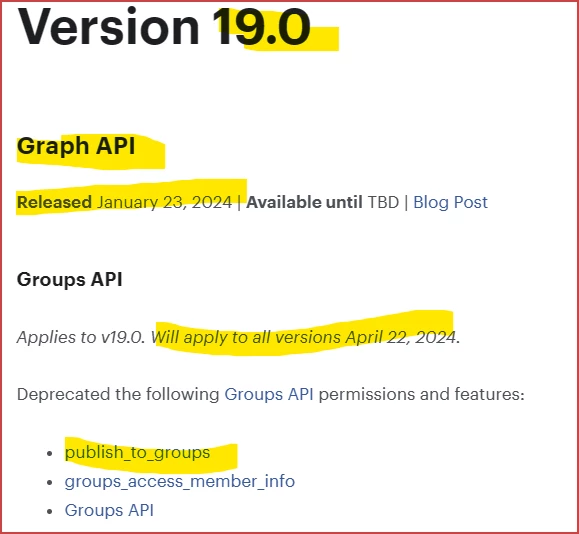
Zoom did not make this change; it was made by Meta/Facebook.  This change was made by the implementation of Version 19.0 of the Facebook Graph API, which was released January 23, 2024, and became effective today, April 22, 2024.  
 

To livestream to a Facebook Group, you must now use the Custom RTMP method of connecting a livestream.  See this Zoom Support article for information on how to do this from Zoom:

https://support.zoom.com/hc/en/article?id=zm_kb&sysparm_article=KB0064210


Unfortunately, this option requires a Licensed/paid account. Please note that I’m a Zoom Customer just like many of you. I don’t make the rules! If you’re a Basic user, your option to live-stream from Zoom to Facebook Groups at the moment is to upgrade to a Pro license. Consider streaming from OBS which is free and has the Custom RTMP capability built in without restriction. (info added here 25 April 2024)


References in Zoom documentation to being able to livestream to Facebook no longer include the ability to stream to Facebook Groups from the Zoom-Facebook integration.


Added 24 April 2024:

Watch this video to see how it can be done:

https://vimeo.com/938818658?share=zoomcommunity

19 replies

Newcomer
April 22, 2024

Thanks Ray....but this is still not working on my Macbook...could it be that my iOS isn't updated enough? My MacBook Air is about 7 years old. 

Ray_Harwood
Community Super Champion | Customer
April 24, 2024

@telbeavers, if you’re using Zoom, it should work if you are following the instructions using Custom RTMP. If you can provide some Screen shots (with personal info redacted) of your configuration and any error displays, I’ll try to help. 

Newcomer
April 24, 2024

Newcomer
April 24, 2024

There is no way to do Custom RTMP.  How can we feed into FB Groups?

Ray_Harwood
Community Super Champion | Customer
April 24, 2024

@shawn2019, no way to do Custom RTMP where? Plenty of applications have this capability, including Zoom, OBS, vMix, etc. 

Newcomer
April 24, 2024

Can not use that you feed zoom into a Facebook group

Newcomer
April 24, 2024

Do you think they'll fix/restore things back or from now on it just works with Custom RTMP?

Ray_Harwood
Community Super Champion | Customer
April 24, 2024

@valemazza80 - you'd have to ask Facebook/Meta about that... I have no indication that they will re-enabled live-streaming from integrated applications like Zoom.

Ray_Harwood
Community Super Champion | Customer
April 24, 2024

Watch this video to see how it can be done: 

https://vimeo.com/938818658?share=zoomcommunity

Newcomer
April 25, 2024

Hello again,  Ok so watching the video and when I open More there is only a Live on Facebook, no Custom option


YOu can see it here:  https://imgur.com/a/DX5BDQS

https://imgur.com/a/NFuLWAc

Newcomer
April 25, 2024

I am going to watch the video...  I will let you know if I till have a problem.  At first glance I do not see any option for Custom Live Stream .. but I will let you know soon.

Newcomer
April 25, 2024

Hey there Ray....video great...much appreciated....my Zoom doesn't have the options yours has...I do have a paid Zoom account....see screenshot....

Ray_Harwood
Community Super Champion | Customer
April 25, 2024

Please check that the Custom Live Streaming option is enabled in Admin -> Account Management-> Account Settings -> In Meeting (Advanced) – scroll down (pretty far) to see:


Unfortunately, this option isn’t currently available for Basic (free) accounts. 
https://support.zoom.com/hc/en/article?id=zm_kb&sysparm_article=KB0064210

Newcomer
April 25, 2024

Done....then I went back to start a meeting....and that option still isn't there...I have paid Zoom...but it's the first level.....

Newcomer
April 26, 2024

Good Morning Ray.


Will this need to be done every time we go live or just input once and Zoom saves the information?

Ray_Harwood
Community Super Champion | Customer
April 26, 2024

Welcome to the Zoom Community, @KBofKingzSpeak.


As with many questions, the answer I think is "it depends".


I believe (but haven't tested this) that if you create a "recurring meeting with no recurrence schedule" that the Custom RTMP data will remain attached to that meeting, and with the "Persistent" switch turned on in your Facebook settings, the data in Zoom will continue to match up with the data in Facebook.


If you start a new meeting every time, or if you live-stream to multiple groups, then yes, you'll have to copy the 3 data elements every time.


There is another solution!  Check out the Live Streaming app in Zoom's Marketplace here:

https://marketplace.zoom.us/apps/BXVkc6YUSQKunUAODGkgtg


This is a Zoom-created app (no third party involvement), and allows you to set up a number of stream settings that are persistent across your account.  Why have I not recommended it?  While the app works very well -- when it works -- I've seen too many people struggling with trying to get it to work, as there are nuances you have to be aware of (or willing to research) in order to resolve certain issues in getting it set up.  So I've "fallen back" to the Custom RTMP, which (once you do all the correct steps) "just works."


Give Zoom's Live Streaming app in the Marketplace a try, but please don't ask for assistance in this thread... maybe I'll start a new thread of "Here's another way to Stream to Facebook Groups", if there's interest.

Newcomer
May 22, 2024

Thanks for all of the details that you have provided. Prior to seeing your post, I followed the guidelines rigorously to use the Live Streaming app in Zoom but it always failed with an error.


On my own, I discovered the "custom" method that you have described and it works although it's more complicated than the proceedure that is supposed to work in the Live Streaming app.


Should you take the time to start a new thread, I'd love to have the link! Many thanks for supporting us!

Newcomer
April 26, 2024

I am happy to say I got it working!  Thank you!

Newcomer
April 26, 2024

Is this the fix for live-streaming to a Facebook Page, also?

Newcomer
April 27, 2024

Thank you so much for all of this help! Question: do you have to do the key and urls every single time you live feed in to FB group?