

Live Captions | Community
Skip to main content
Newcomer
May 4, 2023
Solved

Live Captions

  • May 4, 2023
  • 3 replies
  • 0 views

Hello Everyone,


One of my colleagues have set up a zoom meeting and I don't see an option to enable live captions when I join that meeting. How do I enable the live caption considering the fact that I am not the host of that meeting.
    Best answer by Ohkawa

    Hi, @yashp1 


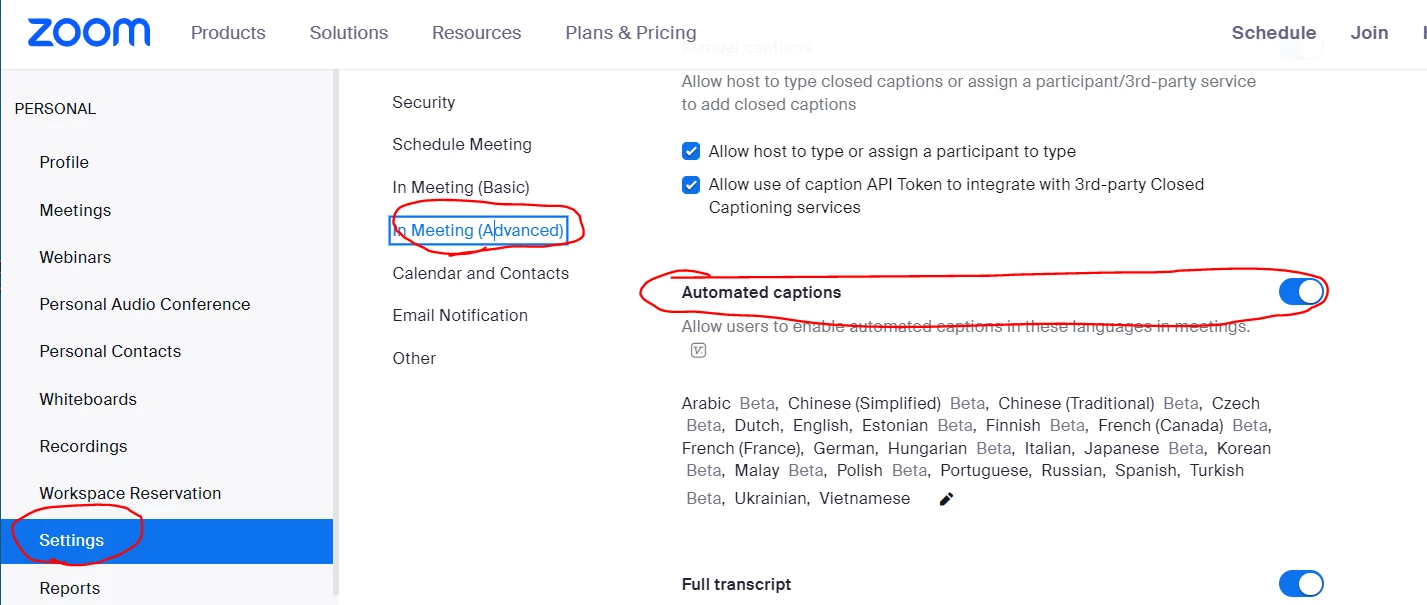
    Meeting host must enable automated captions.

    My Settings - Zoom > Inmeeting(Advanced)


    3 replies

    Ohkawa
    Community Champion | Customer
    OhkawaAnswer
    Community Champion | Customer
    May 4, 2023

    Hi, @yashp1 


    Meeting host must enable automated captions.

    My Settings - Zoom > Inmeeting(Advanced)


    yashp1Author
    Newcomer
    May 4, 2023

    Thanks, @Ohkawa

    Newcomer
    September 6, 2023

    I am admin of single user Zoom Pro account which I have purchased. I am logged into my paid Zoom Account. I have enabled the live captioning in my personal paid account. Being remaining logged into my paid Zoom Account, if now when I join any other Zoom meeting whose meeting ID and password are shared by someone else, whether live captioning will be made available to me. The second user have not enabled the live captioning in their account.

    Ohkawa
    Community Champion | Customer
    Community Champion | Customer
    September 6, 2023

    @SJ2475 

    Whether live captioning is enabled depends on the meeting host's configuration.