

Incoming video freezes since new app update | Community
Skip to main content
Newcomer
August 17, 2021
Solved

Incoming video freezes since new app update

  • August 17, 2021
  • 6 replies
  • 0 views

Please can the community assist.


I recently updated to the latest Zoom app. Since then, after accepting someone from the waiting room as host into a meeting -their video freezes after a few seconds. Sound is perfect, and in a  hour long  meeting the video may unfreeze for 15-20 seconds 2 to 3 times. My video stream to them is unaffected, and they have un-interrupted video of myself as host for the duration of the meeting.


I am using a 200Mbps up/down fibre line running at 186Mbps on my computer. Furthermore, if I run the meeting from a web browser I don't have any issues. I did do a Windows update, and have since rolled back the update to see if that would fix the issue, which it did not.


Any advice would be greatly appreciated.
    Best answer by DebbieNZ

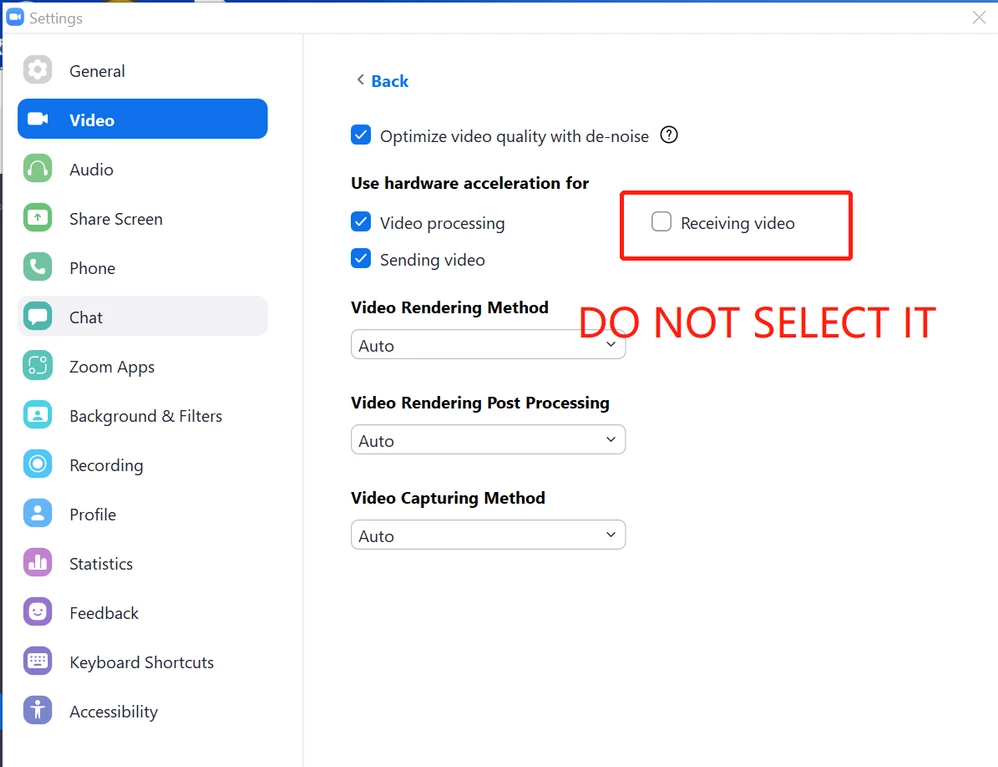
    Hi @CN Please try adjusting the video settings in Zoom Client -> Settings -> Video -> Advanced -> Uncheck Receiving Video in the section (Use hardware acceleration for), and see if this solves the issue. 


    Virginia Johnson (she/her/hers)
    Zoom Community Team
     

    6 replies

    Newcomer
    August 17, 2021

    The same issue is happening for me and a number of collegues. I have tried uninstalling and reinstalling zoom. Then uninstalling and reinstalling an older version but the problem has not been fixed. If it doesn't get fixed soon I will have to switch platforms because this renders the experience useless.

    Newcomer
    August 18, 2021

    I am also experiencing the same problem.

    Newcomer
    August 18, 2021

    I too have had the same problem since the update was made and have had to switch platforms already as I use Zoom for business meetings. I would like to come back to Zoom if the bug can be fixed. 

    DebbieNZAnswer
    Newcomer
    August 25, 2021

    Hi @CN Please try adjusting the video settings in Zoom Client -> Settings -> Video -> Advanced -> Uncheck Receiving Video in the section (Use hardware acceleration for), and see if this solves the issue. 


    Virginia Johnson (she/her/hers)
    Zoom Community Team
     
    Newcomer
    August 25, 2021

    This works for groups and individuals 🙂

    IlipmanAuthor
    Newcomer
    August 25, 2021

    Thank you @DebbieNZ. This solution appears to be working thus far....

    Newcomer
    August 26, 2021

    Hi is it anthony


    IlipmanAuthor
    Newcomer
    August 26, 2021

    Hi Peb


    No, I'm not Anthony....