
cancel
Showing results for 
Search instead for 
Did you mean: 
The Zoom Community will be placed in read-only mode January 9th, 2026 through January 22nd, 2026 to deliver you a new and improved community experience!

The community will still be accessible, however, the creation of any new discussions or replies will be temporarily unavailable. We appreciate your patience during this time.

I am trying to start a meeting and don’t know how.

Marigold
Explorer
Explorer
 
1 ACCEPTED SOLUTION

Bri
Community Moderator | Employee

Hi @Marigold ! Here are the steps to starting a meeting:
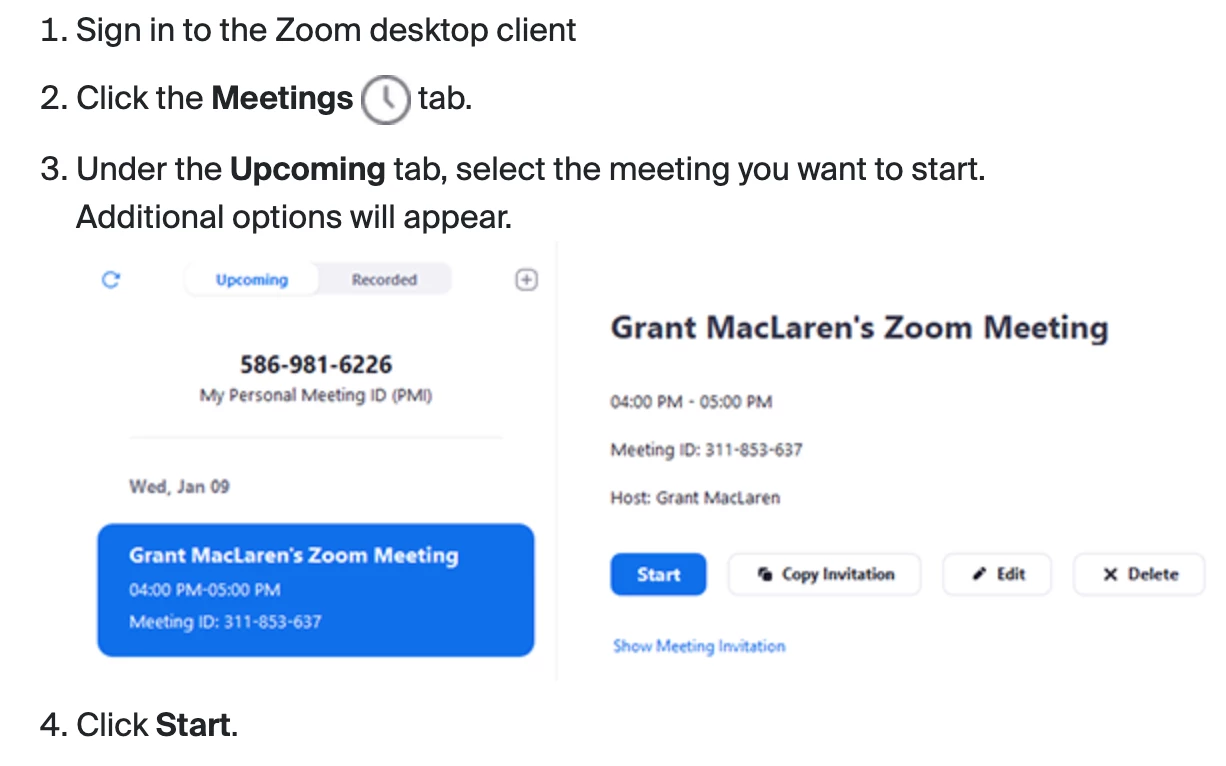
 

Screen Shot 2023-05-09 at 3.19.40 PM.png


If you're looking to schedule a meeting, the steps can be found here: https://support.zoom.us/hc/en-us/articles/201362413-Scheduling-meetings 


Hope this helps!


Bri
Zoom Community Team
Have you heard of Zoom AI Companion?

View solution in original post

4 REPLIES 4

Bri
Community Moderator | Employee

Hi @Marigold ! Here are the steps to starting a meeting:


Screen Shot 2023-05-09 at 3.19.40 PM.png


If you're looking to schedule a meeting, the steps can be found here: https://support.zoom.us/hc/en-us/articles/201362413-Scheduling-meetings 


Hope this helps!


Bri
Zoom Community Team
Have you heard of Zoom AI Companion?

Marigold
Explorer
Explorer

thanks so much!

Bri
Community Moderator | Employee

No problem! Happy I could help 😎


Bri
Zoom Community Team
Have you heard of Zoom AI Companion?

Marigold
Explorer
Explorer

Really appreciate it. 😊
