

How to hide all day meetings in my zoom client, under "upcoming meetings"? | Community
Skip to main content
Newcomer
September 7, 2021
Question

How to hide all day meetings in my zoom client, under "upcoming meetings"?

  • September 7, 2021
  • 14 replies
  • 2 views

I use outlook as my calendar app, and we have integration to zoom.

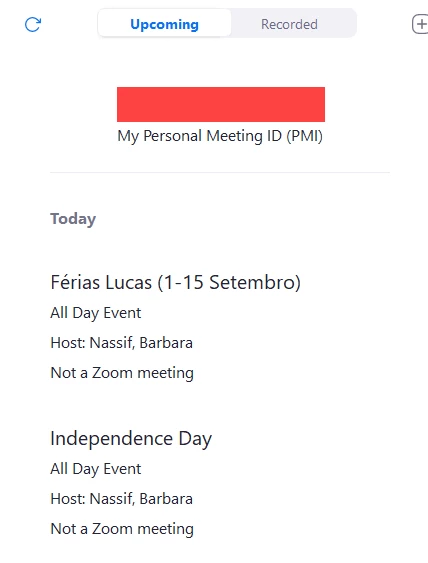
But I have tons of "all my all day meetings" that use my screen (usually vacation notice and holidays), and I need to keep scrolling on zoom to find my next meeting to join.

Is this possible to hide all day meetings in the client?

And past meetings (on the current day), can I hide them?


    14 replies

    Newcomer
    May 15, 2024

    In Outlook, you can filter your calendar view to hide all-day events and past meetings to streamline your Zoom meeting scheduling process. Here's how you can do it:

    1. Hide All-Day Events:
      • Open Outlook and go to the Calendar view.
      • Click on the "View" tab in the ribbon at the top.
      • In the "Arrangement" group, click on the "View Settings" button.
      • In the "Advanced View Settings" dialog box, click on the "Filter..." button.
      • In the "Filter" dialog box, go to the "Advanced" tab.
      • Click on the "Field" dropdown menu and select "All Day Event."
      • In the "Condition" dropdown menu, select "does not equal."
      • In the "Value" field, enter "Yes."
      • Click "Add to List" and then "OK" to apply the filter.
      • Click "OK" again to close the "Advanced View Settings" dialog box.
    Newcomer
    May 16, 2024

    These instructions won't help, they just hide all day events in your Outlook calendar making the situation worse.

    Need bug fix or an option to remove non-zoom meetings and all day meetings from Zoom client.

    Its been over 3 yrs since this issue was first reported and no response from Zoom, pathetic!

    Newcomer
    August 8, 2024

    Plus one to this - it would be really handy to have

    Newcomer
    February 11, 2025

    Lack of this feature is so broken.  I'm recommending to my corporation that we move to a different product.

    Newcomer
    February 11, 2025

    The new calendar interface makes this much better. Do you have that?

    Newcomer
    February 11, 2025

    I don't know.  Does it have an option to eliminate those meetings from Zoom entirely (not show them at all in the UI, not popup reminders, nothing)?  If I can't get rid of non-zoom meetings entirely, then it doesn't matter to me what the interface looks like.

    Newcomer
    October 3, 2025

    Install google calendar app and login to the specific account and select a meeting from the calender and try deleting it and then you can see option to delete all recurring meetings click that and delete....easy same goes for outlook