
Solved
How do I see my meeting id once the meeting is running?
Hi everyone,
If I start or join a meeting from a link, is there a way from Zoom's desktop UI to see the name of the meeting or the meeting ID?
Thanks in advance for your help!

Hi everyone,
If I start or join a meeting from a link, is there a way from Zoom's desktop UI to see the name of the meeting or the meeting ID?
Thanks in advance for your help!
Hi @KevinRintoul
The quickest way to check what meeting ID you are currently in is to check the shield icon in the top-left corner of the meeting. That provides information about the meeting you are in, the passcode (if set), the type of encryption being used, and other info.
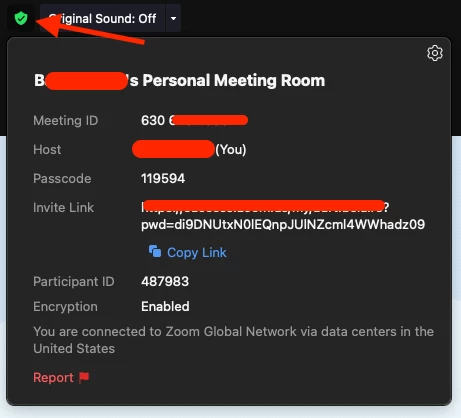
Hope that helps and please make sure to mark the solution as accepted if this information is what you needed.
Enter your E-mail address. We'll send you an e-mail with instructions to reset your password.