
cancel
Showing results for 
Search instead for 
Did you mean: 
The Zoom Community will be placed in read-only mode January 9th, 2026 through January 22nd, 2026 to deliver you a new and improved community experience!

The community will still be accessible, however, the creation of any new discussions or replies will be temporarily unavailable. We appreciate your patience during this time.

Getting Closed Captioning Live and Changing email address?

TimAverill
Newcomer
Newcomer

How do I change my Zoom email address, and also how can I get closed captioning for the hearing impaired in my meetings?

I am frustrated by the lack of human agents in Zoom.

 

1 ACCEPTED SOLUTION

YaBoiB
Community Champion | Employee

Hello,
My name is Brandon. Thanks for joining the Zoom Community! To change your email log in to zoom.us/profile and then navigate to where it says to edit your email. An email from no-reply@ zoom.com will be sent to you so that you can approve the login and then you will have to l...

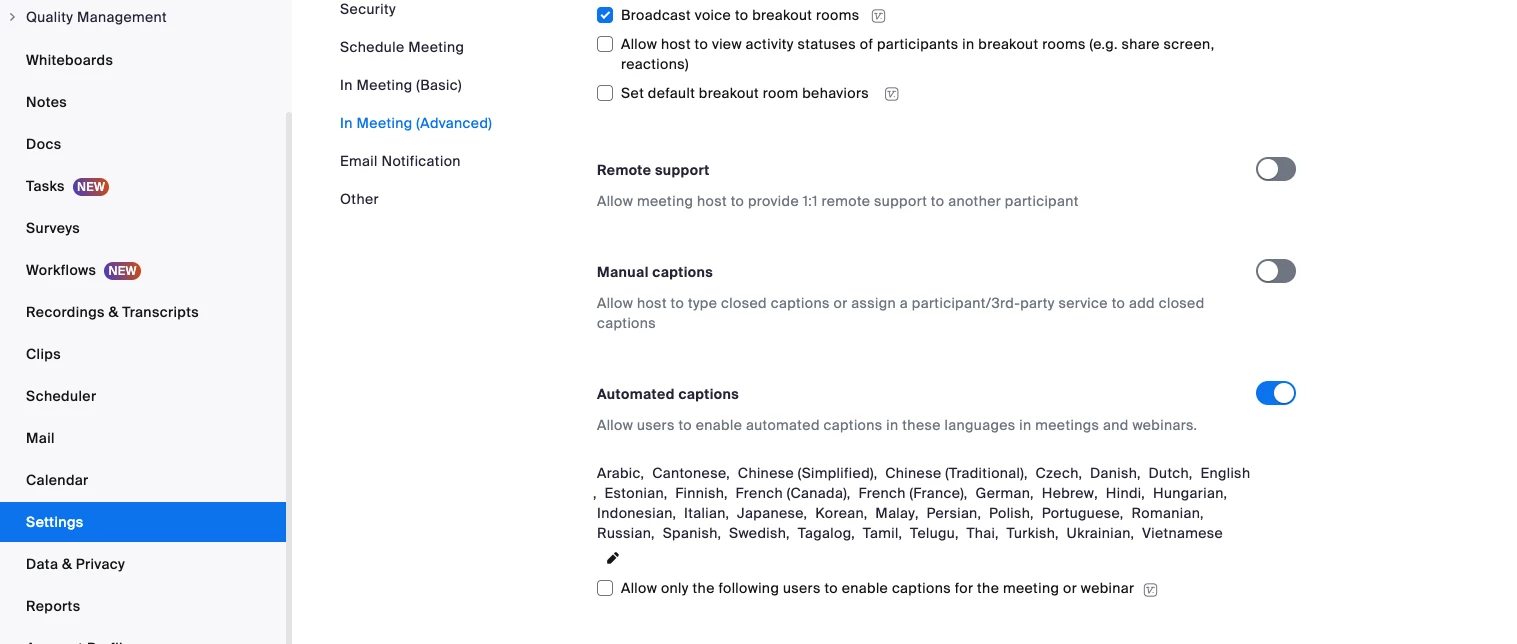
To add captions, go to your settings tab on the left hand side and then choose "In Meeting (Advanced) and then navigate down to either manual captions or automated captions and then toggle on which one you would like to utilize. 
 

Screenshot 2025-05-01 at 5.04.24 PM.png

Here is a screenshot of my test account. 


Brandon (he/him/his)
Zoom Community Champion
Have you heard of Zoom AI Companion?

View solution in original post

1 REPLY 1

YaBoiB
Community Champion | Employee

Hello,
My name is Brandon. Thanks for joining the Zoom Community! To change your email log in to zoom.us/profile and then navigate to where it says to edit your email. An email from no-reply@ zoom.com will be sent to you so that you can approve the login and then you will have to l...

To add captions, go to your settings tab on the left hand side and then choose "In Meeting (Advanced) and then navigate down to either manual captions or automated captions and then toggle on which one you would like to utilize. 


Screenshot 2025-05-01 at 5.04.24 PM.png

Here is a screenshot of my test account. 


Brandon (he/him/his)
Zoom Community Champion
Have you heard of Zoom AI Companion?