Fake network problem / disconnect | Community
Skip to main content
Newcomer
August 17, 2022
Question

Fake network problem / disconnect

  • August 17, 2022
  • 11 replies
  • 16 views

Good morning!


I'm math teacher at one of the universities in Odessa, Ukraine.

Currently I have Zoom lectures only on Wednesdays in the morning. Today I was unpleasantly surprised when I was not able to run my lecture.

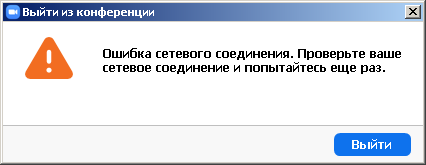
After about 1-2 minutes from the conference start (now) or much longer time period (an hour ago) the organizer (me) is kicked out with a message box like attached ("Network connection error. Check network connection and try again"). I switched from WiFi to cable, I have about 0% packet loss and enough stable ping now. I know Zoom worked fine in much worse conditions (poor internet connection, packet loss about 20% and unstable ping).

Additional sympthoms:
Chat works 100%.
Users list works, when user turns on/off video or micro the status is updated for all users.
Screen sharing worked at the beginning, but failed later: others see only "User ... shared his screen" (sorry, the translation into English may not be 100% correct) but no image. And absolutely no sound both ways.

Zoom Status shows all systems are online and no issues detected, so I should report it. Also I pressed report button few times inside Zoom client but I'm not sure how these reports are processed.

This problem persists at 2 physically different computers connected to 2 different internet connections (cable and mobile, unfortunately the same company, one of the biggest in our country) simultaneously.


The last successfull Zoom usage was last Wednesday, Aug 10th.

Could somebody please check and fix this problem? I need to be able to use Zoom actively all following week.


Best regards from Ukraine

    11 replies

    Community Manager
    August 31, 2022

    Hi @Odessa_math and everyone else on this discussion! Please be aware that Windows XP is not a support OS according to our KB article on Zoom system requirements: Windows, macOS, Linux


    You can also look more into @Bort's reply in this discussion "Zoom meeting client for windows xp" on reverting to an older version of Zoom. However, please be aware that the suggestion is a 1-year old version of Zoom, so it is missing many security enhancements, bug fixes, and new features, so install and use at your own caution. 

    Newcomer
    September 1, 2022

    Hello,
    Thank you for reply

    Maybe XP is not supported by Zoom officially but Zoom works under XP for at least 2.5 years that I use it and there were no problems until August 14th (as @bryanpet already mentioned). I think it must be supported since many universities (especially in our country) have dozens of PCs running XP. At least at the level like it was before (no official support but it works).

    The situation is more complicated then you may think there in western countries. Here the university staff is not allowed to re-install Windows on any of the computers. The reason is very stupid: in case controlling organizations will come, the university will be fined for non-licensed software. Of course, there is low probability of such control visits now, during the war, but these checks will immediately resume after the war ends.
    The other reason - many PCs have less then 1.5 GB RAM (768 Mb, 1 Gb etc) and it would be not rational to install Windows 10 there cause it will consume all available memory itself for its numerous useless services, and nothing will left for useful software. Windows 7 is also not the best soultion because tomorrow you may exclude it from the supported OS list like you did with XP for no reason before and we will experience same problems again.

    Windows XP support is very important for education in "third world" countries, especially when the education is mostly online due to quarantine the previous years or the war during current year. We do not need any new features, honestly. It is the solution we used to use in the form we use it now. If this support could not be announced officially, the only thing necessary is just to cancel (or review for compatibility) the changes that were done server-side between August 10th and 14th (Wednesday Aug 10th verything worked for me, Aug 14th was first report by @bryanpet).

    I will try @Bort's solution mentioned by you and reply if it works or not


    As for web client, I'm not sure how it works. When I get Zoom link via mail (e.g. the link to connect to the meeting) the browser asks me to start Zoom for Desktop to join this meeting. The System Requirements  link you've provided states Firefox 27+ and Chrome 30+ are supported that must be enough for XP but I should check.

    As I understood, the link to start the meeting is https://zoom.us/wc/[MEETING ID NUMBER]/start

    (unfortunately, I saw it only once, now I can't see it anywhere but bookmarks are OK)


    Thank you.