

Error code 100000404 | Community
Skip to main content
Newcomer
November 16, 2021
Solved

Error code 100000404

  • November 16, 2021
  • 2 replies
  • 2 views

I can't join zoom since a month ago, I always get this error code (I add pictures)

I have deleted and installed zoom tons of times since then, for the M1 Apple Chip. 

The last time I used it, I joined from an institutional account and when I tried to join from the personal one again, I couldn't. 


I would really appreciate your help since I'm having my final teaching exams soon and I need to use zoom for that!!!
"error code 5003" @RN52_2 @AnonEl 

Best answer by rn-zm


Hey @val3, let's try to do a clean uninstall of the Zoom application from your Mac by following the steps below:
 

  1. Open the Zoom desktop application.
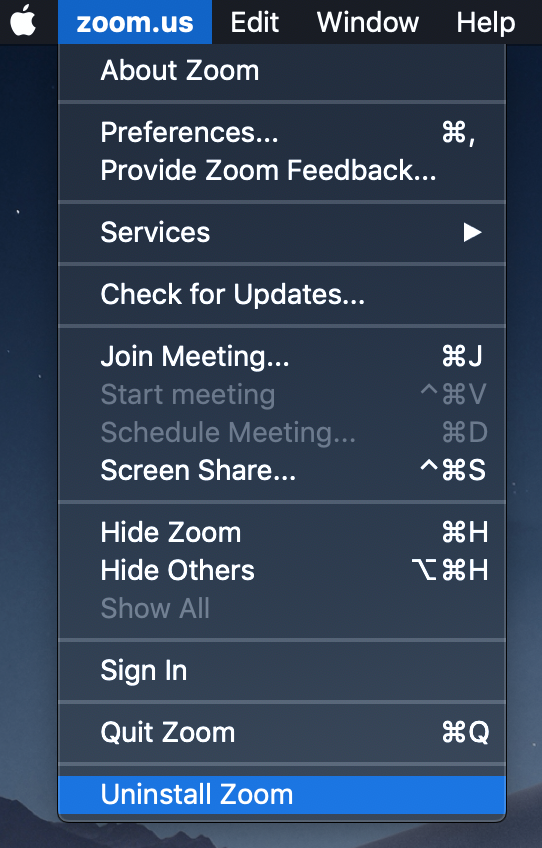
  2. Select zoom.us at the top of your screen and select Uninstall Zoom.
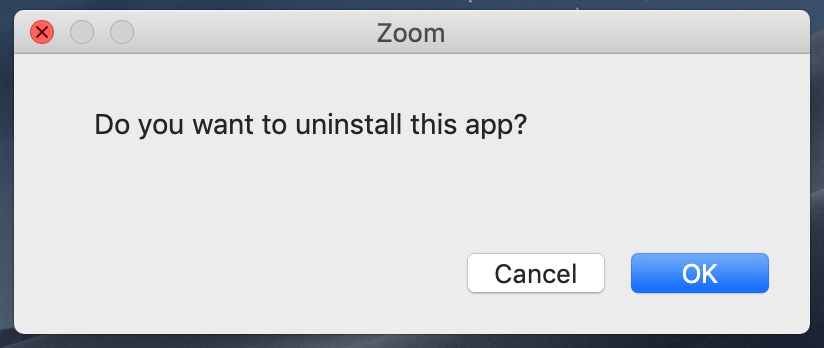
  3. Select OK to confirm uninstalling the Zoom desktop application and all of its components.
  4. Reboot your Mac.
  5. Once back up, you can reinstall Zoom on our download center >  Apple Silicon chips, click here to download.


Let me know if this helps! 

2 replies

rn-zmAnswer
Community Manager
November 16, 2021


Hey @val3, let's try to do a clean uninstall of the Zoom application from your Mac by following the steps below:
 

  1. Open the Zoom desktop application.
  2. Select zoom.us at the top of your screen and select Uninstall Zoom.
  3. Select OK to confirm uninstalling the Zoom desktop application and all of its components.
  4. Reboot your Mac.
  5. Once back up, you can reinstall Zoom on our download center >  Apple Silicon chips, click here to download.


Let me know if this helps! 

val3Author
Newcomer
November 16, 2021

thank you so much! it worked this time following that exact steps. Thanks thanks :)))


Have a nice day!

Community Manager
November 16, 2021

@val3 🎉 amazing!