cancel
Showing results for 
Search instead for 
Did you mean: 

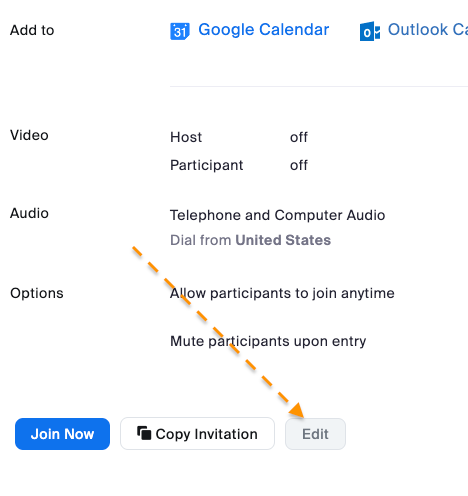
Edit Button Disabled... Personal-->Meetings-->Personal Room

georgedean
Participant
Participant

I am the owner and only user of this account.

For the life of me, I can not figure out how to change my passcode b/c the EDIT button is disabled. 


Location: Personal-->Meetings-->Personal Room

I have a paid account. 

Screen Shot 2023-05-22 at 8.07.54 AM.png

2 ACCEPTED SOLUTIONS

Ray_Harwood
Community Champion | Customer

Hey, @georgedean.


I’m not sure why your Edit button is greyed out.  This Zoom Support article might be helpful:

https://support.zoom.us/hc/en-us/articles/201362843-Using-your-personal-meeting-ID-PMI-and-personal-... 


Added July 23, 2025:

You can’t edit parameters of any meeting in progress, and if anyone is in your meeting, the Edit button will be greyed out. 


Ray -- check out the GoodClix website.

View solution in original post

georgedean
Participant
Participant

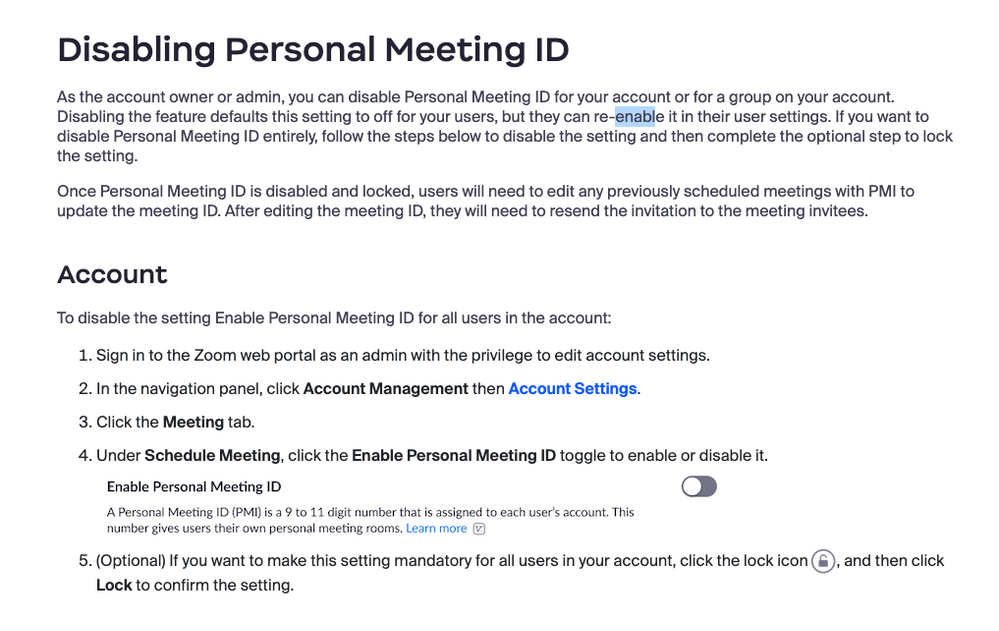
I had to turn this OFF and then back ON... then the edit button was "Active"

Screen Shot 2023-05-22 at 10.56.22 AM.png


View solution in original post

10 REPLIES 10

Bri
Community Moderator | Employee

Hi @georgedean , I'd be happy to help. Do you know if the Passcode checkbox is selected in the Security section


Bri
Zoom Community Team
Have you heard of Zoom AI Companion?

Thank you. It is. 

Screen Shot 2023-05-22 at 10.28.19 AM.png

Ray_Harwood
Community Champion | Customer

Hey, @georgedean.


I’m not sure why your Edit button is greyed out.  This Zoom Support article might be helpful:

https://support.zoom.us/hc/en-us/articles/201362843-Using-your-personal-meeting-ID-PMI-and-personal-... 


Added July 23, 2025:

You can’t edit parameters of any meeting in progress, and if anyone is in your meeting, the Edit button will be greyed out. 


Ray -- check out the GoodClix website.

georgedean
Participant
Participant

I had to turn this OFF and then back ON... then the edit button was "Active"

Screen Shot 2023-05-22 at 10.56.22 AM.png


Bri
Community Moderator | Employee

Glad you were able to get it figured out! Thanks for sharing 💙


Bri
Zoom Community Team
Have you heard of Zoom AI Companion?

devanggandhi
Newcomer
Newcomer

I'm seeing the same problem and the above solution is not working for me.

Stardust
Newcomer
Newcomer

I share your frustration. I need to edit my information on Zoom and it is not allowed me to do so it’s been over a year now. I’m not sure why I’m not allowed to change my own personal information, but I’ve tried everything.

dnintzel
Newcomer
Newcomer

The PMI disable/enable solution didn't work for me either.

Ray_Harwood
Community Champion | Customer

Welcome to the Zoom Community, @dnintzel.


ts anyone in your PMI meeting? You can’t edit parameters of any meeting in progress, and if anyone is in your meeting, the Edit button will be greyed out. 


Ray -- check out the GoodClix website.

dnintzel
Newcomer
Newcomer

Thanks @Ray_Harwood. That must have been it. I was in the meeting when I tried, but thought it would just not let me edit the current date, but would let me update subsequent dates. I just tried and it is working now. Thanks!