

Dual window freezing | Community
Skip to main content
Newcomer
June 29, 2023
Solved

Dual window freezing

  • June 29, 2023
  • 8 replies
  • 1 view

I am having a problem when I am using Dual monitors. 

I am using a laptop and an external monitor. Just recently when the second window is open on the laptop screen the video is frozen. When I move my second window that is displaying on the external monitor to the screen the laptop is using the video freezes and it stays that way even if I move the window back to the external monitor. I can still use the chat and see participants on both monitors  but the video stays frozen

I have tried re-installing the Zoom desktop app, changing all the video settings one by one (turning all off and on again), and updated all my drivers.

Is anyone else having this problem? This just started after updating to the newest version of Zoom.
Best answer by Deryaus

Okay So I was able to fix this on my computer. I am using Windows 10


I had to switch the zoom app from using my dedicated graphics to the integrated graphics used in the cpu.


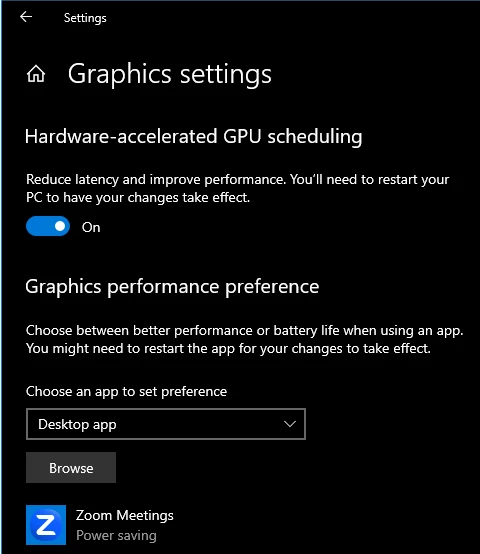
Go to Settings->Display->Graphics settings. 


If the zoom app does not come up click browse you will need to know the install location of zoom. If you are unsure, you can click the desktop icon - select properties and in the box that says "target" it will have your install location. Find the file that says zoom.exe and select it.

Once the zoom comes up on this screen select it and click options.
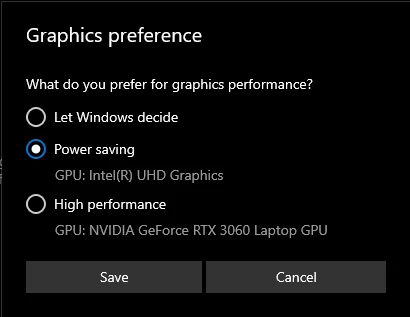
Here you can change the settings to select which GPU it runs from. 


As seen in the image above I have selected power saving mode which selects my integrated graphics instead of the dedicated GPU.

If you only have an integrated graphics card, Try just selecting power saving mode. 

This seemed to fix the issue for me. let me know if this helps


8 replies

Newcomer
June 30, 2023

I got this exact same problem and still couldn't fix it. This is really annoying.

Newcomer
July 9, 2023

I have the same problem

Newcomer
July 9, 2023

Same thing happened in to me for the first time last night 7/8/23 while using a projector as the second monitor, but did not happen today (7/9/23) while using a television as the second monitor. Upon opening zoom the zoom content was in my laptop screen. When I moved the zoom content to the extended second screen, my zoom video froze. Though my video and the zoom meeting generally was just fine for everyone  else in the meeting.

Each has been used without issue before, each was connected via HDMI with the same cable. So in my case, possibly something to do with the projector except that there is nothing I'm aware of that was different with the setup last night compared to previous times when I could place zoom content just fine.

Newcomer
July 12, 2023

Same problem

DeryausAuthorAnswer
Newcomer
July 13, 2023

Okay So I was able to fix this on my computer. I am using Windows 10


I had to switch the zoom app from using my dedicated graphics to the integrated graphics used in the cpu.


Go to Settings->Display->Graphics settings. 


If the zoom app does not come up click browse you will need to know the install location of zoom. If you are unsure, you can click the desktop icon - select properties and in the box that says "target" it will have your install location. Find the file that says zoom.exe and select it.

Once the zoom comes up on this screen select it and click options.
Here you can change the settings to select which GPU it runs from. 


As seen in the image above I have selected power saving mode which selects my integrated graphics instead of the dedicated GPU.

If you only have an integrated graphics card, Try just selecting power saving mode. 

This seemed to fix the issue for me. let me know if this helps


Newcomer
August 11, 2023

does not work

Newcomer
August 8, 2023

Bumping.  It has significantly disrupted my ability to run meetings.

How has this not been fixed yet!?

Newcomer
August 10, 2023

Same boat.  I've implemented so many approaches, and none are working.  This has been incredibly disruptive.

Newcomer
August 15, 2023

I AGREE THIS IS A CONTINOUS PROBLEM, THESE PEOPLE ARE DOING ANYTHING TO RESOLVE IT. THEY EVEN SENT ME A SOLUTION FROM A USER AND NOT THEIR TECH TEAM.  

Newcomer
August 8, 2023

When I followed the steps laid out by Deryaus (above) it solved my problem.


Newcomer
August 10, 2023

Stuggled with same problem with seemingly no solution. Stumbled upon Settings/Statistics/Video which showed abnormally high "Packet Loss" (generally anything above roughly 2).  Simple reboot of the router returned everything to normal. 


Newcomer
August 12, 2023

Interestingly, while no solutions have fixed the issue when I am expanding my desktop, I discovered that if I mirror my desktop, the issues doesn't exist.

So perhaps there is something there.

As someone noted, this kind of thing should not persist this long for paid accounts.  While "mirroring" is a work around for one of my scenarios, there are times I need to expand my desktop.