

Does not recognize me as owner of account - when I join a meeting, it thinks I am a participant | Community
Skip to main content
Newcomer
January 4, 2022
Solved

Does not recognize me as owner of account - when I join a meeting, it thinks I am a participant

  • January 4, 2022
  • 7 replies
  • 0 views

My ZOOM account used to work properly. Now, and I don't know why, it is not working the way it did before. Whenever I set up a meeting ahead of time, then later join the meeting, then ZOOM thinks that I am a PARTICIPANT. It does not recognize me as the owner of the account, so I cannot make someone a co-host and I cannot allow someone to record the meeting. How can I fix this?
    Best answer by Joaz2080

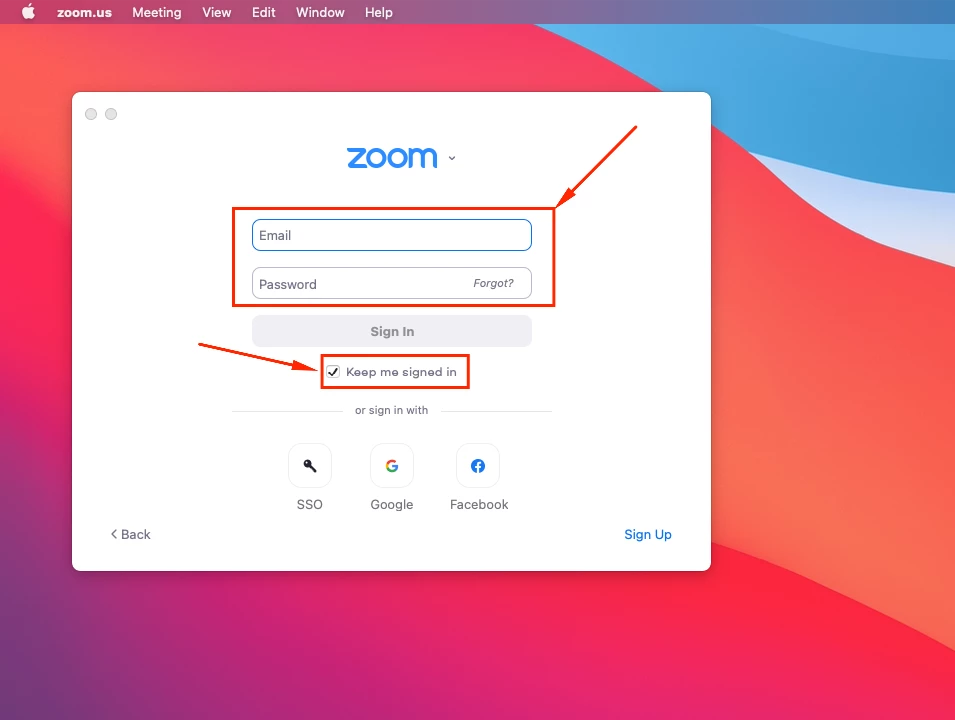
    Hello @ExecDirMCIE - Sorry to hear about this. It's mostly likely you are not signed into the Zoom App/Client. Can you make sure you are signed into Zoom before the meeting(s) as shown below?


    7 replies

    Joaz2080Answer
    Employee
    January 4, 2022

    Hello @ExecDirMCIE - Sorry to hear about this. It's mostly likely you are not signed into the Zoom App/Client. Can you make sure you are signed into Zoom before the meeting(s) as shown below?


    Newcomer
    March 16, 2022

    So, regardless of which computer you are using, signing into the Zoom App/Client will identify you as the Zoom host?

    Dan_ZoomSE
    Employee
    Employee
    January 4, 2022

    Hello @ExecDirMCIE,


    Make sure that you are signed into your Zoom Client with the same account that you used to schedule the meeting in the web portal, or using the Outlook/Google add-ons.  If you do not join the meeting while signed in as the same user, then Zoom does not know that you are in fact the users that scheduled and should be the host.


    If this answers your question, please click the Accept as Solution button below so that the rest of the Community may benefit as well.


    Thanks!


    Newcomer
    January 19, 2023

    I am experiencing the same problem - Zoom always worked fine, but now when I start a scheduled meeting, it does not recognize me as host. I am signed in to the Zoom client, using my gmail account. It has always worked successfully, but now instead of opening my meeting with me as host, I get the Join a Meeting window, asking for a pass code, and it has a different name for me as a participant. I attended an online meeting on Microsoft Teams ( !! ) - could this have created another default profile for me somewhere on my Windows machine? BTW, Zoom works great on my MacAir laptop, so I'm thinking something changed on my Windows desktop. Any suggestions are welcome. Thanks!

    Newcomer
    January 19, 2023

    I get it now... there was confusion in the digital realm because I go to Zoom via my browser, but my PC also has the Zoom app installed. (Which might be a new Zoom requirement? I have a history of its download in Jan of this year.) Anyhoo... I think Zoom defaulted to the local desktop app and used my PC's default user info which does not match my Zoom user name.  So it did not recognize me as the Zoom host that I am, and thought I was somebody else with the pass code ( !! ) to join the meeting. After I signed in to the desktop app with my Zoom credentials, and then went back to Zoom via my browser, it worked fine, just like it used to.  Let's hope it sticks!

    Employee
    January 19, 2023

    Hello @AliBeth - Sorry to hear about this and seem there is a conflict with the account but glad to hear you were able to sign in. Do let us know if you have any further concern(s).

    Newcomer
    August 8, 2023

    I am having the same problem and it is INFURIATING! Help!!!!! I tried email tech support and it was a painful process - didn't solve it.

    Newcomer
    August 21, 2023
    Hi fresco3,
    Sorry to hear of your frustration. I understand, read back, here's what worked for me:
    I had been using my browser to go to the Zoom website, and signing in to Zoom with my Google account. It recognized me by my Google name.
    When I loaded the Zoom App on my Windows desktop, it controlled my connection to Zoom, and Zoom defaulted to my User Profile in Windows. I forget the particulars, but go to Settings in the Zoom App, and change the user id setting from your Windows default to your Zoom account credentials.
    Good luck!
    Newcomer
    July 8, 2025

    Seems like everyone's is just saying "make sure you're signed into the right gmail account when you access Zoom"....what is the solution when YOU ARE signed into the right account, the host account, and Zoom still is not recognizing you as the host?