

cancel
Showing results for 
Search instead for 
Did you mean: 
The Zoom Community will be placed in read-only mode January 9th, 2026 through January 22nd, 2026 to deliver you a new and improved community experience!

The community will still be accessible, however, the creation of any new discussions or replies will be temporarily unavailable. We appreciate your patience during this time.

Disabling Captions

tutor10
Participant
Participant

I teach reading and spelling to children over Zoom and I want the captions disabled.  If a student puts captions on, they might see the spelling of what I'm saying plus it distracts them.  I know I can disable them after starting a meeting, but I have a different student every hour and I want to disable them BEFORE meetings start.  Is there a way for me to do that?
2 ACCEPTED SOLUTIONS

Ray_Harwood
Community Champion | Customer

Hi, @tutor10.


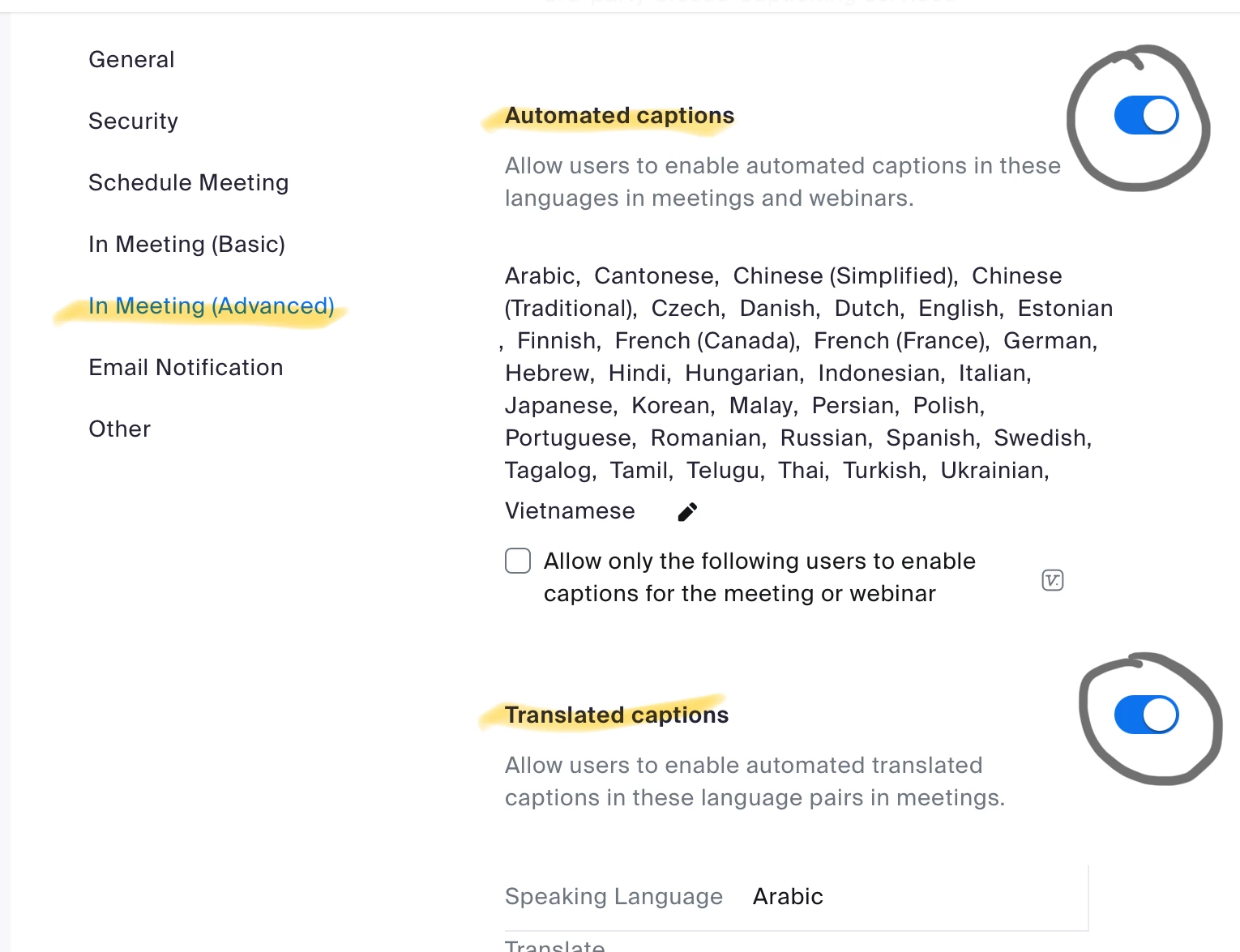
Start at the Web Portal here: https://zoom.us/profile/setting


Ray_Harwood_0-1718068809458.png

You might not have Translated Captions, but you can disable the Automated Captions. 


Ray -- check out the GoodClix website.

View solution in original post

Thanks you so much!!!!! Perfect!

View solution in original post

4 REPLIES 4

storyhub
Community Champion | Customer

Yes, Sign in to the web portal. Go to settings > In Meeting (Advanced) > automated captions and turn it off.

Thanks you for your reply.  I don't have a place on settings that says "meetings" .  I'm attaching a screenshot that shows what settings are there. 

Ray_Harwood
Community Champion | Customer

Hi, @tutor10.


Start at the Web Portal here: https://zoom.us/profile/setting


Ray_Harwood_0-1718068809458.png

You might not have Translated Captions, but you can disable the Automated Captions. 


Ray -- check out the GoodClix website.

Thanks you so much!!!!! Perfect!