
Creating breakout rooms through polling | Community
Skip to main content
Newcomer
April 11, 2023
Question

Creating breakout rooms through polling

  • April 11, 2023
  • 2 replies
  • 6 views

Hello there,


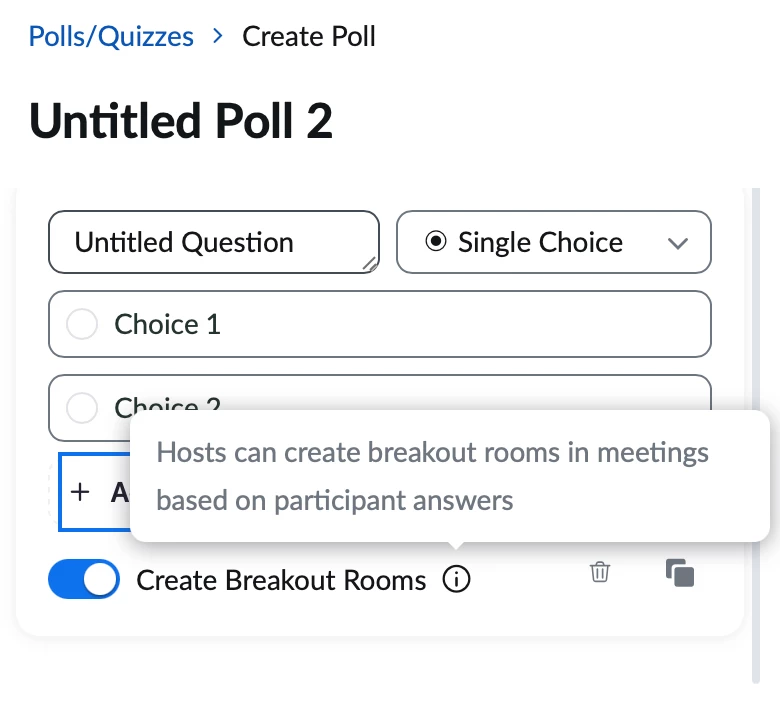
I just noticed this option (Create Breakout Rooms) when creating a poll. 


Can someone explain how this works? I was not able to find any resources.


Thanks in advance, 


Miriam


2 replies

ZoomTestKitchen
Specialist
Specialist
April 12, 2023

Here's a link to the official documentation.


https://support.zoom.us/hc/en-us/articles/12211651297933-Creating-breakout-rooms-from-poll-results#:~:text=Set%20up%20polls%20with%20the%20option%20to%20create%20breakout%20rooms,-Sign%20in%20to&text=From%20the%20same%20window%20where,answer%20for%20a%20particular%20question.&text=Click%20Save.


Basically, the answers that you provide in your poll will become the names of the breakout rooms, and everybody will be sent to the breakout room that they answered in the poll.


If you find this information helpful, please click on "Accept as Solution".

If you have further questions, please reply, we're happy to help.

Newcomer
January 16, 2024

I can't find any description of what happens when there are more respondents to a poll answer than the limit of participants per room. Does it automatically generate enough rooms to keep people together who had the same answer, while keeping those rooms below the max participants per room? Or does it just not put the 'overflow' participants in any room at all?

Newcomer
July 13, 2023

I have the admin account and my poll doesn't have this feature. My employee does have this option. I don't understand why I don't have this same option?
