

Can you turn on/off the the chat function during a meeting? | Community
Skip to main content
Newcomer
August 12, 2021
Solved

Can you turn on/off the the chat function during a meeting?

  • August 12, 2021
  • 5 replies
  • 0 views

Hello, I find the chat function quite annoying while presenting, especially when participants write irrelevant messages that pop up and distract the speaker and others.

Question: can the host turn on and off the chat function during a meeting to ensure it is on when needed and off when someone is speaking?

thanks

Andrea(s)
    Best answer by Bort

    Hi @analetto , 

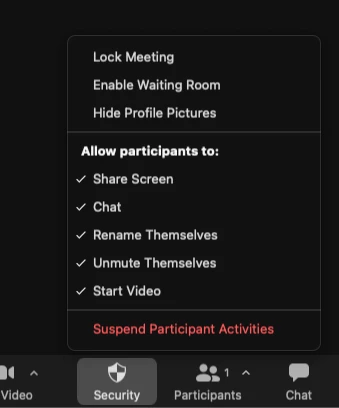
    Yes, it is possible to temporarily limit the use of chat during a meeting. This is done via the Security button in the meeting controls: 

    You can find out more about the Security settings on the Support site


    Hope that helps and please make sure to mark the solution as accepted if this information is what you needed.

    5 replies

    Bri
    Community Manager
    Community Manager
    August 12, 2021

    Hi @analetto, I believe this article has just the solution you're looking for https://support.zoom.us/hc/en-us/articles/115004809306-Enabling-and-disabling-in-meeting-or-in-webinar-chat. Let me know if this helps! 

    Bort
    Employee
    BortAnswer
    Employee
    August 12, 2021

    Hi @analetto , 

    Yes, it is possible to temporarily limit the use of chat during a meeting. This is done via the Security button in the meeting controls: 

    You can find out more about the Security settings on the Support site


    Hope that helps and please make sure to mark the solution as accepted if this information is what you needed.

    Newcomer
    August 18, 2021

    thx


    Newcomer
    August 24, 2021

    I don't like that too

    analettoAuthor
    Newcomer
    June 8, 2022

    Hi there,

    I recently figured that the option "Show Chat Previews" is also especially useful as it flags incoming messages without having the whole message popping up and distracting. 

    Cheers


    Newcomer
    September 29, 2022

    This is EXACTLY what I was looking for.  Thanks so much!

    Newcomer
    April 12, 2023

    Thank you analetto!!