
Zoomtopia is here. Unlock the transformative power of generative AI, helping you connect, collaborate, and Work Happy with AI Companion.
Register nowEmpowering you to increase productivity, improve team effectiveness, and enhance skills.
Learn moreKeep your Zoom app up to date to access the latest features.
Download Center Download the Zoom appDownload hi-res images and animations to elevate your next Zoom meeting.
Browse Backgrounds Zoom Virtual BackgroundsEmpowering you to increase productivity, improve team effectiveness, and enhance skills.
Zoom AI CompanionUser groups are unique spaces where community members can collaborate, network, and exchange knowledge on similar interests and expertise.
Help & Resources is your place to discover helpful Zoom support resources, browse Zoom Community how-to documentation, and stay updated on community announcements.
The Events page is your destination for upcoming webinars, platform training sessions, targeted user events, and more. Stay updated on opportunities to enhance your skills and connect with fellow Zoom users.
2025-04-16 05:14 PM
I have none checked for background and it's still blue. I've deleted the app from all of my devices and it is still showing up.
Any help is appreciated

Solved! Go to Solution.
2025-04-20 05:23 PM
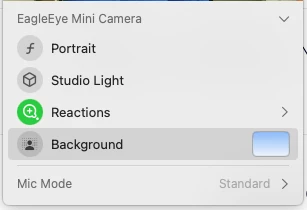
I "think" that this might be your Facetime Camera mac background. Mac Sequoia has this new thing. It is really kind of cool where you can change the background of your camera. Can you check it and see if that is what is changing your background. It is a green icon at the top of your display, and when you click on it you will see what I see on the screenshot below. Let me know if this is the issue.
2025-04-20 05:23 PM
I "think" that this might be your Facetime Camera mac background. Mac Sequoia has this new thing. It is really kind of cool where you can change the background of your camera. Can you check it and see if that is what is changing your background. It is a green icon at the top of your display, and when you click on it you will see what I see on the screenshot below. Let me know if this is the issue.
2025-06-26 01:29 PM
I can confirm that Sequoia Facetime CameraBackground is the issue. Importantly, you need to start a Zoom call (doesn't matter if you have someone on) and turn on your camera. Once the camera is on and the session has started, look for the FaceTime Camera icon above your menu and right click. If zoom is using your Facetime camera the bottom option will be Background.
Remove the background and done! Remember the background button for Zoom is NOT the one you want.
2025-07-31 09:50 AM
Thank you SO much! This was making me crazy trying to figure it out!
2025-10-02 02:03 PM
I had the same problem! The only thing I would add is the way you "remove the background" once you are in FaceTime Control at the top of your screen menu is to deselect it so it goes from green (on) to grey (off). Well done!