

Can participants have Zoom meeting without me (host?) | Community
Skip to main content
Newcomer
November 30, 2021
Solved

Can participants have Zoom meeting without me (host?)

  • November 30, 2021
  • 3 replies
  • 7 views

Hi there,


I am trying to create a Zoom meeting for two other people that I don't plan to attend. Is this possible, even though I'm technically the host? Will they be able to join and conduct their whole meeting without me ever joining/participating? Are there any specific settings I need to enable in order for them to do this?
    Best answer by Bort

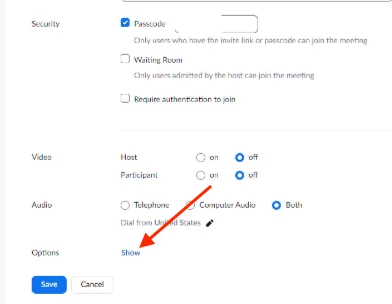
    Hi that is exactly how I used to do it. And the option is no longer there. See screen grab. 


    @brianb 

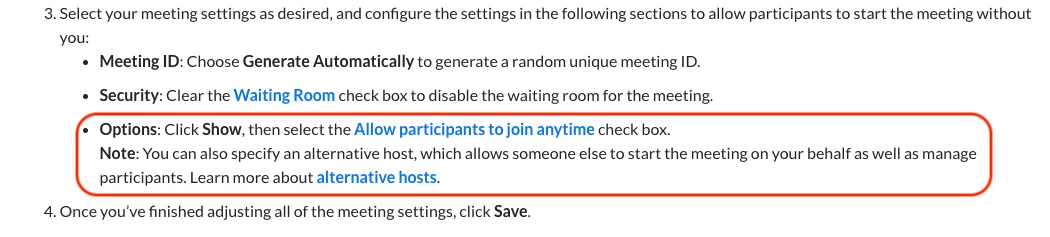
    Make sure you are following the correct instructions for the method you are scheduling with. Since you are scheduling in the web portal, you would find the Join before host setting under the Options section: 

    3 replies

    Bort
    Employee
    Employee
    November 30, 2021

    Yes, it is possible for a meeting to be held without the host present, but you do need to configure the meeting correctly. 

    • Disable waiting room
    • Enable Allow participants to join anytime
    Newcomer
    September 9, 2022

    Can you please confirm if this is still a feature? It seems to no longer be available. 

    Bort
    Employee
    Employee
    September 9, 2022

    Hi @brianb 

    Yes, this is still possible. We've even created a dedicated article for how to set this up: https://support.zoom.us/hc/en-us/articles/8780304262157-Starting-a-meeting-without-the-host-present

    Newcomer
    March 26, 2022

    guys i have done so, but it seems i'm still required to sign in for the participants to join. Did i do something wrong some where/

    Newcomer
    August 5, 2022

    ATTENTION ALL - THE FIX


    Hey guys,

    I was having the same issue. But figured it out.


    1. You need to go into settings, which is positioned at the right hand corner, its a little cog.

    2. Find the profile tab (about 4 from the bottom).  

    3. Click on "View Advanced Features".  This will open up your web browser the Advanced Features.

    4.  Find and click  "Allow participants to join before host"

    5. It will then have a drop down box.   You can choose the time participants are allowed to join before the host.  anytime, 5, 10,  or15 minutes.


    MISSION COMPLETE!


    If you found this helpful, please like so we can help as many others going through the same challenge. 🙂

    Newcomer
    April 5, 2022

    Go to Zoom Meeting settings and enable to allow participants to join before host option.

    Newcomer
    June 1, 2022

    Hi @Shalin, how do I get to this setting? Can't find it on the Windows app or on browser.
    Thanks in advance!