

Breakout Rooms Participant Choice Missing | Community
Skip to main content
Newcomer
May 17, 2022
Question

Breakout Rooms Participant Choice Missing

  • May 17, 2022
  • 2 replies
  • 1 view

I used Zoom extensively last year and never had this problem.  This is what is happening today.


  • I turned on Breakout rooms in my settings
  • When I scheduled a meeting, I enabled breakout rooms.
  • I joined the meeting early and created 5 rooms allowing participants to choose
  • When the participants joined, I opened all the breakout rooms

The participants could not see the invitation to the breakout rooms.

They did not have the "more" dots to get to breakout rooms.  

This truly puzzled me:

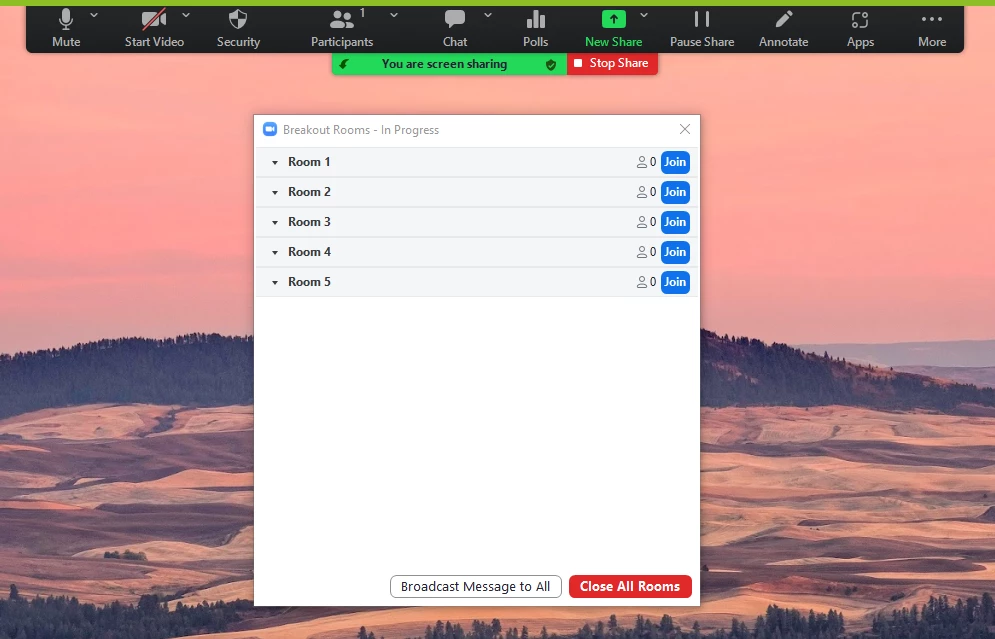
They can't see the list of rooms even when I shared my screen. 

I have attached a screen shot below.  They could see the picture that is behind the list of rooms.


Fortunately, this was a test but we need a meeting with ~100 participants with breakout rooms


Any help appreciated!!
 

    2 replies

    Employee
    May 17, 2022

    Hi ProfMel,


    Thanks so much for your post! There are a few things to address in your question:


    1. First, we would need to see the list of settings you had toggled prior to opening the breakout rooms to confirm you had the option enabled to allow participants to choose their own room. Could you please provide that?
    2. Second, if you do not assign any participants to any rooms, and instead allow them to choose their own, there will not be a popup notification for them. Instead, they should see a 'Breakout Rooms' button appear on their Zoom toolbar where they can select their room.
    3. Third, by default, Zoom will not share your Zoom windows whatsoever when sharing your screen / desktop. This would be why they could not see your list on your screen, but could see the picture behind it. To enable that, you will need to toggle on 'Show Zoom windows during screen share' in your Zoom web portal, and then check the box called 'Show my Zoom Windows to other participants when I am screen sharing' in your Zoom application's settings > Share Screen settings. Please see this article for more details: https://support.zoom.us/hc/en-us/articles/360061383571-Showing-Zoom-windows-during-screen-share.

    I hope this helps, please let me know if you have any more questions!


    Thanks,


    Timothy

    Newcomer
    March 13, 2023

    I have the same issue - 5 breakout rooms created in my personal meeting room for ad-hoc collaboration. Participants can't see these breakout rooms when they join unless promoted to co-hosts.