Automatic Recording | Community
Skip to main content
Newcomer
April 11, 2022
Solved

Automatic Recording

  • April 11, 2022
  • 2 replies
  • 0 views

Hi,


I sometimes forget to click on the "Record" button at the beginning of the meetings, and so I miss the video records, although the auto-recording is on in the settings. How is it possible to have all the meetings recorded without having to click on the "Record" button?


Thank you.

    Best answer by Ray_Harwood

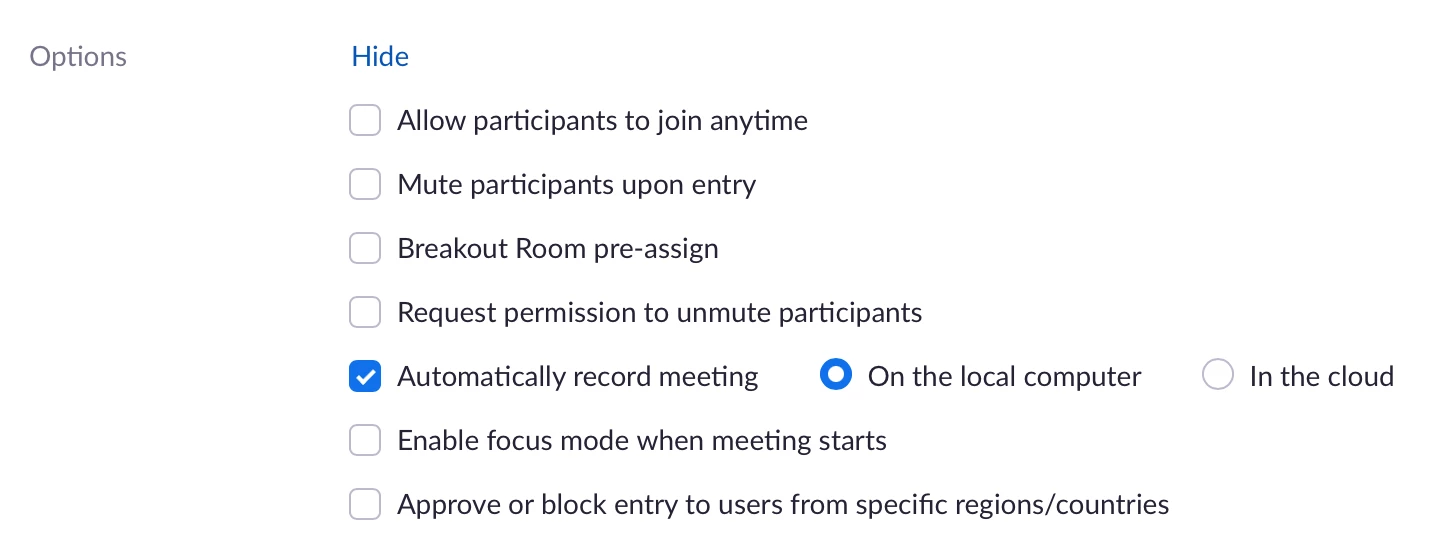
    @vahidch– when setting up the meeting in the web interface, there is an option to automatically record. Click the Show link next to the Options setting,


    then check Automatically record meeting and select either to record locally or in the cloud:


    2 replies

    Ray_Harwood
    Community Super Champion | Customer
    Community Super Champion | Customer
    April 11, 2022

    @vahidch– when setting up the meeting in the web interface, there is an option to automatically record. Click the Show link next to the Options setting,


    then check Automatically record meeting and select either to record locally or in the cloud:


    Newcomer
    September 20, 2022

    Is it possible to only auto record calls from within the company and not external calls?

    vahidchAuthor
    Newcomer
    April 11, 2022

    Thank you. It was such a great help.