Automatic Recording | Community
Skip to main content
Newcomer
April 11, 2022
Solved

Automatic Recording

  • April 11, 2022
  • 2 replies
  • 4 views

Hi,


I sometimes forget to click on the "Record" button at the beginning of the meetings, and so I miss the video records, although the auto-recording is on in the settings. How is it possible to have all the meetings recorded without having to click on the "Record" button?


Thank you.

    Best answer by Ray_Harwood

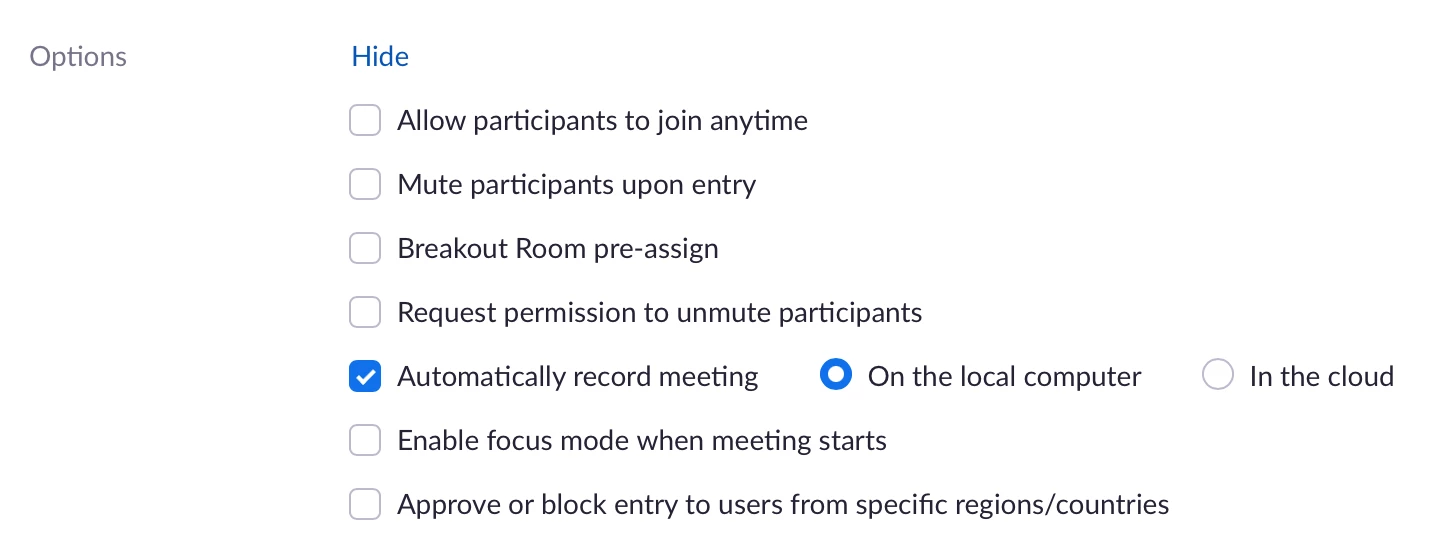
    @vahidch– when setting up the meeting in the web interface, there is an option to automatically record. Click the Show link next to the Options setting,


    then check Automatically record meeting and select either to record locally or in the cloud:


    2 replies

    Ray_Harwood
    Community Super Champion | Customer
    Community Super Champion | Customer
    April 11, 2022

    @vahidch– when setting up the meeting in the web interface, there is an option to automatically record. Click the Show link next to the Options setting,


    then check Automatically record meeting and select either to record locally or in the cloud:


    Newcomer
    October 12, 2022

    I have automatic recording enabled but I still have to start it manually. This is a fairly recent occurrence and I assume it's tied to one of the software updates. Any idea what's going on?

    Ray_Harwood
    Community Super Champion | Customer
    Community Super Champion | Customer
    March 20, 2023

    Hello! 

    I still have a problem with the automatic recording of my account. I am the admin and I have two other users. Sometimes I give them the license to start their meetings, but once they start, it does not record automatically. What should I do?

    When it comes to my personal meeting, it starts recording automatically, but when they have the license, it doesn't. 


    Welcome to the Zoom Community, @EnglishUmbrella.


    So you’re saying you create new Meetings on your account, properly set the Meeting Settings so it should record, then here’s where you loose me: how do give them the license?  If you’re resigning the license to their account (essentially swapping Pro and Basic designations), then the other user schedules their own Meetings?

    vahidchAuthor
    Newcomer
    April 11, 2022

    Thank you. It was such a great help.