

Allow participants to join before host | Community
Skip to main content
Newcomer
May 13, 2024
Solved

Allow participants to join before host

  • May 13, 2024
  • 2 replies
  • 0 views

On My settings, participants are allowed to join before the host, and also on our account management but all participants were not allowed unless I'm in. What am I missing here?

Also, this has worked for me before and I haven't made any adjustments so I'm confused about what happened.


Thanks
Best answer by Ray_Harwood

Welcome to the Zoom Community, @userjhona1.


Refer to this Zoom Support article for details:

https://support.zoom.com/hc/en/article?id=zm_kb&sysparm_article=KB0060501


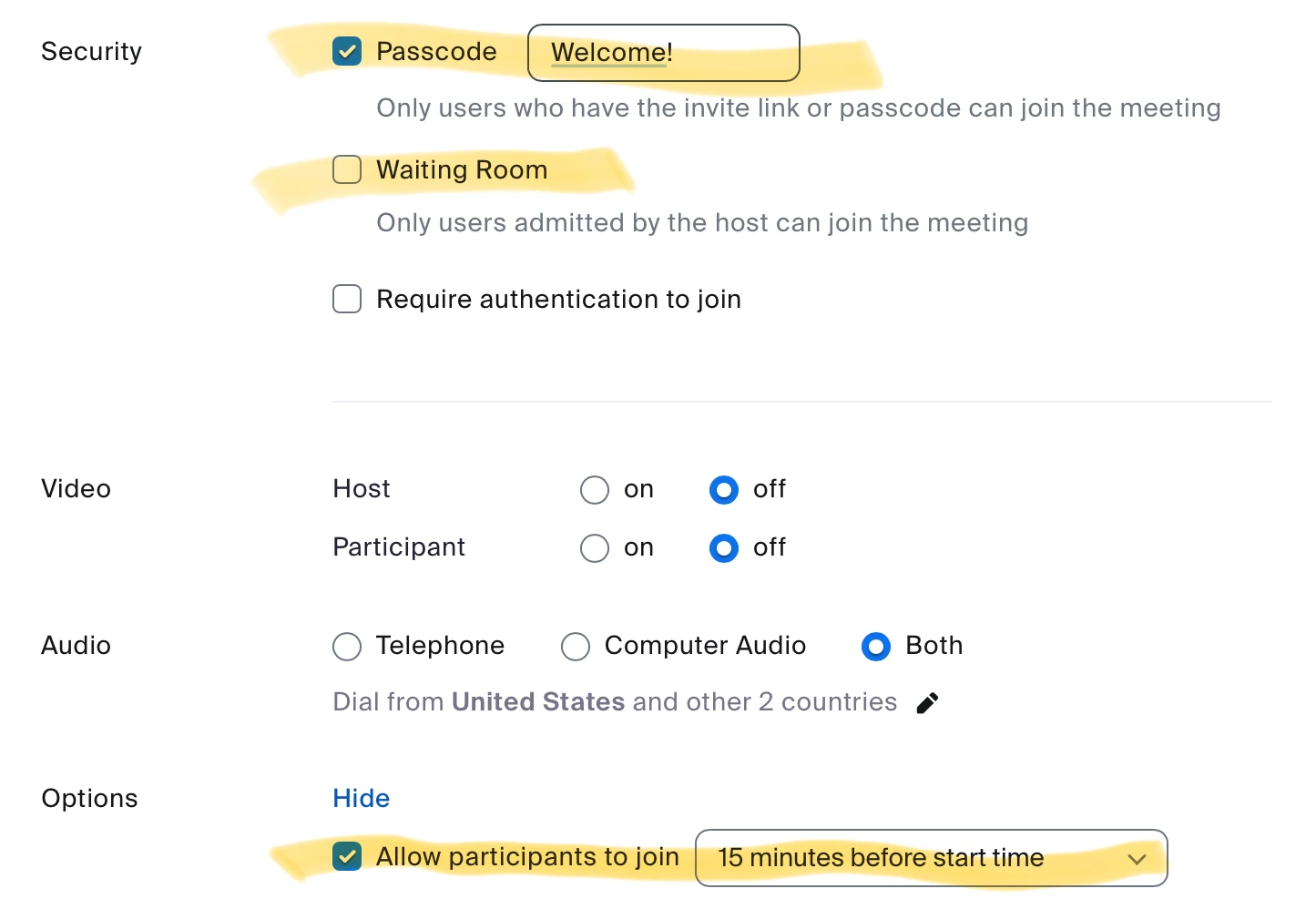
There are a few things that must be done:

  1. The Passcode must be enabled and assigned to the meeting.
  2. Waiting Room must be disabled for the meeting in the meeting setup.
  3. Join Before Host must be enabled.

 Here’s a sample meeting setup – see the highlighted areas:


2 replies

Ray_Harwood
Community Super Champion | Customer
May 14, 2024

Welcome to the Zoom Community, @userjhona1.


Refer to this Zoom Support article for details:

https://support.zoom.com/hc/en/article?id=zm_kb&sysparm_article=KB0060501


There are a few things that must be done:

  1. The Passcode must be enabled and assigned to the meeting.
  2. Waiting Room must be disabled for the meeting in the meeting setup.
  3. Join Before Host must be enabled.

 Here’s a sample meeting setup – see the highlighted areas:


MGSR
Community Manager
Community Manager
October 25, 2024

Hi @userjhona1!

Given the time elapsed since we last heard from you, I've taken the liberty of marking the provided answer as the solution.

If you need further assistance, please let us know.

Have a fantastic day!

Newcomer
September 30, 2024

I have these settings applied

exactly as recommended did not resolve the issue.  

Ray_Harwood
Community Super Champion | Customer
October 1, 2024

Screen shot of your settings, please.