

All participants sharing screen together on a call | Community
Skip to main content
Newcomer
October 22, 2021
Solved

All participants sharing screen together on a call

  • October 22, 2021
  • 1 reply
  • 0 views

We are unable to get all participants on the call to share their screen together on the same call. It only allows one person at a time to share their screen. The option is turned on to have all participants to share their screen and to share screen while someone else is sharing screen but it still doesn't allow more than one person to share screen at the same time in our meetings.

Any thoughts on how to resolve this?
 

    Best answer by Bort

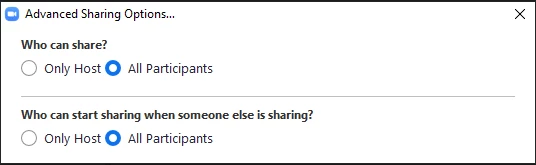
    Here is a screen shop of the only options we have which is not the same as the Youtube video:


    I did a few test and the only way I could replicate your issue is by having Remote Support enabled in my Settings page. As the Prerequisites state, this must be off for the host. 

    1 reply

    Bort
    Employee
    Employee
    October 22, 2021

    It is possible to have multiple participants sharing at once, but its not on by default and won't work for participants joined on the mobile app. This article has info about how to enable and use this feature: https://support.zoom.us/hc/en-us/articles/115000424286

    SB-GlobalAuthor
    Newcomer
    October 22, 2021

    Thanks for the reply. I saw that link but it didnt help me.
    I noticed on this video an option I do not have on my ZOOM and I dont know why. think, this is the cause of my issue:


    Search Youtube and they show us how to do it, but it seems that an option they have we do not have and I dont know why. We have a paid subscription for ZOOM.
    Here is the link: https://www.youtube.com/watch?v=lgM6b0pBijY&t=189s
    - In the video above, at 0.50 seconds they showed some options. We do NOT have the 2nd option to select on our zoom and I dont know why. I think this is what is causing the issue because a little further int he video at 0.59 seconds he talks about 2 options and agent we do not see the 2nd option about multiple share. We only see the 1st option and I do not know why.

    SB-GlobalAuthor
    Newcomer
    October 22, 2021

    Here is a screen shop of the only options we have which is not the same as the Youtube video: