

Zoomtopia is here. Unlock the transformative power of generative AI, helping you connect, collaborate, and Work Happy with AI Companion.
Register nowEmpowering you to increase productivity, improve team effectiveness, and enhance skills.
Learn moreKeep your Zoom app up to date to access the latest features.
Download Center Download the Zoom appDownload hi-res images and animations to elevate your next Zoom meeting.
Browse Backgrounds Zoom Virtual BackgroundsEmpowering you to increase productivity, improve team effectiveness, and enhance skills.
Zoom AI CompanionUser groups are unique spaces where community members can collaborate, network, and exchange knowledge on similar interests and expertise.
Help & Resources is your place to discover helpful Zoom support resources, browse Zoom Community how-to documentation, and stay updated on community announcements.
The Events page is your destination for upcoming webinars, platform training sessions, targeted user events, and more. Stay updated on opportunities to enhance your skills and connect with fellow Zoom users.
2025-02-11 06:47 AM
Hi Zoom Support & Service,
I immediately need to integrate zoom scheduler (calendar, appointments, meetings, etc.) onto my Apple Calendar.
FYI - I do not use google, microsoft, or other products. Only with Apple!
Thank you for your prompt reply with tips how to work well with Apple Calendar!
Nice greetings,
JUE6
Solved! Go to Solution.
2025-03-24 08:14 AM
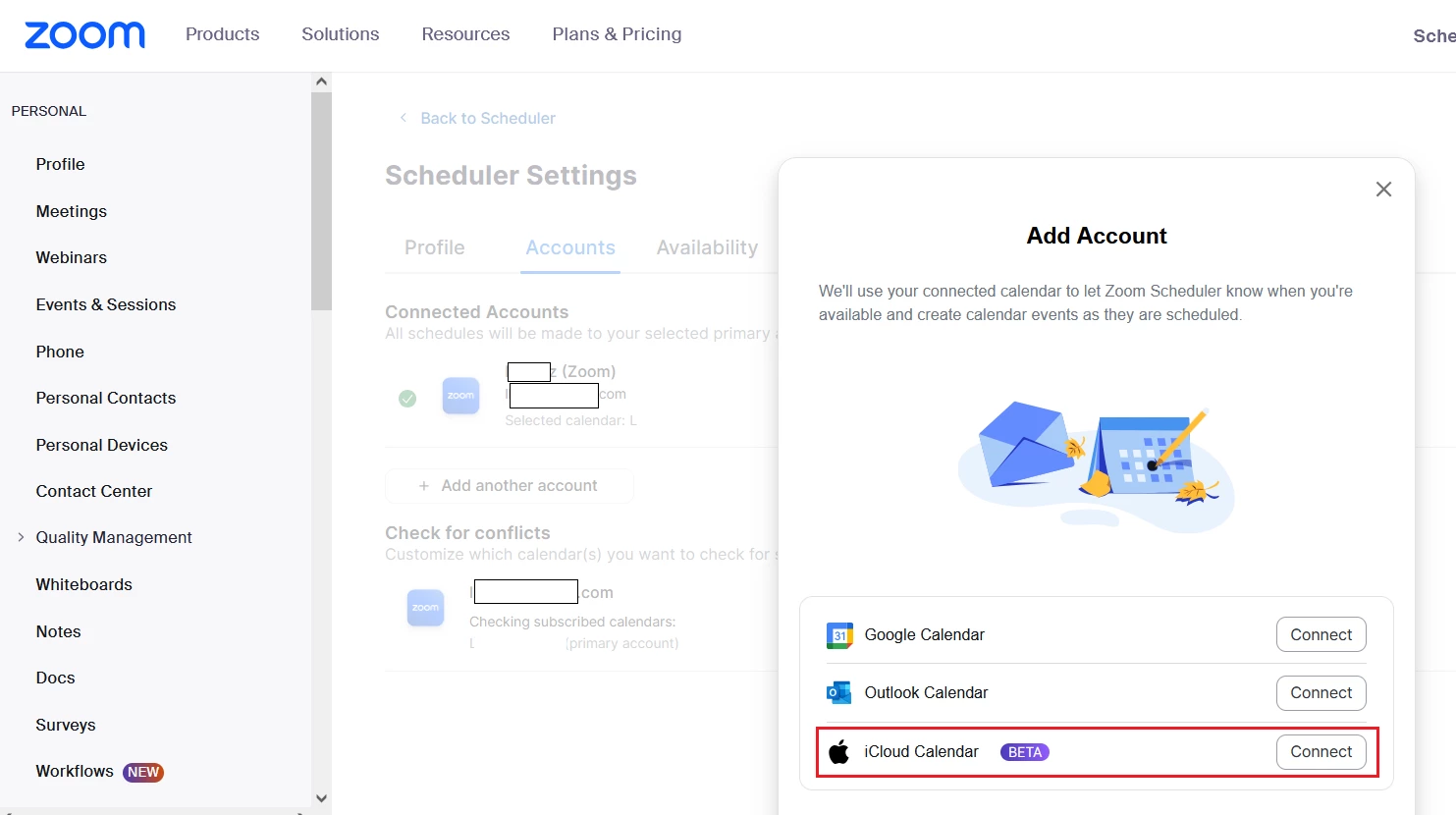
When you are in Scheduler tab, then in the bottom left corner you should find "Settings" option. After pressing that, Zoom should redirect you to Scheduler settings in a browser.
I've noticed, that if you go to "Accounts" tab there and press "+ Add another account", there is a iCloud Calendar available as a beta. Not sure if that will solve your Scheduler problem??
2025-07-15 12:41 PM
Hello Community Members,
We do apologize for the inconvenience and appreciate your patience.
While the “iCal” option is still visible in the Zoom macOS desktop app, we want to clarify that this feature has never been fully supported by Zoom. Although it may have worked for some users in the past, recent updates to Zoom and macOS have introduced inconsistencies with its functionality.
Because of this, our backend team is actively working on developing a fully supported integration to ensure a more reliable and seamless experience moving forward.
We’ll be sure to share more details as soon as we have updates available.
In the meantime, we recommend using one of our fully supported calendar integrations—Google Calendar, Office 365, or Exchange—for the most consistent performance.
Thanks again for your understanding and for choosing Zoom.
2025-07-17 06:58 AM
Dear Zoom Team,
With all due respect, your explanation leaves us more confused and disappointed.
iCal was previously available and functioning, and now—suddenly—with the introduction of Zoom Scheduler, it’s no longer supported. This is a clear step backward in functionality, and unfortunately, we, the users, are the ones who have to "pay the price" for it. This is simply not acceptable.
We expect immediate action — not vague promises of improvements “at some point.” Many of us pay monthly for Zoom Pro and Scheduler services. In my case, I pay for both. That’s a significant amount of money, and yet Zoom cannot offer proper iCal support—despite the huge number of macOS users worldwide?
This is beyond frustrating and difficult to understand.
Once again: Please fix this issue as soon as possible and ensure Zoom Scheduler can integrate with iCal. Alternatively, provide a working solution for iCal immediately.
Thank you.
2025-07-18 05:58 AM
Hello Community Support Team / Mark,
As per JUE6, and again with all due respect:
- you provided integration with ical. It worked at least for me seamlessly and there is nothing on the community pages to indicate anyone else was unhappy with the functionality. So, your concerns seemed groundless.
- You now seem to suggest it was never intended to be there, never really supported 'but we put it on there anyway' without disclaimers that it might not work.
- you then went on to remove the feature without notification to the many, many users of Zoom who use ical.
- then the only way you allowed integration was through a further paid subscription (which also presumably "sort of / may be worked but this time honest guys you're paying for it so it will")
- AND THEN it has taken an absolute age for you to put out a media release on this thread addressing the issue. Do you consider that to be optimal customer support? Or are you a company wholly focussed on working with enterprise corporate companies and the smaller companies can just pay up and take what we're given? Because there is a real sense here that's the case.
- Finally you say your backend team is developing ical integration. So, if this is an active project what is the anticipated release date? This would be useful to know since it determines our own decisions going forward.
Thank you.
2025-08-11 06:36 PM
well said!!
Thanks
2025-08-11 06:34 PM
Thanks but no thanks. I do not choose to use your other options as I only use ical and the hassle to readjust my work flow for Zoom's lack of integration, does not appeal.
2025-09-09 09:08 AM
Hello Community Members,
Kindly update your Zoom Workplace app to the latest version, and the iCal integration should work now.
Let us know if this helps or if you need further assistance.
2025-09-09 09:41 AM
2025-09-09 09:54 AM
Hello @prognis! On the home page of the Zoom Workplace app, click Schedule > More Options > Create in Calendar. Then, click the drop-down menu, where you should see an option for iCal.
2025-09-10 01:06 AM
Thank you Zoom for reintroducing ical integration, and actually listening to your customers needs.
It is such a shame you removed integration in the first place and tried to extricate more value by making this a paid feature, and alienated a lot of your customer base, but you did listen.
2025-09-10 08:34 PM
YESSSSS THANK YOU!
That worked.
Couldn't be more relieved.
Thank you so much for sorting this.
I was doing serious research into alternative platforms.
2025-09-10 01:40 AM
"The integration is done through the Zoom web portal, not the desktop or mobile app. Log in to your Zoom account on the web, go to Settings > Calendar and Contacts, and you'll find the options to add iCal and other calendar services. Once connected, your Zoom meetings will automatically sync and show up in Apple iCal."
2025-09-10 08:38 PM
I don't have Calendar & Contacts on my web portal - only Mail & Calendar.
When I look at the "add calendar" feature - it still only shows me the 3 options and no iCal.
I did the app refresh to the latest version and it is integrating for today. Long may it last 🤞