

Acuity appointments not showing up on Zoom anymore | Community
Skip to main content
Newcomer
November 18, 2024
Solved

Acuity appointments not showing up on Zoom anymore

  • November 18, 2024
  • 2 replies
  • 3 views

I use Acuity for my scheduling and it is integrated with Zoom.  While the appointment shows up on my google calendar and acuity calendar, when I open up Zoom it says I have no meetings.  It also gave me a message that I had to connect my calendar, which is weird b/c this used to work fine, and then it made me create a Zoom mail account.  When I then tried to also link my google calendar, (thinking this might help), it said it was not available.  I have no idea what to do.   I am using Zoom workplace.  Any support here would be gratefully appreciated.


Best answer by mdwpsyd

Two possible solutions:

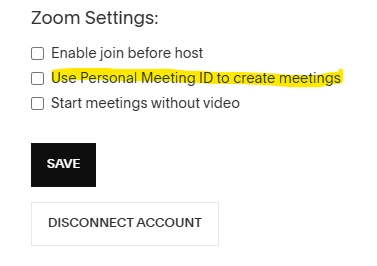
  1. If you recently changed your Zoom login information (User ID, email, phone, or password), disconnect and then re-connect Zoom within Acuity Scheduling. Within Acuity: Integrations » Integrations you're using » Zoom » Edit » [scroll down] Disconnect Account » [save or confirm, if needed] → Refresh browser, then go back to » Integrations » Select Zoom, and following instructions from there.
  2. I am not sure if this will work for everyone, but when I had this problem (as described by OP), I learned that I needed to Uncheck "Use Personal Meeting ID to create meetings" in Zoom Settings. Within Acuity: Integrations » Integrations you're using » Zoom » Edit » [scroll down to] Zoom Settings » If enabled (checked, toggled on), disenable (uncheck, toggle off) "Use Personal Meeting ID to create meetings".

2 replies

Newcomer
November 22, 2024

This comes down to the API integration. Acuity meetings don't show up in your Zoom workspace account but will be added to your gmail calendar. You could set up a webhook to reflect your Acuity meetings in one interface to join. Alternatively there is a Zoom app, Salepager, that lets you join all your Zoom meetings from one location including those scheduled via Acuity.

mdwpsydAnswer
Newcomer
July 3, 2025

Two possible solutions:

  1. If you recently changed your Zoom login information (User ID, email, phone, or password), disconnect and then re-connect Zoom within Acuity Scheduling. Within Acuity: Integrations » Integrations you're using » Zoom » Edit » [scroll down] Disconnect Account » [save or confirm, if needed] → Refresh browser, then go back to » Integrations » Select Zoom, and following instructions from there.
  2. I am not sure if this will work for everyone, but when I had this problem (as described by OP), I learned that I needed to Uncheck "Use Personal Meeting ID to create meetings" in Zoom Settings. Within Acuity: Integrations » Integrations you're using » Zoom » Edit » [scroll down to] Zoom Settings » If enabled (checked, toggled on), disenable (uncheck, toggle off) "Use Personal Meeting ID to create meetings".

MGSR
Community Manager
Community Manager
July 10, 2025

Hi @Xanetp!

Did you see the previous response from @mdwpsyd?
If it has resolved your inquiry, please press Accept as Solution.

If you need further assistance, please let us know.

Have a great day!