

What's New with OnZoom
We’re excited to share the following updates!
Announcement
We invite you to join us and other Zoom customers, partners, analysts, and more at Zoomtopia 2021 to network with peers, mingle with experts, and see the latest updates to the platform powering businesses of the future!
Don’t miss the session entitled, “‘Ask Me Anything’ with Zoom Events and OnZoom Product Managers,” to hear directly from our product team.
New Tools for Hosts
Focus Mode
Focus Mode allows you to bring meeting participants into a view where they are only able to see themselves, the host/co-hosts, and the content they are sharing.
Pre-recorded Content
Free yourself up to engage with your audience via chat and Q&A by recording your content beforehand and playing it during your event! This works great if you have guest speakers with limited availability or wish to deliver the same content to different audiences at different times. (Learn more)
Host Community
The OnZoom Host Forum has joined the Zoom Community on a new platform! We believe this simple change will help our OnZoom Hosts learn from each other in a more connected and integrated manner alongside the larger community of Zoom users.
Attendee Email
Hosts can now export event registrants’ contact information by clicking Events>’...’>Event Summary>Orders>Export.

Recording Notifications
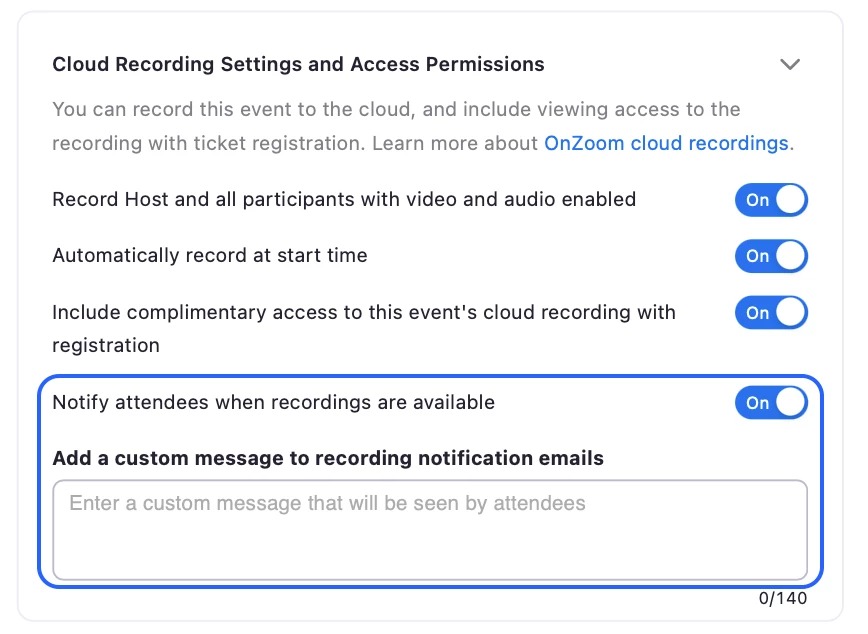
In Step 3 of the event creation process, you can enable a new setting that will automatically notify attendees when your recordings are available to watch. Write a custom message to add a personal touch!
Share Feedback
You can now submit feedback directly to the OnZoom team! Whether you have a feature request or a success story.
Updated Terms
Account administrators can now accept the OnZoom Host Terms of Service on behalf of all users on their accounts.
At this time, OnZoom availability remains limited to the United States. If you have any questions regarding OnZoom, please visit the Zoom Help Center.