

To generate Zoom webinar reports you can only choose from webinars in a one month span | Community
Skip to main content
Newcomer
February 19, 2024
Question

To generate Zoom webinar reports you can only choose from webinars in a one month span

  • February 19, 2024
  • 3 replies
  • 0 views

Hello,

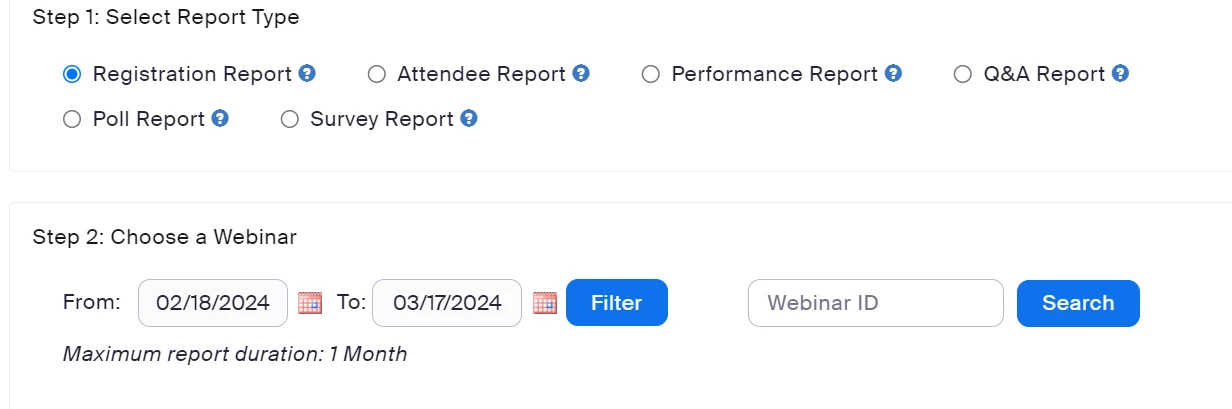
Why does Zoom webinar only allow a one-month span for selecting webinars from which to report? Is there any way to get around this? If you plan webinars a year's worth of webinars, you need to select webinars in a greater time span, both pre and post-webinar. It's like the system was designed for companies that produce very few webinars. That's can't be the case. Here's an image that shows that Zoom only allows customers to select from webinars within one month.
 

3 replies

Newcomer
February 22, 2024

Correct, within Zoom you can only generate 1 month at a time, however we use Salepager to generate combined Zoom reports across a much larger time frame. We are also able to combine participation and registration reports to get a complete picture of attendance with all registrant information included. We are able to get these reports emailed to us daily.

FSSimonAuthor
Newcomer
February 23, 2024

I refuse to pay for another product to do what Zoom should do. This function is easy in GoTOWebinar. It is a duh function!

Newcomer
September 3, 2024

Our district uses a 3rd party product called Expo XT and it shows us basic reports plus who is active/engaged, zoom phone, etc.  We can pull historical data back for a year, but I think you can set it to longer.

Newcomer
September 9, 2024

Zoom allows you to generate webinar reports, but you can only select webinars that occurred within the past month. To access these reports, navigate to the “Reports” section, choose “Webinars,” and specify the date range within that one-month span.

Newcomer
September 10, 2024

Correct, larger time frames can be accomplished using APIs or Salepager, a Zoom app, that lets you generate Zoom reports over a much larger time frame.