
Is it possible to limit the number of attendees for a webinar? | Community
Skip to main content
Newcomer
November 2, 2021
Solved

Is it possible to limit the number of attendees for a webinar?

  • November 2, 2021
  • 1 reply
  • 0 views
No text available
    Best answer by ChrisO

    Thanks ChrisO.

    We have a webinar that has been created by someone who no longer works with us, it appears to be limited to 20 participants. I was hoping if I figured how to limit the number I would be able to increase the participant number. We have a licence that allows for 500 so this isn't the issue.


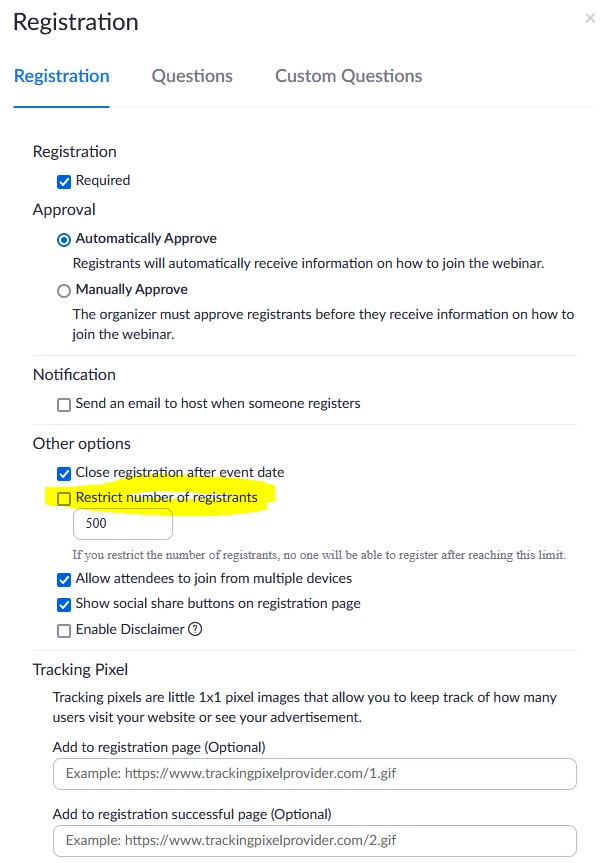
    I stand corrected. I just found a way to limit registrants. You have to require registration. After creating the webinar, click on the webinar under My Webinars. Scroll to the bottom and click Edit to the far right side of registration settings. Inside the pop up there is an option to restrict the number of registrants.
     

    1 reply

    ChrisO
    Participant
    Participant
    November 2, 2021

    The number would be limited by your webinar license. You could also require registration and only send the registration to invite out to a limited number. If you have access to OnZoom you could create an "Event" that is based on a webinar and limit the number of tickets.

    ClareGDAuthor
    Newcomer
    November 3, 2021

    Thank you ChrisO, I realise the upper limit for participants is dictated by the licence, however if a webinar has been created with a maximum of 20 participants, how could this have been done? We don't have access to On Zoom.

    ChrisO
    Participant
    ChrisOAnswer
    Participant
    November 3, 2021

    Thanks ChrisO.

    We have a webinar that has been created by someone who no longer works with us, it appears to be limited to 20 participants. I was hoping if I figured how to limit the number I would be able to increase the participant number. We have a licence that allows for 500 so this isn't the issue.


    I stand corrected. I just found a way to limit registrants. You have to require registration. After creating the webinar, click on the webinar under My Webinars. Scroll to the bottom and click Edit to the far right side of registration settings. Inside the pop up there is an option to restrict the number of registrants.
