Welcome to the Zoom Community, @fommnp.
First, you should know that the Host can exercise control over what view the Attendees see, and almost always, the view seen by the Host and Panelists is different! When I'm facilitating a Webinar for a client, I always have a second PC log into the event as an attendee, so I know exactly what they're seeing. I always "warn" my panelists and co-hosts not to worry if they're seeing extra videos on their screen -- I'm controlling the attendee view.
So here's the thing: Set the View menu to Attendee View: Speaker:
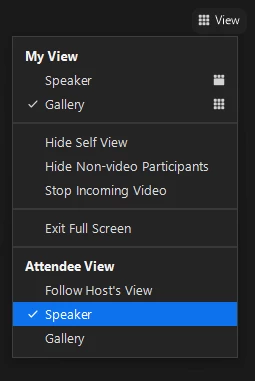
Then Spotlight only those people you want the attendees to see. With Attendee View set to Speaker, only Spotlighted (Spotlit?) people will be shown. If you have Attendee View set to Gallery, anyone with camera On will be seen; you can effectively also "hide" from view there by leaving your camera Off.
Try it with a couple of friends... one or two playing Co-Host and Panelist, and another playing attendee. That's the best way to learn it. (It took me months to figure this all out!!)

