

Collaborating on the management of a webinar | Community
Skip to main content
Newcomer
February 6, 2025
Solved

Collaborating on the management of a webinar

  • February 6, 2025
  • 1 reply
  • 2 views

My colleague and I are in charge of running webinars for our organisation. Our organisation has a Pro account, and we are both Workplace Pro users on this account.


If I set up a webinar via my account, is there a way for my colleague to be able to collaborate on the setting up of this webinar via her account? For example, update the description, manage registrations, access the reports and the recording?


We understand the Co-Host aspect which is useful for the actual running of the webinar, but would like to collaborate more on the pre and post event aspects of this.
    Best answer by Ray_Harwood

    Welcome to the Zoom Community, @rowen1011.


    This is tricky. With Scheduling Privilege shared between two users, You can create and edit each other's meetings, but the only way to extend this to webinars is if you both have an assigned webinar license. 

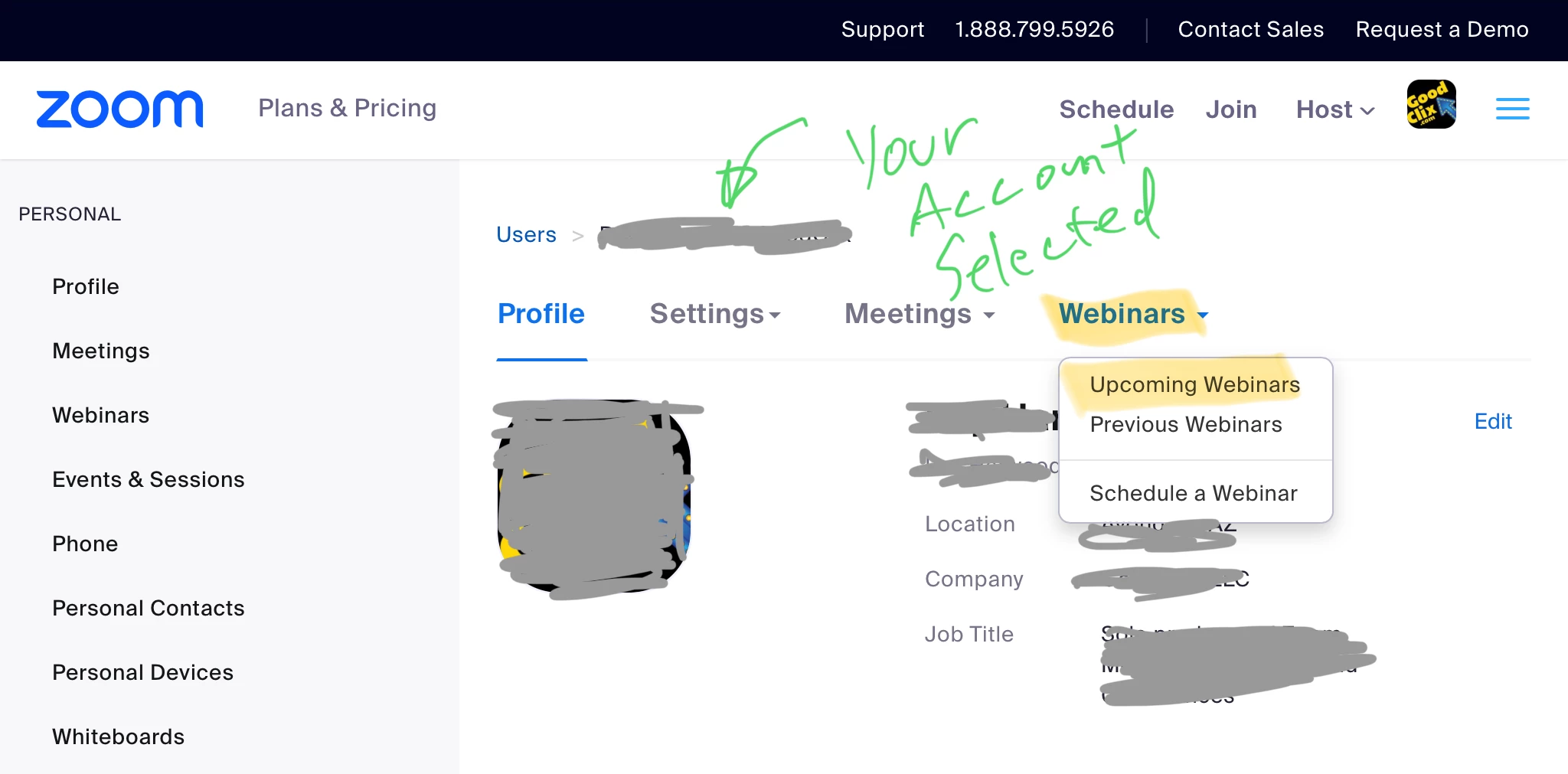
    Depending on a your organization’s security processes (some are very strict, some are more trusting), there is another way to do this, by granting the non-licensed person Admin privileges. With this, your coworker can go to the Admin -> User Management-> Users menu, select your account from the list of accounts, then click the Webinars menu from the top and the Upcoming sub menu:

    From there, they see your webinars, and can enter them for editing just like you can. 

    This way, your coworker doesn’t need a Webinar license. Also, if security over-reach is a concern, I think there’s a way to create a new User Role with limited access. Let me know if you need help with creating a new role. 

    1 reply

    Ray_Harwood
    Community Super Champion | Customer
    Community Super Champion | Customer
    March 5, 2025

    Welcome to the Zoom Community, @rowen1011.


    This is tricky. With Scheduling Privilege shared between two users, You can create and edit each other's meetings, but the only way to extend this to webinars is if you both have an assigned webinar license. 

    Depending on a your organization’s security processes (some are very strict, some are more trusting), there is another way to do this, by granting the non-licensed person Admin privileges. With this, your coworker can go to the Admin -> User Management-> Users menu, select your account from the list of accounts, then click the Webinars menu from the top and the Upcoming sub menu:

    From there, they see your webinars, and can enter them for editing just like you can. 

    This way, your coworker doesn’t need a Webinar license. Also, if security over-reach is a concern, I think there’s a way to create a new User Role with limited access. Let me know if you need help with creating a new role.