cancel
Showing results for 
Search instead for 
Did you mean: 
Effective January 9th, 2026 through January 22nd, 2026: The Zoom Community is currently in read-only mode with login disabled, to deliver you a new and improved community experience!

The site is still accessible to view, however, the ability to login, create content, or access your community account is temporarily unavailable. We appreciate your patience during this time. If seeking support, please browse existing community content or ask our Zoom Virtual Agent.

Can I upgrade from clips plus to pro?

wocaonima
Newcomer
Newcomer

Hi there, 

If I have a 'Zoom Clips Plus' plan and I find the 'Zoom Workplace Pro' plan necessary, can I just upgrade from the former to the workplace pro plan? How much will it cost? Can I only pay for the difference between the two plans?

1 ACCEPTED SOLUTION

Ray_Harwood
Community Champion | Customer

Welcome to the Zoom Community, @wocaonima


From the Zoom Pricing page in USD, I see that the Clips Plus plan is $6.99/month:

Ray_Harwood_0-1752877962823.png

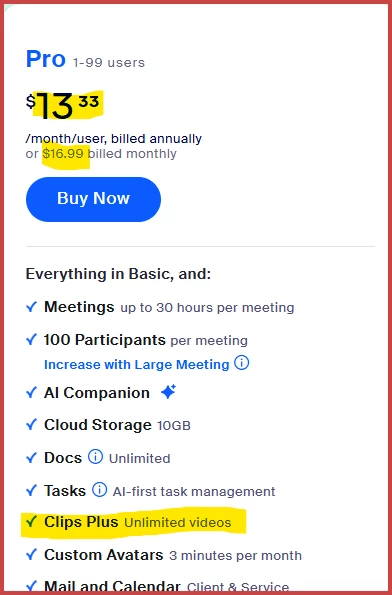
A Zoom Pro plan is $16.99/month paid monthly ($13.33/month paid annually), and includes the Clips Plus feature:

Ray_Harwood_1-1752878083474.png

So if you upgrade to a Zoom Workplace Pro account, it should automatically prompt you to drop the Clips Plus plan; if it doesn't, contact Zoom Sales Support for assistance and they should be able to remove it for you.


Ray -- check out the GoodClix website.

View solution in original post

2 REPLIES 2

Ray_Harwood
Community Champion | Customer

Welcome to the Zoom Community, @wocaonima


From the Zoom Pricing page in USD, I see that the Clips Plus plan is $6.99/month:

Ray_Harwood_0-1752877962823.png

A Zoom Pro plan is $16.99/month paid monthly ($13.33/month paid annually), and includes the Clips Plus feature:

Ray_Harwood_1-1752878083474.png

So if you upgrade to a Zoom Workplace Pro account, it should automatically prompt you to drop the Clips Plus plan; if it doesn't, contact Zoom Sales Support for assistance and they should be able to remove it for you.


Ray -- check out the GoodClix website.

MGSR
Community Moderator | Employee

Hi  @wocaonima! I wanted to let you know that I’ve marked @Ray_Harwood's response as the accepted solution, as I believe it answers your question. If you have any more questions or need further clarification, feel free to ask.


Mark
Zoom Community Team
Have you heard of Zoom AI Companion?