

How to add Zoom for Intune into Azure? | Community
Skip to main content
Newcomer
May 30, 2022
Question

How to add Zoom for Intune into Azure?

  • May 30, 2022
  • 3 replies
  • 0 views

Hi,


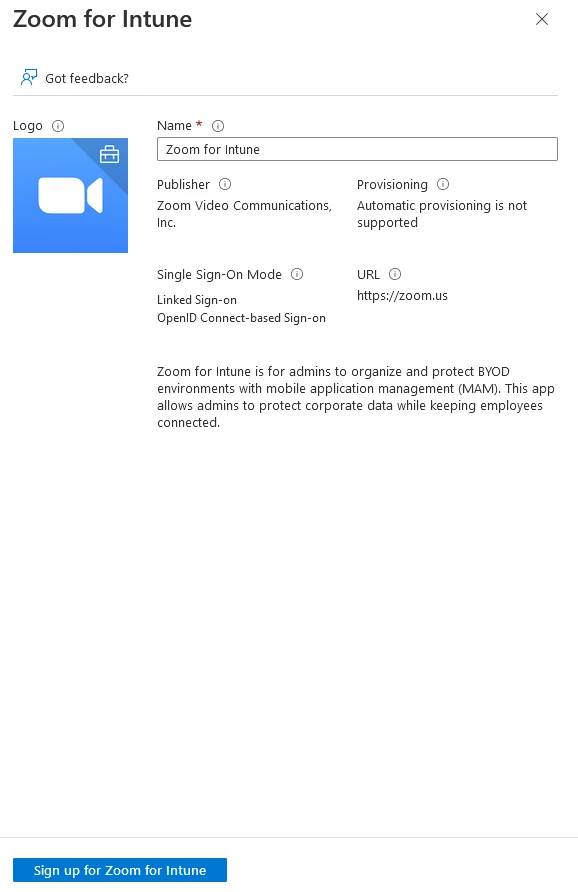
Does anyone know how to add Zoom for Intune into Azure for iOS and Android deployment? All I get when clicking on 'Sign up for Zoom for Intune' is a redirect to the Zoom website, which doesn't help with adding Zoom for Intune into Azure.
Look forward to your responses, thanks.


    3 replies

    Employee
    May 30, 2022

    Hi, @MKi7 Thanks for your contribution to Zoom Community, You could use (SSO).


    Single sign-on allows you to log in using your company credentials. Zoom single sign-on (SSO) is based on SAML 2.0. Zoom works with Okta and other enterprise identity management platforms such as CentrifyMicrosoft Active DirectoryGluuOneLoginPingOneShibboleth, etc. Zoom can map attributes to provision a user to different groups with feature control.


    By installing with an Active Directory Administrative Template or registry keys, administrators can lock certain features and settings upon deployment of the Zoom desktop client. 

    Here an article could help you understand more.

    https://support.zoom.us/hc/en-us/articles/360039100051

    MKi7Author
    Newcomer
    May 30, 2022

    Hi @Shaimaa 

    Zoom SSO has been configured in Azure, we are attempting to deploy Zoom for Intune on to iOS and Android devices, this requires the Zoom for Intune to be assigned into Azure Enterprise Application in order to grant Admin Consent Approval for the users to be able to use Zoom for Intune with application protection policy attached. 


    Unfortunately, we are unable to add Zoom for Intune into Azure to perform the above process, as the Zoom for Intune app shown in the Azure Enterprise Application store is just redirecting us to the zoom.us site and not adding the app into Azure for configuration and deployment of Zoom for Intune app to iOS and Android devices.

    Partner
    June 9, 2022

    Hi @Shaimaa,

    We have reviewed the Mass deployment for iOS and Android devices though it still doesn't shine any light on how to deploy the Zoom for Intune app to iOS and Android with grant Admin Consent Approval assigned. 


    I'll open a case with Zoom support and update this thread accordingly once a suitable solution has been provided by Zoom.


    Thanks.


    Hi - @MKi7 Did you ever get an answer from Zoom?

    Does anyone know what the Azure Enterprise App called "Zoom for Intune" actually is? I assume it's a new feature still being worked on.

    YaBoiB
    Community Champion | Employee
    Community Champion | Employee
    September 13, 2023

    Hello All, 


     Zoom for Intune is a specific app in the Microsoft Intune admin center. 


     What is it that you are attempting to accomplish? Are you attempting to redirect your organization members to log in through SSO through the Zoom for Intune app? 


    We do have this support article for setting up conditional access within Intune. https://support.zoom.us/hc/en-us/articles/12419690044045-Configuring-the-Conditional-Access-policy-for-Zoom-for-Intune- 


    Let me know what difficulties you are having, and I can see if I can help you through them. 


    Newcomer
    September 26, 2023

    I created an App Protection Policy in Intune based on BYOD, and when I try to join a Zoom meeting through a link, the external app opens (Zoom for Intune), but I'm taken to a screen that says Approval is required. My question is, do I need to create a Conditional Policy or configure another specific Enterprise App for Zoom for Intune, considering that SSO is already set up for Zoom across the organization?

    YaBoiB
    Community Champion | Employee
    Community Champion | Employee
    September 13, 2023