Can't disconnect Otter.ai | Community
Skip to main content
Newcomer
March 10, 2022
Solved

Can't disconnect Otter.ai

  • March 10, 2022
  • 6 replies
  • 17 views

I am trying to connect zoom to ReStream.io and I previously had integrated with Otter.ai. I disconnected otter.ai, took the zoom app off of my account. Now everytime I try to select livestream with RTMP it says it is "connected to livestream...but it it not- it's still trying to talk to otter.ai! Soooo frustrated. Anyone know what i am doing wrong?


I can't seem to find the original fill in the blanks for the url and streaming code. The input options are gone under the livestreaming option.

    Best answer by karlalang

    Here is what Otter.ai sent me from my support question in January 2023.  It took 5 months to respond. Before I received this, I completely deleted the app off of everything and unsubscribed. 

    Alchilyn Robles (Otter.ai)

    May 30, 2023, 4:59 PM PDT

    Hi Karla,

    Thanks for reaching out to us with your concern. I'd be happy to assist you with this.

    We're sorry to hear about what happened. To make sure that this will not happen again, you need to make sure that OtterPilot is disabled. To do this, please follow the steps below:

    To disable OtterPilot from automatically joining your meetings.
    1. Sign in to your Otter account.
    2. Navigate to Account settings by clicking on your name in the top left.
    3. Click on the Meetings tab.
    4. In the OtterPilot section, disable Auto-join all meetings. OtterPilot will no longer auto-join your upcoming meetings.
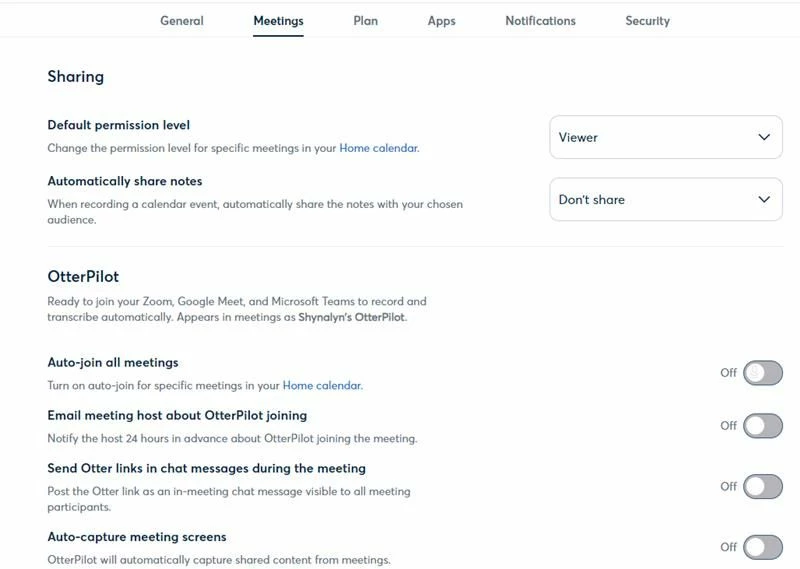


    The photo above should be what your meetings tab looks like to make sure all settings are disabled.

    Hope this helps.

    Feel free to let me know if you have any further questions or if you have any clarifications. I'll be glad to help.

    Have a nice day!
     

    Thank you,

    Alchilyn Robles
    Otter.ai Support Team

     

    6 replies

    Newcomer
    July 19, 2022

    Otter.ai is violating privacy of people.  I had to boot it from a meeting that was sharing HIPPA data.  Our account does not use Otter.ai, however someone who joined the zoom did and the otter.ai automatically joined without permission from the user or from our group.  The person then told me that otter.ai was joining all the meetings on their calendar even if they did not join that meeting.  I run meetings that are sensitive and confidential in nature and this person is cancelling their Otter.ai account due to this incident.  I have reported otter.ai to the DHCS for HIPPA violations and privacy violations.  DO NOT USE THIS TOOL.

    Daniel-Pirciu
    Newcomer
    Newcomer
    September 15, 2022

    Indeed, this is a really important issue when the bot joins the call without consent.

    I don't know Otter's settings, but Meetgeek has the toggle to join or not to join, really well displayed. And you can also enable it to join only the meetings where you are the host.

    Newcomer
    January 4, 2025

    Make sure to disconnect your Zoom account AND calendar from otter ai as well as uninstall in the Zoom marketplace. If the AI notetaker is joining on behalf of guests in the meeting you are hosting you can enable a waiting room to vet attendees before joining. Alternatively there is an app, Meetinguard, that van verify whether attendees are human before they join your meetings to prevent AI bots from joining and violating your privacy.

    Newcomer
    March 28, 2023

    Glad to know I am not alone with this problem. But the solutions suggested so far are all for action by the Otter owner/subscriber. What about action by the Zoom host? As others have said, when somebody's Otter bot joins a meeting without the human even being present it is a serious invasion of privacy. As a Zoom host I need a way to block this from happening. 

    Newcomer
    March 30, 2023

    Yikes - that didn't happen to me but Otter started deleting my Google Contacts.  Fortunately I was able to restore back a few days and get my contacts back.

    Can you kick out the Otter bot?  I think that ai should be banned from existence.  It is going to ruin for other legitimate companies.  I use Fathom but Fathom won't let me record unless I'm the host.  Have you submitted a ticket to zoom.  That would be my next move.  I feel your pain.  I wish you the best. 


    Newcomer
    January 14, 2025

    As you the meeting host you can enable a waiting room to vet attendees. Typically the bots will include either AI or notetaker in their display name. You can also ban specific IP addresses from your Zoom meetings. If you reach out to Zoom support you can request they not be allowed to join. Alternatively there is a Zoom app, Salepager, that lets you verify if attendees are human before joining to block bots and AI notetakers from your Zoom meetings.

    Newcomer
    April 27, 2023

     I attended a zoom meeting about six weeks ago. Showing as attending was something called Cheryl.Otter.ai.  no one seemed to know who that was but thought it was a colleague zooming in from her car.  I clicked something - don't remember what and there was a transcription program recording our meeting conversation.  After the meeting i received an email saying Cheryl (and her correct last name) recommends Otter.ai transcript program.  I clicked on it to see what she was recommending.  Somewhere in this event, I was ambushed by Otter.ai.  I did not agree to an account but every zoom meeting i attend now  Bobbi.Otter.ai shows up and i have to ask the meeting organizer to remove it. Then it sends an email to anyone who had attended the meeting that says that I recommend it. 

    I've tried contacting the company, which sends an email message "we take care of paying customers first, we'll get to you." that was 5 weeks ago-i've heard nothing... I've also asked our IT guy and internal digital assistant to remove it, they've had no luck.  I chatted with ZOOM's support, they say nothing it connected to my account and I went onto the account connected to my email and unclicked everything, and looked for a delete but couldn't find one and I even send a message to FBI and DHS because I feel like it's an invasion.  

    If anyone has a solution on how to get rid of this invasive ai please tell us!


    Newcomer
    April 27, 2023

    Two problems:

    1. To stop your Otter from joining meetings automatically, here is what Otter's Help page says: "Click on your profile and navigate to Account Settings > Meetings. Under the Otter Assistant section, toggle off Auto-join all meetings. A pop-up will alert you to how many upcoming meetings Otter Assistant is scheduled to join automatically. Select Yes, turn them off to proceed with toggling off auto-join."

    2. To stop other people's Otter from joining your meeting - we are waiting for Zoom to make this easier please.

    Community Champion | Customer
    May 24, 2023


    Manage your Otter settings

    OtterPilot can automatically join your Zoom, Google Meet, or Microsoft Teams meetings, and transcribe the meetings in real-time.

    OtterPilot works by connecting your calendar (Google or Microsoft) to your Otter account. Once connected, your calendar events are synced to Otter. If an upcoming calendar event includes a Zoom, Google Meet, or Microsoft Teams meeting link, OtterPilot will automatically join the meeting at the scheduled time as a participant. 

    Auto-join all meetings

    This setting controls whether your OtterPilot will automatically join a calendar event. Toggling this option on will ensure OtterPilot automatically joins all calendar events with a valid Zoom, Google Meet, or Microsoft Team meeting URL. 


    Source https://help.otter.ai/hc/en-us/articles/13675989227543-Manage-your-OtterPilot-settings 


    Stop OtterPilot from automatically joining your meetings

    https://help.otter.ai/hc/en-us/articles/12906714508823-Stop-OtterPilot-from-automatically-joining-your-meetings 


    Newcomer
    May 24, 2023

    I have removed all these from my end, deleted the account even, but an email contact still complains that it keeps joining her meetings

    Newcomer
    May 24, 2023

    I have removed all these from my end, deleted the account even, but an email contact still complains that it keeps joining her meetings

    Newcomer
    May 24, 2023

    Cherry2-I tried the below and it's seems to have worked, at least for the last week or so.  But I had never opened an otter account so I had to put in my email address and then select "forgot password" to set up a password to change the autojoin all meetings.  After that I deleted the account.  
    Good luck!   The below is from an Otter rep. 


    OtterPilot enabled, which works by automatically inviting Otter as a virtual participant to your Zoom, Google Meet, or Microsoft Teams meetings. You can learn more about how OtterPilot on our Help Center.
     
    To disable OtterPilot from automatically joining your meetings, follow these steps:
    1. Sign in to your Otter account.
    2. Navigate to Account settings by clicking on your name in the top left.
    3. Click the Meetings tab.
    4. In the OtterPilot section, disable Auto-join all meetings. The OtterPilot will no longer auto-join your upcoming meetings.

    Thank you,

    Robert
    Otter.ai Support Team

    Newcomer
    May 24, 2023

    so i should tell my contact to do this, hopefully it works

    karlalangAnswer
    Newcomer
    May 31, 2023

    Here is what Otter.ai sent me from my support question in January 2023.  It took 5 months to respond. Before I received this, I completely deleted the app off of everything and unsubscribed. 

    Alchilyn Robles (Otter.ai)

    May 30, 2023, 4:59 PM PDT

    Hi Karla,

    Thanks for reaching out to us with your concern. I'd be happy to assist you with this.

    We're sorry to hear about what happened. To make sure that this will not happen again, you need to make sure that OtterPilot is disabled. To do this, please follow the steps below:

    To disable OtterPilot from automatically joining your meetings.
    1. Sign in to your Otter account.
    2. Navigate to Account settings by clicking on your name in the top left.
    3. Click on the Meetings tab.
    4. In the OtterPilot section, disable Auto-join all meetings. OtterPilot will no longer auto-join your upcoming meetings.


    The photo above should be what your meetings tab looks like to make sure all settings are disabled.

    Hope this helps.

    Feel free to let me know if you have any further questions or if you have any clarifications. I'll be glad to help.

    Have a nice day!
     

    Thank you,

    Alchilyn Robles
    Otter.ai Support Team

     

    Newcomer
    December 12, 2023

    doesnt work