Here is what Otter.ai sent me from my support question in January 2023. It took 5 months to respond. Before I received this, I completely deleted the app off of everything and unsubscribed.
Alchilyn Robles (Otter.ai)
May 30, 2023, 4:59 PM PDT
Hi Karla,
Thanks for reaching out to us with your concern. I'd be happy to assist you with this.
We're sorry to hear about what happened. To make sure that this will not happen again, you need to make sure that OtterPilot is disabled. To do this, please follow the steps below:
To disable OtterPilot from automatically joining your meetings.
- Sign in to your Otter account.
- Navigate to Account settings by clicking on your name in the top left.
- Click on the Meetings tab.
- In the OtterPilot section, disable Auto-join all meetings. OtterPilot will no longer auto-join your upcoming meetings.
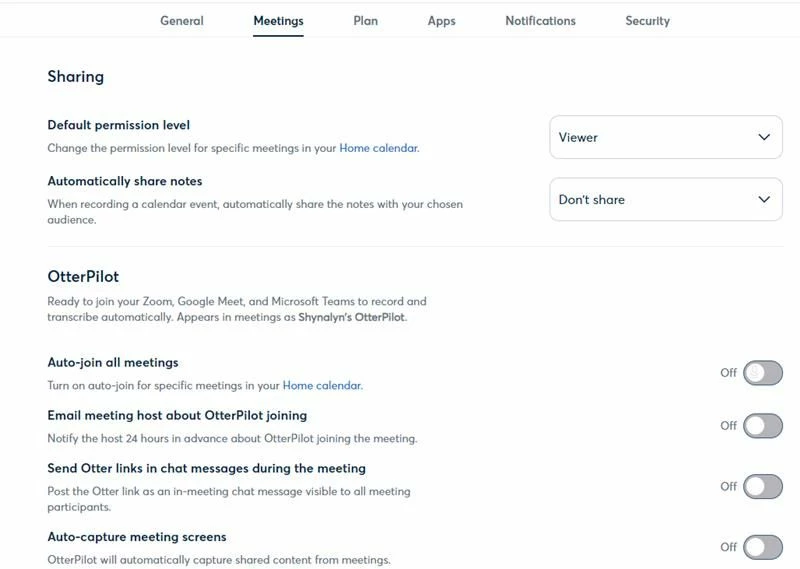
The photo above should be what your meetings tab looks like to make sure all settings are disabled.
Hope this helps.
Feel free to let me know if you have any further questions or if you have any clarifications. I'll be glad to help.
Have a nice day!
Thank you,
Alchilyn Robles
Otter.ai Support Team

