cancel
Showing results for 
Search instead for 
Did you mean: 
The Zoom Community will be placed in read-only mode January 9th, 2026 through January 22nd, 2026 to deliver you a new and improved community experience!

The community will still be accessible, however, the creation of any new discussions or replies will be temporarily unavailable. We appreciate your patience during this time.

Zoom AI Companionを利用する方法

sumiyuwa
Contributor I
Contributor I
有料プランに加入し、Zoom AI Companionを利用する方法を教えてください。 日本語以外わからないので日本語でお願いします。

1 ACCEPTED SOLUTION

Ohkawa
Community Champion | Customer

@sumiyuwa さん

こんにちは


有料プランであれば、Zoomへの機能有効化の申請は不要で、AI Companionを使うことができます。

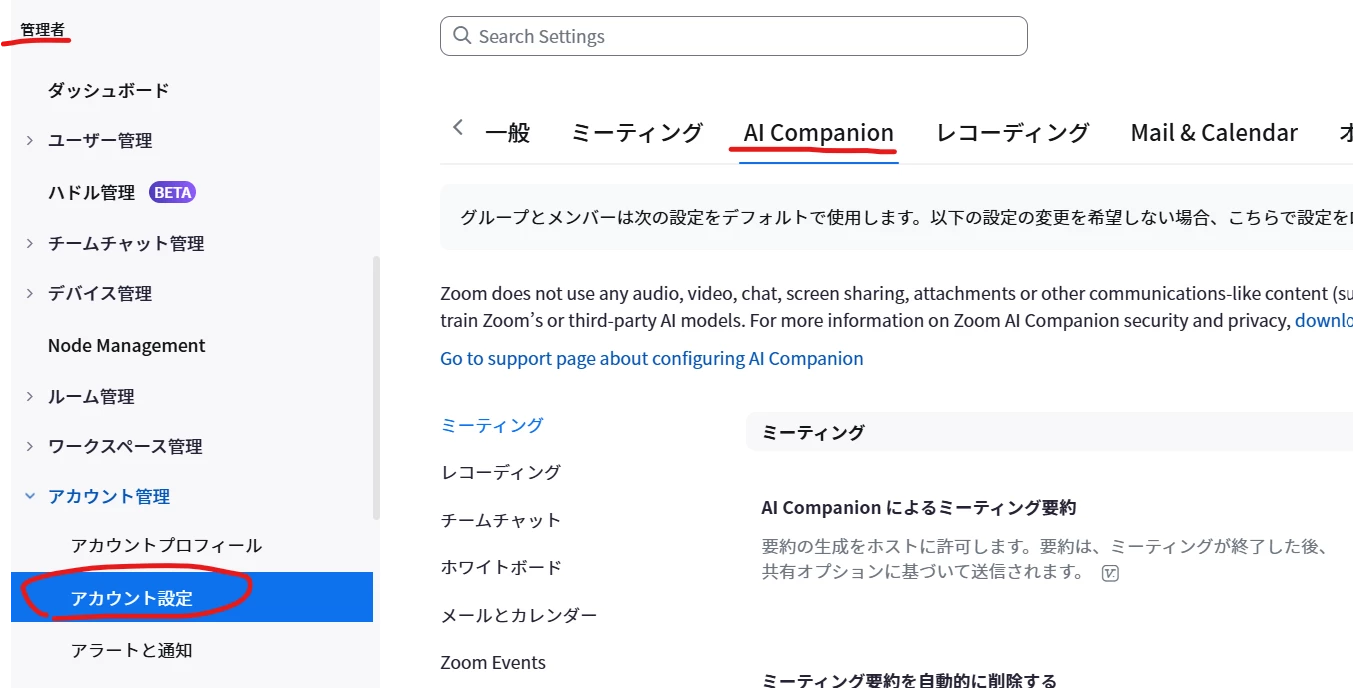
もし、利用できない場合は、管理者メニューのアカウント設定のAI Companionのタブで、設定を行って使えるようにしてください。

Ohkawa_0-1719135659995.png


View solution in original post

1 REPLY 1

Ohkawa
Community Champion | Customer

@sumiyuwa さん

こんにちは


有料プランであれば、Zoomへの機能有効化の申請は不要で、AI Companionを使うことができます。

もし、利用できない場合は、管理者メニューのアカウント設定のAI Companionのタブで、設定を行って使えるようにしてください。

Ohkawa_0-1719135659995.png