AI Companion Setting "Locked by admin" | Community
Skip to main content
Newcomer
October 10, 2023
Solved

AI Companion Setting "Locked by admin"

  • October 10, 2023
  • 15 replies
  • 2 views

I am the admin of my account, but I can't turn on the AI Companion because it says lock by admin.  What can I do to enable this feature. 

Best answer by Bort

Hi @PolinaKrasnova 

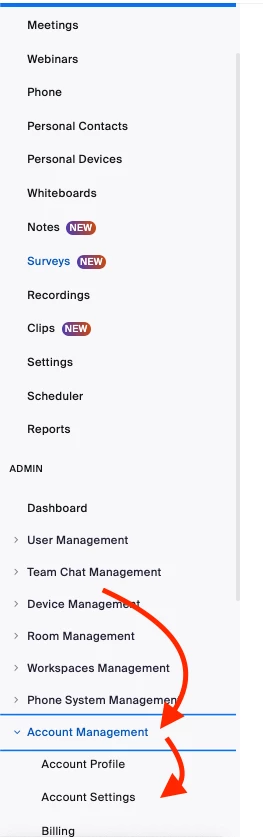
If you are signed-in to your account in the web portal, you should see the Account Settings option under Account Management

If you don't see this option, its likely you are not the owner or an admin on the account so you wouldn't have access to account-wide settings. You would also not have account settings if you are a free account, as there would be no other users to manage at the account level. 

15 replies

Bort
Employee
Employee
October 10, 2023

Hi @satikusala 

If you are an admin on your account, then you should be able to access all the AI Companion settings at the account-level Settings page. There you can unlock the setting and enable it. 

If your account has different user groups with differing access-levels, you might check the Group-level settings page instead, as you might be in a group with AI Companion disabled and locked there, instead of at the account-level. 

This article has more information about how to enable AI Companion settings: https://support.zoom.us/hc/en-us/articles/17396873863309


Hope that helps and let me know if you have any further questions. Otherwise, make sure to mark the solution as accepted if this information is what you needed.

Newcomer
October 10, 2023

Hi there, thanks. I read the article before posting, but did to help. I'm the account owner, but it appears that as the owner does not have amdin status. How did I give my account admin access, as the owner?

Newcomer
October 10, 2023

Again, I really appreciate your response. Again it is not clear to me why an "account owner" does not have "admin" rights and how one can give the account owner admin rights. Thanks again. 

Bort
Employee
Employee
October 10, 2023

Hi @satikusala 

The account owner has the same permissions as an admin, and more actually, so there shouldn't be anything additional to do for you to have the necessary admin rights. 

Let's try a few other things: 

  • Make sure you're opening the Account-level settings page here: https://zoom.us/account/setting
  • Try opening that page with a different browser than what you're currently using
  • Try restarting your computer and opening the settings page again. 
Newcomer
October 10, 2023

Hi Bort, thanks! This worked.  I logged in with a different browser and was able to change the settings. 

Bort
Employee
Employee
October 11, 2023

Great to hear and glad I could help! 

Newcomer
October 10, 2023

Hello - I had the same problem today. I have a Pro account and I'm the owner so I should have admin rights. I noticed in the article Bort linked to that it says " AI Companion may not be available for select verticals and select regional customers". What does this mean? Are we in some disqualified group? Please do get back to us on this topic, it's very frustrating. 

Bort
Employee
Employee
October 11, 2023

Hi @KateCook 

That item refers to specialized accounts, like Healthcare, Education, and Financial Services, so its unlikely you are affected by that limitation with your Pro account. 

Have you tried the other troubleshooting steps I provided above? 


Newcomer
October 11, 2023

I had the same problem. In my Vivaldi Browser it didn't work. But on Firefox I could change this settings.

Newcomer
October 17, 2023

I tried it on Safari and Firefox (apart from Google) and none let me habilitate it

Newcomer
October 25, 2023

I have tried Edge and Goolge and cannot access the toggle. It still says Admin Locked

Newcomer
October 26, 2023

I'm having the same problem and have tried in multiple browsers.

Newcomer
October 31, 2023

Same problem here. I'd like to try the AI Companion.

Newcomer
November 13, 2023

I had the same problem - I'm the owner but it said locked by admin and I couldn't toggle on AI Companion even in multiple browsers. I was only able to change an AI recording toggle. I managed to get it working by: 

- Toggling on the AI Recording
- Opening a Zoom meeting in the client/mac app
- Clicking 'more' and then AI Companion in the meeting
- Following the prompt that appeared to return to settings and turn AI Companion on
- New settings appeared and I was able to adjust

Hope this helps!

Newcomer
May 27, 2024

This worked for me. It's like a bug work around. You have to pretend to be enabling AI Companion for the meeting and it then takes you to the setting page and the locked by admin are magically accessible. 

Newcomer
December 19, 2023

Exact same problem.
Doesn't make sense that as the account owner, I'm locked out of changing this setting. When I can change other settings.