

why won't zoom let me choose 'editor' for external users of whiteboards? | Community
Skip to main content
Newcomer
December 18, 2023
Solved

why won't zoom let me choose 'editor' for external users of whiteboards?

  • December 18, 2023
  • 4 replies
  • 11 views

Hi all,


I have chosen 'who has access as 'anyone' and then go to choose 'access level'... it does not allow me to click 'editor'. ('commenter' and 'editor' are greyed out and cannot be selected).

I want anyone on the zoom to be able to be an editor on any whiteboard and this is just not letting me do that! I have tried everything!

PLEASE HELP ME  Thank you!

Best answer by FlexLiu

Hi, we don't allow this to be done based on our current design - set 'commenter' and 'editor' for "anyone"

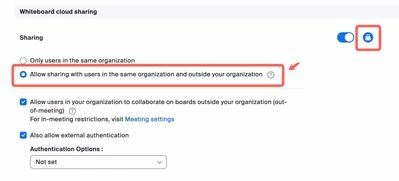
If you want all participants in a meeting can edit your board, you can set the sharing setting like the screenshot below. If there are no security issues, you can lock the setting at account level. https://zoom.us/account/setting


4 replies

Newcomer
December 19, 2023

I'm having same problem.  My participant can't annotate when I share the whiteboard and is defaulted to viewer only access.  Share settings are properly set, but default whiteboard access levels are greyed for commenter and Editor for anyone. I can't find override settings in my account or in- meeting that fixes the problem.  This issues started around Dec first.  I am only user on my account.

Newcomer
January 9, 2024

I also have the exact same problem starting around Dec 1.  Updating to most current desk top clients at both ends does not help.

FlexLiuAnswer
Employee
January 11, 2024

Hi, we don't allow this to be done based on our current design - set 'commenter' and 'editor' for "anyone"

If you want all participants in a meeting can edit your board, you can set the sharing setting like the screenshot below. If there are no security issues, you can lock the setting at account level. https://zoom.us/account/setting


Newcomer
January 18, 2024

Hello, FlexL,


Thank you for the solution offered. However, I can't find this setting for the Whiteboard in my account. I have Zoom One Pro licence. I have the only setting available for the Whiteboard which is 'allow to save the whiteboard content after the conference'' (my translation from the language in my zoom). Unfortunately, I can't find Whiteboard cloud sharing as it is your reference. Could you help me locate this setting?

Thank you.

Employee
January 19, 2024

Hi, can you open this link - https://zoom.us/account/setting , if you can't, that means you are not an admin of your account, you need to ask the admin to do this operation. if you can, you can follow the step as the screenshot below.


liv3Author
Newcomer
January 17, 2024

Hi FlexL thank you for your response, I have tested the way you suggested. When I give the people in the meeting permission to use the whiteboard in the meeting, it means I have to go on the whiteboard after the meeting and clear them off the shared list, as they will have permanent access to the whiteboard. it's all very clunky compared to using google Jamboards, which they are getting rid of in October this year. No one seems to be offering anything as simple as creating a URL for the whiteboard that you can share in the chat box and people can open in breakout rooms. Is there any chance Zoom with be improving the current design of the whiteboards? think more about people using Zoom for training rather than just meetings?? 


many thanks

Employee
January 18, 2024

Hi, you can uncheck the "allow persistent access to ..." before the sharing, or you can select "temporary permission" in the share sheet. (click the top-right Share button can open share sheet".


Employee
February 6, 2024

example of what a meeting participant see if they click on the whiteboard URL link


HI @liv3 ! Thank you so much for taking the time to explain your scenarios to Flex and I! I'm sorry about the added friction you are experiencing.


When you run these training sessions do you have a trainer / facilitator in each one of the breakout rooms with the trainees? If so, then that individual can open an existing whiteboard directly in the meeting, which would grant temporary access to all the users even if they are not signed in. 


If not, then it sounds like there are two solutions which we can explore:

  1. Short term: Provide guest edit access and password protect our sharing links (replicate googles sharing flow)
  2. Long term: Assign specific whiteboard to breakout rooms

What do you think about these options?