Zoom phone number change | Community
Skip to main content
Newcomer
September 1, 2023
Solved

Zoom phone number change

  • September 1, 2023
  • 5 replies
  • 0 views

Hello community, 

I'm new to the Zoom Phone (registered today) already have got an issue 🙂 


How can I change Zoom Phone number? I've got US number instead of Canadian (which I need) and now need to change it. 


Regards,

Muza

Best answer by Eliot

Hi MuzaS,


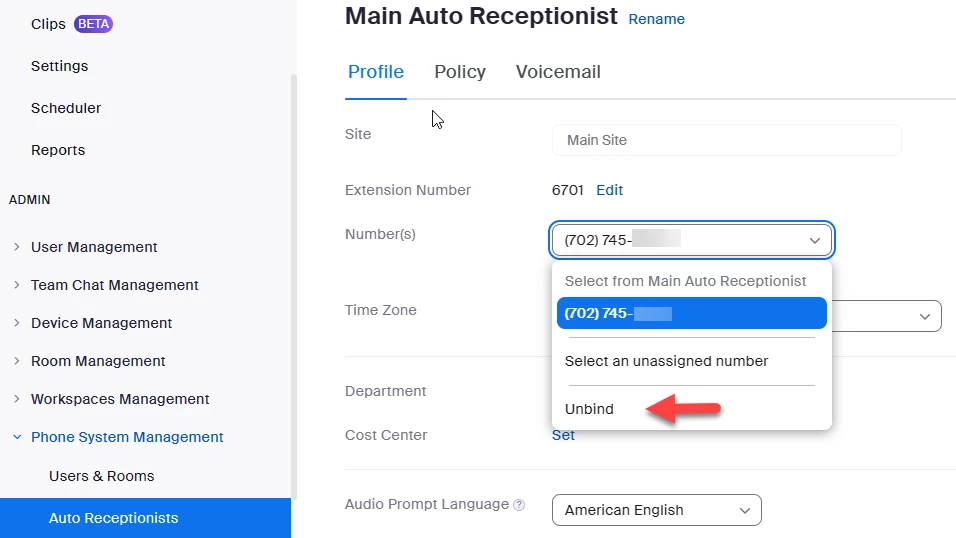
Please check to see if your usa number is assigned to your main auto receptionist.  Your Profile->admin-> phone system management -> auto receptionists -> profile.  If your usa number is assigned to the main auto receptionist, click unbind. 


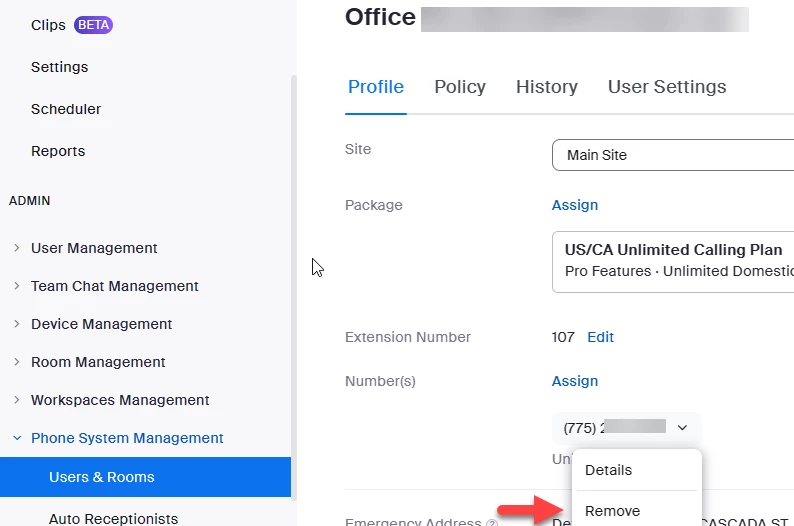
If your usa number was not assigned to the auto receptionist, then it was probably assigned to you as a user.  Go to Your Profile->admin-> phone system management -> users & rooms ->profile -> numbers.  Click Remove to remove your usa number from your user profile.  Your number should end up in unassigned numbers.


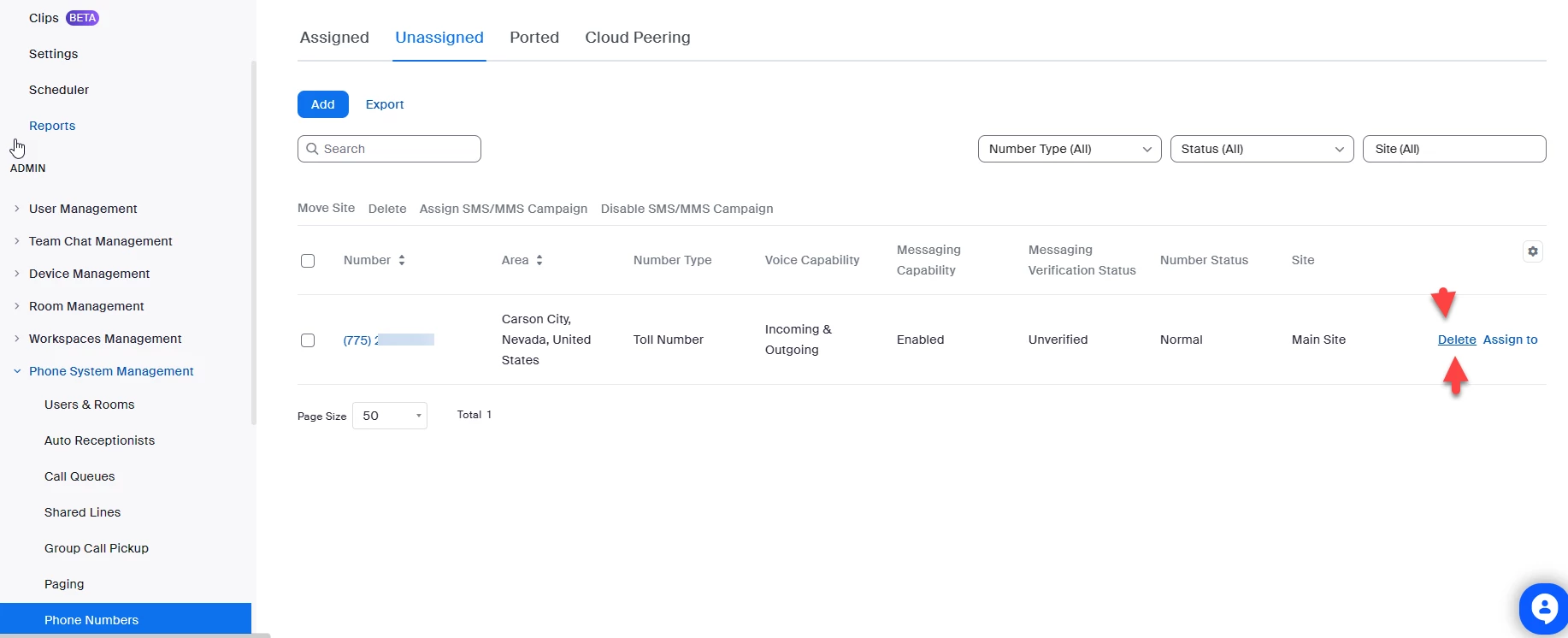
Go to Your Profile->admin-> phone system management -> phone numbers -> unassigned.  Click your usa number and click delete.  This will free up a number license for your Canadian number.


After removing your usa number, you can now choose a Canadian number.


thanks,  eliot

 

5 replies

Community Super Champion | Partner
September 1, 2023

Hi muza


How to change the main company number

The main company number is chosen during the initial setup. Follow these steps to view or change your main company number and use the Replace & Delete option.

Sign in to the Zoom web portal.

In the navigation menu, click Phone System Management then Phone Numbers.

Click the Assigned tab.

The main company number is displayed at the top.

Click the drop-down menu to change the main company number. You can either:

Choose from numbers assigned to the main auto reception. The previous main company number will remain assigned to the main auto receptionist.

Click Select an unassigned number and choose a number from the list of unassigned numbers then click Confirm. You can also click Get Numbers to purchase a new phone number. Select one of these options:

Replace & Keep: Replace the main company number with the selected number, then keep the previous main company number. You can assign the number that was previously the main company number.

Note: You must have an available phone number license to see this option.

Replace & Delete: Replace the main company number with the selected number, then delete the previous main company number. The same phone number license is used.

https://support.zoom.us/hc/en-us/articles/360028553691-Managing-the-main-company-number-and-caller-ID


Did my response answer your question? If so, please don't forget to mark the reply as an accepted solution.


thanks, eliot

MuzaSAuthor
Newcomer
September 2, 2023

Hi Eliot, 

Thanks for sharing the steps. Unfortunately I could not fix the issue.

1. I have no set number as "Main Company Number"

2. I don't have unassigned number. As I have only one number.

3. When I tried to Get (new) Number, system says I need more number license. But where to get it is something User need to figure out. 


It's much complex system than I thought and setting it up takes hours. 


EliotAnswer
Community Super Champion | Partner
September 2, 2023

Hi MuzaS,


Please check to see if your usa number is assigned to your main auto receptionist.  Your Profile->admin-> phone system management -> auto receptionists -> profile.  If your usa number is assigned to the main auto receptionist, click unbind. 


If your usa number was not assigned to the auto receptionist, then it was probably assigned to you as a user.  Go to Your Profile->admin-> phone system management -> users & rooms ->profile -> numbers.  Click Remove to remove your usa number from your user profile.  Your number should end up in unassigned numbers.


Go to Your Profile->admin-> phone system management -> phone numbers -> unassigned.  Click your usa number and click delete.  This will free up a number license for your Canadian number.


After removing your usa number, you can now choose a Canadian number.


thanks,  eliot

 

MuzaSAuthor
Newcomer
September 2, 2023

Eliot, thank you for support! Finally delete the number.

It appears, there is no available number for Alberta/Canada, but I requested one. My journey continues.... :))


Enjoy you weekend!

Best

Muza.

Community Super Champion | Partner
September 2, 2023

hi muza,


zoom has alberta numbers available online in area codes 587, 780, and 825.  if you want 403 area code, then a ticket is necessary.


i am learning about canada area codes and found a nice map.

https://cnac.ca/area_code_maps/canadian_area_codes.htm


thanks,


eliot


Newcomer
February 16, 2024

To change your Zoom Phone number from US to Canadian:

  1. Log in to your Zoom account.
  2. Go to Zoom Phone > Numbers.
  3. Find the US number, click Edit/Change.
  4. Choose to release/change the number.
  5. Follow prompts to select a Canadian number.

In the UK, bank transactions use a six-digit sort code to identify branches.