

Outgoing caller ID showing wrong number on desk phone | Community
Skip to main content
Newcomer
August 26, 2023
Solved

Outgoing caller ID showing wrong number on desk phone

  • August 26, 2023
  • 3 replies
  • 0 views

Recently I noticed the outgoing caller ID on my desk phone is not showing the correct number from my settings. It's using the main company number which is toll-free. The Zoom desktop and mobile apps show the correct caller ID. Any ideas on how to fix this? Desk phone is a Poly VVX450.
Best answer by Eliot

hi chrisjohns,


assuming your admin allows you to change desk phone keys and positions,

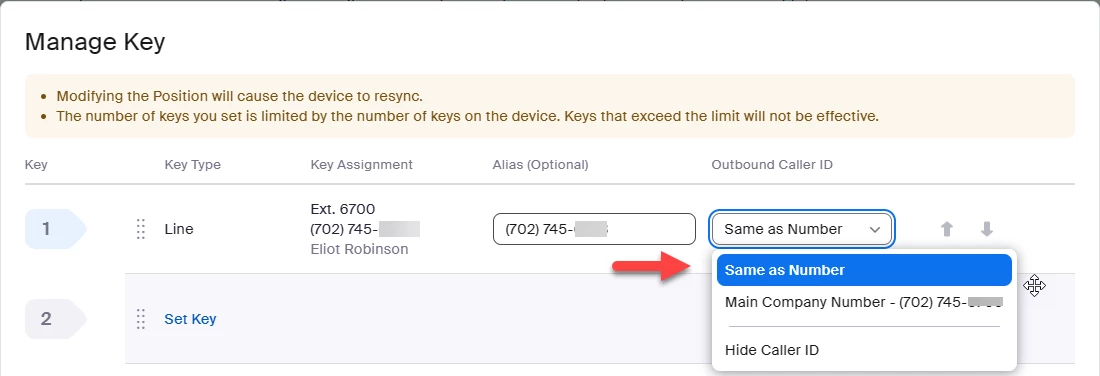
go to your profile->personal->phone->settings->desk phone->keys and positions->view or edit->manage key.

select outgoing caller id same as number


Did my response answer your question? If so, please don't forget to mark the reply as an accepted solution.


thanks,  eliot


3 replies

EliotAnswer
Community Super Champion | Partner
August 26, 2023

hi chrisjohns,


assuming your admin allows you to change desk phone keys and positions,

go to your profile->personal->phone->settings->desk phone->keys and positions->view or edit->manage key.

select outgoing caller id same as number


Did my response answer your question? If so, please don't forget to mark the reply as an accepted solution.


thanks,  eliot


Newcomer
October 31, 2023

Hi @Eliot , 


Do let us know how we can show the caller ID of Call queue or AR,  as We wanted to display the same outbound caller ID or 5 digit caller ID for internal 5 digit extension calls also.

i.e for internal Zoom phone call within organization.

Note – We are trying to change the caller ID on Desk phone\Common area poly phone.


Newcomer
July 23, 2025

Hello,


I have a question. Under the user's Zoom Phone account, I set up the Outbound Caller ID to a specific number, which is different from the user's direct number! When I call out from this user externally, the number I set up does not display, and it still shows the user's personal direct number. 

When I go to your profile -> personal -> phone -> settings -> desk phone -> keys and positions -> view or edit -> manage key, and change the Caller ID there, it works. Why is this so confusing? Why can't I change the caller ID from the user's profile?

Also, I work for a mid-size organization, so I need to change this caller ID for all users. How can I do this via a mass update to reflect in the section: "go to your profile->personal->phone->settings->desk phone->keys and positions->view or edit->manage key"?

Community Super Champion | Partner
July 23, 2025

hi @netadmin 


Hard to believe but some Zoom Phone customers only use desk phones and assign outbound caller id under user settings, desk phone, keys & positions. 


If your organization is using Zoom Workplace apps, then you assign outgoing caller ID to the user profile, outgoing caller ID.  This setting also seems to over-ride keys & positions settings on desk phones.


Admins can control whether users can change their outgoing user ID.  Go to account management, account settings, Zoom Phone,  Select Outbound Caller ID (enable or disable).


I did not see any place to make account level changes to outgoing caller ID.  You might discuss this your Zoom account team and or Zoom Support.


Please see:

Frequently asked questions about caller ID


Changing Zoom Phone policy settings


Changing phone settings (web portal)


Did my response answer your question? If so, please don't forget to mark the reply as an accepted solution.


thanks,  eliot