"Signed out because your account is signed in from another device" during meeting | Community
Skip to main content
Newcomer
October 21, 2021
Solved

"Signed out because your account is signed in from another device" during meeting

  • October 21, 2021
  • 2 replies
  • 4 views

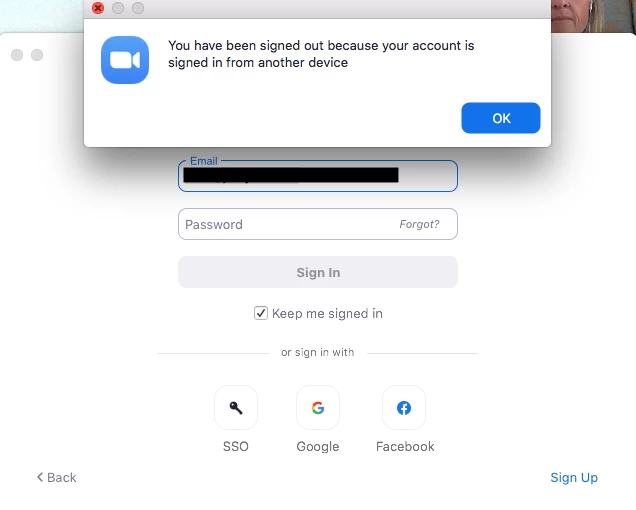
I was in the middle of a meeting that had been going for an hour and I received a Zoom popup message saying, "You have been signed out because your account is signed in from another device".


Very odd, as this wasn't the case. All my devices were with me in the room and switched off. My meeting continued as normal. Never seen this before, was it a security issue?


    Best answer by Rupert

    Hi @CarlaR 


    It could be a security issue, but it could be other things also.


    Does anyone else have your password?


    Do you have Zoom installed on any other actual computers - rather than other devices? Zoom will only log you out like this if there is another sign-in from from another device of the same type.


    A sign-in means, in this case, just means the Zoom client being connected to Zoom - not necessarily connected to a Meeting. If that helps for context?


    If you have a standalone password with Zoom (if your account is not connected to organization, like with SSO) and if this event is still inexplicable, I would recommend changing your Zoom password at https://zoom.us/profile and then also click "Sign Me Out From All Devices" at that same page.


    Depending on your level of access in Zoom, or the critically or sensitivity of your account, you may also like to enable MFA as an added security measure.


    https://support.zoom.us/hc/en-us/articles/360038247071-Setting-up-and-using-two-factor-authentication-2FA-  



    2 replies

    Rupert
    Community Champion | Customer
    RupertAnswer
    Community Champion | Customer
    October 21, 2021

    Hi @CarlaR 


    It could be a security issue, but it could be other things also.


    Does anyone else have your password?


    Do you have Zoom installed on any other actual computers - rather than other devices? Zoom will only log you out like this if there is another sign-in from from another device of the same type.


    A sign-in means, in this case, just means the Zoom client being connected to Zoom - not necessarily connected to a Meeting. If that helps for context?


    If you have a standalone password with Zoom (if your account is not connected to organization, like with SSO) and if this event is still inexplicable, I would recommend changing your Zoom password at https://zoom.us/profile and then also click "Sign Me Out From All Devices" at that same page.


    Depending on your level of access in Zoom, or the critically or sensitivity of your account, you may also like to enable MFA as an added security measure.


    https://support.zoom.us/hc/en-us/articles/360038247071-Setting-up-and-using-two-factor-authentication-2FA-  



    Newcomer
    April 29, 2022

    I have this same problem and it is really annoying because I don't have a lot of time between meetings. I am considering turning off the two factor authentication because I have to do it between every meeting. My assumption is that it is because it is connected to my calendar, and so it is trying to log in each time I have a meeting notification, but I am not sure. 

    My password is reset, I use two factor authentication. I do you zoom from several devices. But I can't get it to stop logging me out at least 4 to 5 times a day. To the point that I can considering using another service


    Newcomer
    June 22, 2022

    Agreed that this is maddening.  I'm on a meeting on my desktop, and on a break I open my laptop to check email.  I'm not going into Zoom, but it still logs me on out of my desktop.

    Newcomer
    June 27, 2023

    This supposed security feature should allow for the user to turn it off. Instead, it smells of a heavy-handed fix for people trying to use one account on multiple computers - when in fact you can only ever start one meeting. Why can't I use my desktop for video and my laptop to schedule the next meeting? Why does zoom log me out of my meeting? I see a transfer call feature but how does this work if you get signed out on the device you would like to transfer to? 


    Zoom has been broken by bad design. 


    Newcomer
    October 13, 2023

    totally agree! I actively use two work laptops, because ZOOM does not allow to keep two connections at the same time I have to constantly enter login, password and 2FA. This is terribly annoying and there should be a function to disable this limitation.

    Newcomer
    January 9, 2024

    I also agree. There is an article entitled "Signing in with your Zoom account on multiple devices" available at https://support.zoom.com/hc/en/article?id=zm_kb&sysparm_article=KB0066990 which talks about this, and gives these steps (quoting the article):


    Prerequisites for allowing users to sign in on multiple devices

    • Business, Education, or Enterprise account
    • Account owner or admin privileges

    How to enable additional concurrent sign-ins

    To enable or disable concurrent sign-ins for all users in the account:

    1. Sign in to the Zoom web portal as an admin with the privilege to edit account settings.
    2. In the navigation menu, click Advanced then Security.
    3. Under Sign-in Methods, click the Allow users to login on multiple devices concurrently toggle to enable or disable it.
    4. Next to Select the max number of devices allowed, click the dropdown menu to select the number of concurrent devices.

    When enabled, admins can choose 2-5 concurrent devices, and when disabled, users can be signed-in to Zoom on only one desktop computer, one tablet, and one mobile device at a time.

    If you are having trouble signing in to Zoom on your desktop, mobile, or browser, learn how to fix sign-in issues


    but i"ve gone through these steps, tried logging out and in, waited a while, and I still have the problem that when I log into one laptop it logs me out of zoom on the other laptop. Very annoying.