

hyperlinks break in invention outlook | Community
Skip to main content
Newcomer
February 18, 2022
Question

hyperlinks break in invention outlook

  • February 18, 2022
  • 2 replies
  • 0 views

hi

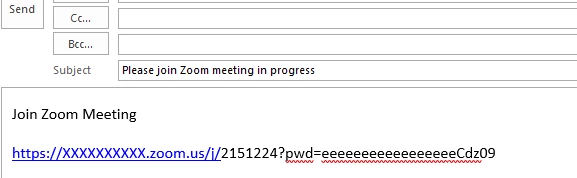
in zoom client when sending invitation with default email, 

we receive the link broke

I try changing in outlook the parameter   Automatically wrap text at character   
https://mail.google.com/mail/u/0/#inbox/WhctKKXPgkThgGTXxLgHtfvFQtdDrzQLtjbcJqBDNSmtwqBZWCmlHmnxmJbLGNjngDVDskL

or 

https://thegeekpage.com/fix-hyperlinks-are-not-working-in-outlook-in-windows-10/


the length of the link is 82 Char

if i press space after the link - it enable the hyperlinks 


have anyone incentre this problem - it affect on users
thank you 

Roni


    2 replies

    Newcomer
    February 18, 2022

    I also have this issue, I use a Mac with Outlook for Mac version 16.57.  I always type a space after my hyperlink before I send out the invite.  The link in the Location field always seems to work regardless its just the link in the body of the message that does not work unless a space is added after for me.   


    Following this thread to see if anyone has a solution. 

    takoroniAuthor
    Newcomer
    February 28, 2022

    Hi All

    I thing we found the solution 

    in outlook go to 

    1. option -> mail

    2. Stationery and fonts

    3. Fonts

    4. delete font and size - +body CS


    now create a new meeting from zoom Client

    the hyperlink is not breaking


    thank you shmolik for my team 

    roni