Zoom camera flashing and glitching after update | Community
Skip to main content
Newcomer
January 11, 2023
Solved

Zoom camera flashing and glitching after update

  • January 11, 2023
  • 37 replies
  • 2 views

I updated my Zoom on my Mac and started having my camera flash, glitch, go black and white, funky colors, reflect my screen during my Zoom calls when not screen sharing. 

I DO NOT have an external camera connected. 

I have never had these problems with Zoom before. When I open photo booth or other apps that use my camera  I do not have this problem. I have restarted my computer and redownloaded Zoom. Both have not worked. 
    Best answer by CarlaA

    Hi everyone!


    I understand that some users are having an issue with their camera while using Zoom.
     
    Our Engineering team has been alerted of this issue and this issue should be fixed in 5.13.5 version of Zoom desktop client which was released this week. You may follow the steps here on how you can update your Zoom app Upgrading Zoom to the latest version – Zoom Support. As an additional step, I would suggest to completely uninstall Zoom (to remove bad app cache) , reboot device, and then reinstall to the latest version .
     
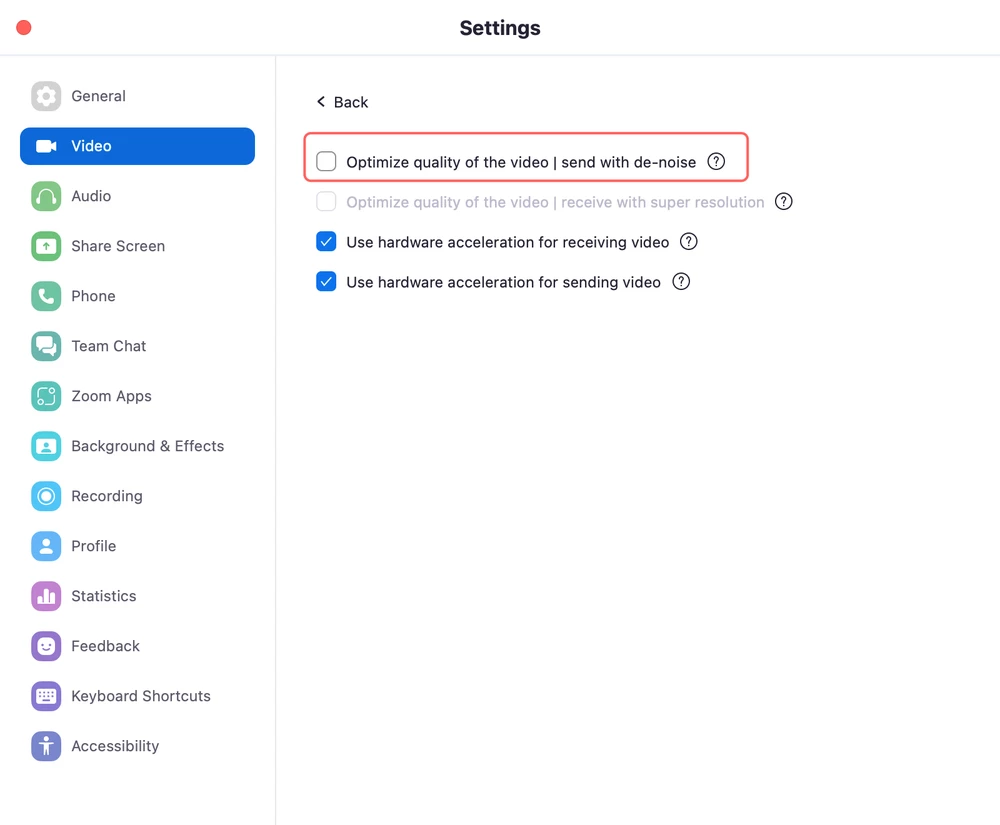
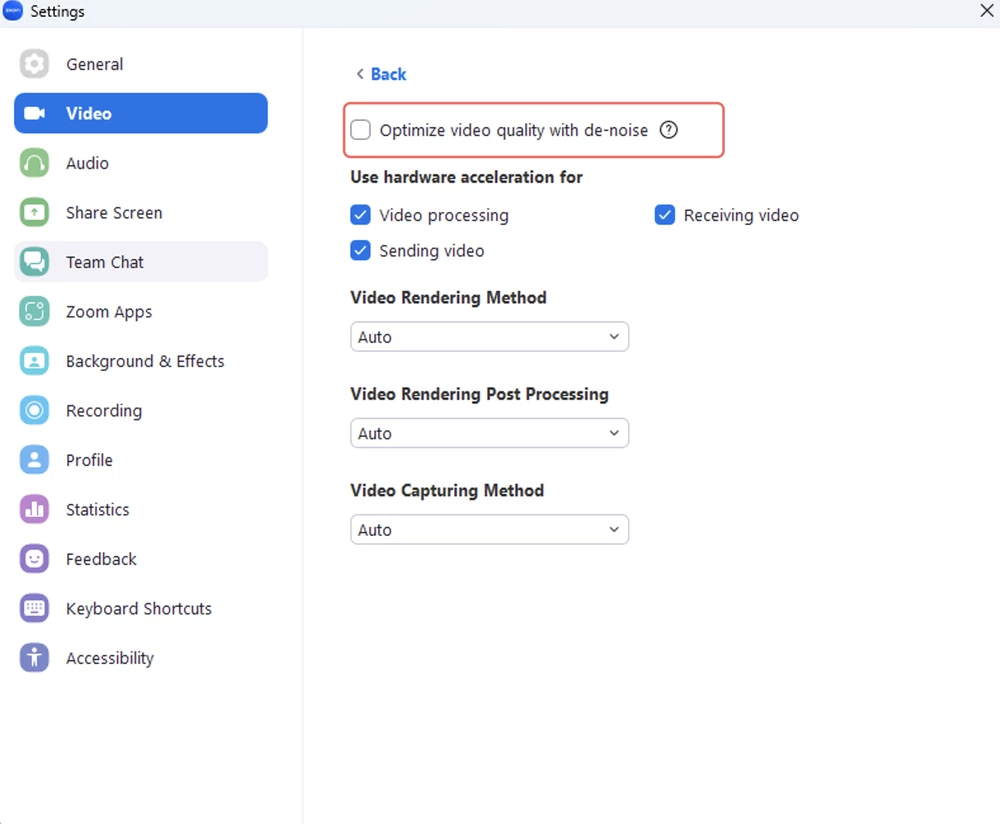
    They have reproduced the issue and found out the root cause, the video de-noise function goes wrong when the CPU usage is high on some computers with low-performance CPUs. If your Zoom desktop client version is currently in 5.13.4, you may follow the workaround below to fix the issue.
     
    As a workaround, disabling video de-noise in the advanced video settings on your Zoom desktop client (pic1:Windows, pic2:Mac) can avoid the issue. 


    I hope this helps!

    Carla,
    Zoom Community Team

    37 replies

    Newcomer
    February 1, 2023

    I tried CarlaA's method (The accepted Solution) and that didn't work for me. However, I tried a different method and that did work.


    On Windows 10 go to Camera App, go to settings and change Flicker Reduction option. The options may be different per computer but I changed mine from 50 Hz to 60 Hz and that fixed the issue.

    Hope this helps someone 🙂

    CarlaA
    Community Manager
    Community Manager
    February 2, 2023

    Thank you for providing an alternate fix! Appreciate your contribution. 


    Carla,
    Zoom Community Team

    Newcomer
    February 19, 2023

    Hello all,


    I also had that issue, which a few days later got fixed by zoom, I suppose. However, after an update a few days ago, it's happening again. Is it going to happen after each update? Is still the same solution applicable?


    Thank you


    Newcomer
    March 13, 2023

    Same Issue. Zoom just updated on my windows 10 computer prior to joining a meeting today. Annoying that I could not delay the update until after my meeting.

    Video started flashing and glitching. Top of the my video feed was flashing through all the attendees. The rest of my feed to the meeting was strobing, freezing, and doing random color patterns.  The Zoom version that my computer updated to is version 5.13.11.

    Newcomer
    March 18, 2023

    What I did is to install the previous versions. The update messes up with my camera and it is so annoying. The latest update hasn't fixed the issue yet.

    CarlaA
    Community Manager
    Community Manager
    March 21, 2023

    Hi @nazarka92 @TabbyGoblin @ZoomUser19-23 , thank you for continuing to update this thread. 


    Can you please completely uninstall your Zoom app, reboot your device (to remove any bad app cache- very important), and reinstall the latest version (64bit if using Windows).


    Reference: Camera flashing and glitching after update 

    Newcomer
    June 23, 2023

    Hello,

    I have tried all of the suggestions listed here and I am on Version 5.14.7.  I am using a Logitech C920 webcam, that used to work perfectly about a year ago.  There is no glitching using the C920 with the Camera app on my Windows 10 workstation.  I've tried switching the USB ports it is plugged into with no success.  I've switched the Flicker Reduction to 50 Hz in the Camera app from another suggestion online with no success either.  The flickering does not happen when I use my integrated laptop camera, even when I switch it mid-meeting.  I've updated the drivers on the Logitech C920 webcam, removed it and reinstalled it, but it seems like an issue between the C920 and the Zoom software.


    Is there any other fix possible?

    Thank you.


    Is there anything else that 

    Newcomer
    June 11, 2024

    I am still having this issue with 6.0.11 over a year and a half later. Very glitchy with USB cameras, much better when Photo Booth is open as well. Optimize video is unchecked, low light, touch up ... doesn't matter what  the settings are it's super glitchy, distracting and very unprofessional. Any other fixes?